
Computer & music
iPod won't play music
Songs won't play, stay at 0:00, or stop right away? Pick your model to see Apple's checks first, then the likely causes and what each fix costs.
What exactly happens?
Which iPod do you have?
Most common causes, by model
Apple's checks first: Hold off, the headphone plug pushed all the way in, the volume up, and Play/Pause pressed. Songs that stay at 0:00 or skip without playing mean the hard drive can't read them or the song files are damaged: check the drive in Diagnostic Mode. A restore can sometimes fix it. On the 4th Gen and Photo, check the hard drive cable first, then the drive: our Hard Drive Repair Service is probably the best first option. On the other models, a drive failure is the ideal time for a flash upgrade.
Free checks first
- Put the Hold switch firmly in the unlocked position. A locked iPod ignores every button.
- Push the headphone plug in all the way.
- Make sure the volume is turned up.
- iPod Video and iPod Classic: a lock next to the volume bar means a volume limit is set; change it in Settings > Volume Limit.
- Press Play/Pause: it may only be paused.
- Hold the iPod up to your ear: unusual clicking patterns are a strong sign that the hard drive is failing.
- Check the hard drive's health in Diagnostic Mode: on a healthy drive the reallocated sectors (reallocs) and pending sectors read zero or close to it. A high number, or numbers that rise each time you check, mean the drive is failing; pending sectors are the sharper warning.
- Before a restore, copy off any songs that aren't on your computer: a restore erases them.
iPod Classic (A1238) won't play musiciPod Classic 6th Gen (A1238) won't play musiciPod Classic 7th Gen (A1238) won't play music
-
Most likely
Failing hard drive
Repeated clicking (the click of death: click, click, whir, or grinding) or the red X usually mean the hard drive is failing. A failed drive is the ideal time for a flash upgrade: flash storage has no heads, platters or motor, so the clicking, stalling and seizing that end an old hard drive can't happen. If your old drive still reads, add our music transfer ($129) and we copy everything on it onto the new flash storage.
Flash Mod Service (installed by iMods)
Replaces the hard drive with flash memory: silent, no moving parts
Replacement Hard Drive 160GB (Late 2009)
Flash Mod Service (installed by iMods)
Replaces the hard drive with flash memory: silent, no moving parts
Step-by-step guide iPod Classic 6th/7th Gen hard drive replacement (11 steps)
-
Next most likely
Loose or damaged hard drive cable
A loose or damaged hard drive cable can make the drive click, drop out or show the red X. Unless the problem started after a repair, the cable itself is rarely the fault on the 6th and 7th Gen: if the hard drive isn't to blame, the logic board is just as likely as the cable.
Free check first Push the cable back in first; replace it only if that does not help.
Hard Drive ZIF Ribbon Cable
-
Also possible
Damaged song files
Damaged song files skip, stop or won't play. Check the songs on your computer for damage. If only the same few songs are affected, those files are most likely damaged, or in a format the iPod doesn't play (WMA files don't play on these iPods): delete them from the iPod and sync them again. If that doesn't help, copy off any songs that aren't on your computer, then restore the iPod and sync your music back (a restore erases the songs on the iPod).
-
Also possible
Worn headphone jack pausing songs
A worn headphone jack can pause songs on its own: these models pause when the plug loses contact. A new headphone jack fixes it.
Free check first Move the plug gently while a song plays: if the sound cuts out or crackles with another pair of headphones too, the jack is likely worn.
Replacement Headphone Jack
Step-by-step guide iPod Classic 6th/7th Gen headphone jack and Hold switch replacement (13 steps)
More causes on this page, depending on what happens
- Brand new hard drive or flash drive not restored yetStarted after a repair or part swap
- Hard drive cable not fully in, or a latch left openStarted after a repair or part swap
- A connector not seated after the repairStarted after a repair or part swap
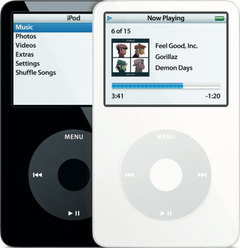
iPod Video (A1136) won't play musiciPod Video 5th Gen (A1136) won't play music
-
Most likely
Logic board
Won't play any song and every song stays at 0:00? On the iPod Video that most likely points to the logic board (one song stuck at 0:00 is a file the drive can't read, or a damaged file).
Replacement Logic Board
30GB 5G · 30GB 5.5G Enhanced · 60GB 5G · 80GB 5.5G Enhanced
-
Next most likely
Failing hard drive
Repeated clicking (the click of death: click, click, whir, or grinding) or the sad iPod face usually mean the hard drive is failing. A failed drive is the ideal time for a flash upgrade: flash storage has no heads, platters or motor, so the clicking, stalling and seizing that end an old hard drive can't happen. If your old drive still reads, add our music transfer ($129) and we copy everything on it onto the new flash storage.
Flash Mod Service (installed by iMods)
Replaces the hard drive with flash memory: silent, no moving parts
Step-by-step guide iPod Video 5th Gen hard drive replacement (14 steps)
-
Also possible
Loose or damaged hard drive cable
A loose or damaged hard drive cable can make the drive click, drop out or show the sad iPod face. Unless the problem started after a repair, the cable itself is rarely the fault on the iPod Video: if the hard drive isn't to blame, the logic board is just as likely as the cable.
Free check first Push the cable back in first; replace it only if that does not help.
-
Also possible
Damaged song files
Damaged song files skip, stop or won't play. Check the songs on your computer for damage. If only the same few songs are affected, those files are most likely damaged, or in a format the iPod doesn't play (WMA files don't play on these iPods): delete them from the iPod and sync them again. If that doesn't help, copy off any songs that aren't on your computer, then restore the iPod and sync your music back (a restore erases the songs on the iPod).
-
Also possible
Worn headphone jack pausing songs
A worn headphone jack can pause songs on its own: these models pause when the plug loses contact. A new headphone jack fixes it.
Free check first Move the plug gently while a song plays: if the sound cuts out or crackles with another pair of headphones too, the jack is likely worn.
Step-by-step guide iPod Video 5th Gen headphone jack and Hold switch replacement (13 steps)
More causes on this page, depending on what happens
- Brand new hard drive or flash drive not restored yetStarted after a repair or part swap
- Hard drive cable not fully in, or a latch left openStarted after a repair or part swap
- A connector not seated after the repairStarted after a repair or part swap
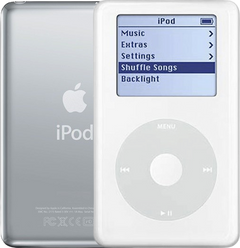
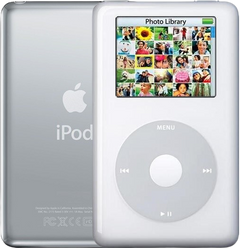
iPod 4th Gen or iPod Photo (A1059 and A1099) won't play musiciPod 4th Gen (A1059) won't play musiciPod Photo (A1099) won't play music
-
Most likely
Loose or damaged hard drive cable
On the 4th Gen and Photo, an iPod that seems too weak to spin up its hard drive often has a hard drive cable problem. A loose or damaged hard drive cable can make the drive click, drop out or show the sad iPod face. A cable fault sounds like click, whir; a failing drive sounds more like click, click, whir.
Free check first Clean the hard drive cable's contacts with 99% isopropyl alcohol (IPA) and re-seat it first; if that fails, it's likely a bad hard drive (our Hard Drive Repair Service is probably the best first option).
Hard Drive IDE Ribbon Cable
Hard Drive IDE Ribbon Cable
-
Next most likely
Failing hard drive
Repeated clicking (the click of death: click, click, whir, or grinding) or the sad iPod face usually mean the hard drive is failing. Flash storage is the silent alternative to a new drive. On the 4th Gen and Photo we can often fix the hard drive without replacing it, and in most cases all songs are saved.
Hard Drive Repair Service
Mail it in: we repair your drive, and in most cases your songs are saved
Hard Drive Repair Service
Mail it in: we repair your drive, and in most cases your songs are saved
Flash Mod Service (installed by iMods)
Replaces the hard drive with flash memory: silent, no moving parts
Replacement Hard Drive
20GB · 30GB · 40GB · 60GB
Flash Mod Service (installed by iMods)
Replaces the hard drive with flash memory: silent, no moving parts
Step-by-step guide iPod 4th Gen and iPod Photo hard drive replacement (12 steps)
-
Also possible
Damaged song files
Damaged song files skip, stop or won't play. Check the songs on your computer for damage. If only the same few songs are affected, those files are most likely damaged, or in a format the iPod doesn't play (WMA files don't play on these iPods): delete them from the iPod and sync them again. If that doesn't help, copy off any songs that aren't on your computer, then restore the iPod and sync your music back (a restore erases the songs on the iPod). On the 4th Gen and iPod Photo the restore can stop at a picture of a plug: connect it to a wall charger to finish. Generic or incompatible wall chargers don't always give the iPod the right voltage: Apple's A1070 wall charger works with every model and is the ideal choice.
More causes on this page, depending on what happens
- Brand new hard drive or flash drive not restored yetStarted after a repair or part swap
- Hard drive cable not fully in, or a latch left openStarted after a repair or part swap
- A connector not seated after the repairStarted after a repair or part swap
iPod Mini (A1051) won't play musiciPod Mini 1st Gen (A1051) won't play musiciPod Mini 2nd Gen (A1051) won't play music
-
Most likely
Failed microdrive (the Mini's hard drive)
When the Mini's tiny hard drive (the microdrive) fails, it shows the sad iPod face or a folder icon, or makes clicking noises. Replace it with a used original microdrive, or upgrade to flash: a failed drive is the ideal time for it. Flash storage has no heads, platters or motor, so the clicking, stalling and seizing that end an old hard drive can't happen. If your old drive still reads, add our music transfer ($129) and we copy everything on it onto the new flash storage.
Replacement Microdrive (4GB)
Flash Mod Service (installed by iMods)
Replaces the hard drive with flash memory: silent, no moving parts
Flash Mod Service (installed by iMods)
Replaces the hard drive with flash memory: silent, no moving parts
Step-by-step guide iPod Mini 1st/2nd Gen hard drive (Microdrive) replacement (13 steps)
-
Next most likely
Loose or damaged hard drive cable
A loose or damaged hard drive cable can make the drive click, drop out or show the sad iPod face. Unless the problem started after a repair, the cable itself is rarely the fault on the Mini: if the microdrive isn't to blame, the logic board is just as likely as the cable.
Free check first Push the cable back in first; replace it only if that does not help.
Hard Drive Cable
Hard Drive Ribbon Cable
-
Also possible
Damaged song files
Damaged song files skip, stop or won't play. Check the songs on your computer for damage. If only the same few songs are affected, those files are most likely damaged, or in a format the iPod doesn't play (WMA files don't play on these iPods): delete them from the iPod and sync them again. If that doesn't help, copy off any songs that aren't on your computer, then restore the iPod and sync your music back (a restore erases the songs on the iPod). On the Mini 1st Gen the restore can stop at a picture of a plug: connect it to a wall charger to finish. Generic or incompatible wall chargers don't always give the iPod the right voltage: Apple's A1070 wall charger works with every model and is the ideal choice.
More causes on this page, depending on what happens
- Brand new hard drive or flash drive not restored yetStarted after a repair or part swap
- Hard drive cable not fully in, or a latch left openStarted after a repair or part swap
- A connector not seated after the repairStarted after a repair or part swap
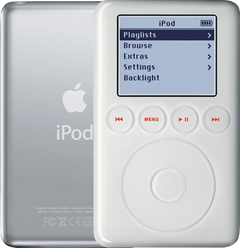
iPod 3rd Gen (A1040) won't play musiciPod 3rd Gen (A1040) won't play music
-
Most likely
Failing hard drive
Repeated clicking (the click of death: click, click, whir, or grinding) or the sad iPod face usually mean the hard drive is failing. A failed drive is the ideal time for a flash upgrade: flash storage has no heads, platters or motor, so the clicking, stalling and seizing that end an old hard drive can't happen. If your old drive still reads, add our music transfer ($129) and we copy everything on it onto the new flash storage.
Replacement Hard Drive
10GB · 15GB · 20GB · 30GB · 40GB
Flash Mod Service (installed by iMods)
Replaces the hard drive with flash memory: silent, no moving parts
Step-by-step guide iPod 3rd Gen hard drive replacement (14 steps)
-
Next most likely
Loose or damaged hard drive cable
A loose or damaged hard drive cable can make the drive click, drop out or show the sad iPod face. Unless the problem started after a repair, the cable itself is rarely the fault on the 3rd Gen: if the hard drive isn't to blame, the logic board is just as likely as the cable.
Free check first Push the cable back in first; replace it only if that does not help.
Hard Drive IDE Ribbon Cable
-
Also possible
Damaged song files
Damaged song files skip, stop or won't play. Check the songs on your computer for damage. If only the same few songs are affected, those files are most likely damaged, or in a format the iPod doesn't play (WMA files don't play on these iPods): delete them from the iPod and sync them again. If that doesn't help, copy off any songs that aren't on your computer, then restore the iPod and sync your music back (a restore erases the songs on the iPod). On the 3rd Gen the restore can stop at a picture of a plug: connect it to its FireWire wall charger to finish. Generic or incompatible wall chargers don't always give the iPod the right voltage: Apple's A1070 wall charger works with every model and is the ideal choice.
More causes on this page, depending on what happens
- Brand new hard drive or flash drive not restored yetStarted after a repair or part swap
- Hard drive cable not fully in, or a latch left openStarted after a repair or part swap
- A connector not seated after the repairStarted after a repair or part swap
Started after a repair or part swap
It stopped playing music after the iPod was opened or a part was swapped.
iPod Classic 6th and 7th GeniPod Classic 6th GeniPod Classic 7th Gen
-
Most likely
Brand new hard drive or flash drive not restored yet
A brand new hard drive or flash drive must be restored when it is first installed. Until then the iPod can sit in Disk Mode, not sync or say "No music", and a blank new drive is likely to show a folder icon or similar. Restore the iPod with iTunes or the Finder, then sync your music to it.
Free check first Connect it to the computer, then choose Restore iPod in iTunes or the Finder.
-
Next most likely
Hard drive cable not fully in, or a latch left open
After the iPod has been opened, a hard drive cable that isn't pushed fully in, or a drive or cable latch left open, stops the drive from working.
Free check first Open it again, push the hard drive cable fully in and close every latch.
-
Also possible
A connector not seated after the repair
After a battery or part swap, a connector that is not fully seated can leave the iPod dead or half-working. We can also look at it: the free diagnostic finds the issue and whether it can be fixed without new parts.
Free check first Open it again and push every connector you touched fully back in.
iPod Video 5th GeniPod Video 5th Gen
-
Most likely
Brand new hard drive or flash drive not restored yet
A brand new hard drive or flash drive must be restored when it is first installed. Until then the iPod can sit in Disk Mode, not sync or say "No music". Restore the iPod with iTunes or the Finder, then sync your music to it.
Free check first Connect it to the computer, then choose Restore iPod in iTunes or the Finder.
-
Next most likely
Hard drive cable not fully in, or a latch left open
After the iPod has been opened, a hard drive cable that isn't pushed fully in, or a drive or cable latch left open, stops the drive from working.
Free check first Open it again, push the hard drive cable fully in and close every latch.
-
Also possible
A connector not seated after the repair
After a battery or part swap, a connector that is not fully seated can leave the iPod dead or half-working. We can also look at it: the free diagnostic finds the issue and whether it can be fixed without new parts.
Free check first Open it again and push every connector you touched fully back in.
iPod 4th Gen and iPod PhotoiPod 4th GeniPod Photo
-
Most likely
Brand new hard drive or flash drive not restored yet
A brand new hard drive or flash drive must be restored when it is first installed. Until then the iPod can sit in Disk Mode, not sync or say "No music". Restore the iPod with iTunes or the Finder, then sync your music to it.
Free check first Connect it to the computer, then choose Restore iPod in iTunes or the Finder. On the 4th Gen and iPod Photo the restore can stop at a picture of a plug: connect it to a wall charger to finish. Generic or incompatible wall chargers don't always give the iPod the right voltage: Apple's A1070 wall charger works with every model and is the ideal choice.
-
Next most likely
Hard drive cable not fully in, or a latch left open
After the iPod has been opened, a hard drive cable that isn't pushed fully in, or a drive or cable latch left open, stops the drive from working.
Free check first Open it again, push the hard drive cable fully in and close every latch.
-
Also possible
A connector not seated after the repair
After a battery or part swap, a connector that is not fully seated can leave the iPod dead or half-working. We can also look at it: the free diagnostic finds the issue and whether it can be fixed without new parts.
Free check first Open it again and push every connector you touched fully back in.
iPod Mini 1st and 2nd GeniPod Mini 1st GeniPod Mini 2nd Gen
-
Most likely
Brand new hard drive or flash drive not restored yet
A brand new hard drive or flash drive must be restored when it is first installed. Until then the iPod can sit in Disk Mode, not sync or say "No music". Restore the iPod with iTunes or the Finder, then sync your music to it.
Free check first Connect it to the computer, then choose Restore iPod in iTunes or the Finder. On the Mini 1st Gen the restore can stop at a picture of a plug: connect it to a wall charger to finish. Generic or incompatible wall chargers don't always give the iPod the right voltage: Apple's A1070 wall charger works with every model and is the ideal choice.
-
Next most likely
Hard drive cable not fully in, or a latch left open
After the iPod has been opened, a hard drive cable that isn't pushed fully in, or a drive or cable latch left open, stops the drive from working.
Free check first Open it again, push the hard drive cable fully in and close every latch.
-
Also possible
A connector not seated after the repair
After a battery or part swap, a connector that is not fully seated can leave the iPod dead or half-working. We can also look at it: the free diagnostic finds the issue and whether it can be fixed without new parts.
Free check first Open it again and push every connector you touched fully back in.
iPod 3rd GeniPod 3rd Gen
-
Most likely
Brand new hard drive or flash drive not restored yet
A brand new hard drive or flash drive must be restored when it is first installed. Until then the iPod can sit in Disk Mode, not sync or say "No music". Restore the iPod with iTunes or the Finder, then sync your music to it.
Free check first Connect it to the computer, then choose Restore iPod in iTunes or the Finder. On the 3rd Gen the restore can stop at a picture of a plug: connect it to its FireWire wall charger to finish. Generic or incompatible wall chargers don't always give the iPod the right voltage: Apple's A1070 wall charger works with every model and is the ideal choice.
-
Next most likely
Hard drive cable not fully in, or a latch left open
After the iPod has been opened, a hard drive cable that isn't pushed fully in, or a drive or cable latch left open, stops the drive from working.
Free check first Open it again, push the hard drive cable fully in and close every latch.
-
Also possible
A connector not seated after the repair
After a battery or part swap, a connector that is not fully seated can leave the iPod dead or half-working. We can also look at it: the free diagnostic finds the issue and whether it can be fixed without new parts.
Free check first Open it again and push every connector you touched fully back in.
Not sure — free diagnostic
Mail us your iPod and we test it and send you a free repair quote. If you don't like the price, we ship it back at our expense.
Free
Which iPod do you have?
The page shows the causes for the iPod you pick.
Not sure which one? Identify your iPod