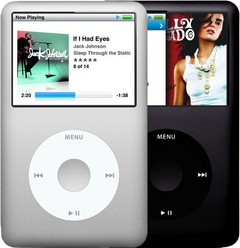
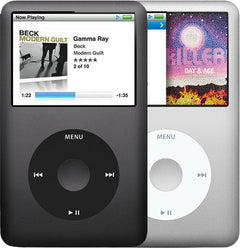
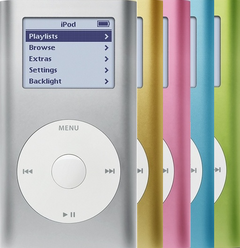


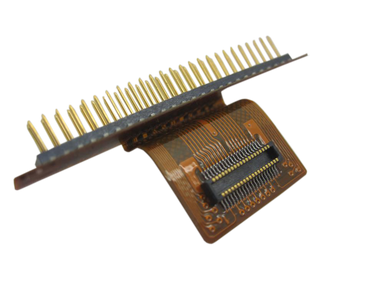
Representative photo. You receive the part named above.
Is this the right part?
For the iPod Mini 2nd GenModel A1051
Doing it yourself?
iPod Mini 1st/2nd Gen hard drive (Microdrive) replacement guide ›iPod Mini 2nd Generation — Hard Drive Ribbon Cable
For the iPod Mini 2nd Gen
Used (Apple Original) · Model A1051
$33.90
Sold out
Not for sale right now
We are not selling this part at the moment.
- Used (Apple Original). Tested: installed in a working iPod and checked before it ships.
- 1-year limited warranty · 30-day returns from delivery
- Free pry tool in the box
- Completed repairs aren't refundable. If a part we fitted fails within a year, we repair it again.
- US shipping is about $6 to $9 by USPS Ground Advantage; free on orders of $200 or moreYou pay the postage to mail your iPod to us, or add our box and prepaid label. Shipping back to you is about $6 to $9 at checkout; free on orders of $200 or more
Questions about this part? Chat with us or email sales@imods.com.
Not sure what's wrong? Get your free repair quotePart details
About this part
Overview
Replacement internal cable for iPod Mini 2nd Generation. Use it when the ribbon is creased, loose, or failing at the connector before blaming the whole attached assembly.
Fitment snapshot
What Is Included
What this part might fix
Help pages, step by step, for problems this part might fix:
Fit and specs
Specifications & Fitment
Part Details
| Detail | Value |
|---|---|
| Model Number | A1051 |
| EMC | EMC 2044 |
| Condition | Used — factory original Apple part. Normal cosmetic wear expected. |
| Interface | CompactFlash Type II connector to microdrive |
| Type | Flat ribbon cable |
Compatible Variants
| Order Number | Capacity | Color | Case | Compatible | Notes |
|---|---|---|---|---|---|
| M9802LL/A | 4GB | Blue | — | Yes | — |
| M9806LL/A | 4GB | Green | — | Yes | — |
| M9804LL/A | 4GB | Pink | — | Yes | — |
| M9800LL/A | 4GB | Silver | — | Yes | — |
| M9803LL/A | 6GB | Blue | — | Yes | — |
| M9807LL/A | 6GB | Green | — | Yes | — |
| M9805LL/A | 6GB | Pink | — | Yes | — |
| M9801LL/A | 6GB | Silver | — | Yes | — |
Install and repair
Step-by-step guide
iPod Mini 1st/2nd Gen hard drive (Microdrive) replacement
Tools: Phillips #00 screwdriver, Thin plastic pry tool, Spudger, Small snap-ring pliers or a small flat tool, Hair dryer, Tweezers, Anti-static wrist strap or mat, Computer with iTunes or the Finder, and a sync cable, Wall charger (1st Gen)
- Lock itUnplug any cable, then slide Hold on and let the screen go blank. Note which side the switch is on, for the top cap later.
- Top cap and two screws offGive the glued top cap a brief burst of warm air from a hair dryer on low, aimed at the cap only, then lift it a little at a time round the seam. Take out the two Phillips #00 screws under it. Our opening guide shows each move.
Install Overview
Rather not open it? Choose We Fix It above: mail your iPod in and we fit it. Turnaround is typically 1–3 business days on our bench. 1-year limited warranty.
Questions
Frequently Asked Questions
How do I choose the right hard-drive cable?
There is one hard-drive ribbon for the iPod mini. The same flex serves both mini generations and both original capacities, so you do not have to match it to your generation or to the drive brand — match it to the mini. What does matter is the condition of the part you are replacing: check the flex for creases and lifted contacts, and check the board-side socket too, because a new ribbon cannot repair lifted pads or a damaged socket.
When is the cable more likely than the drive?
A cable becomes more likely when it is creased, loose, corroded, or fails after reseating, especially if known-good storage still behaves the same way. On this model the cable is rarely the fault: if the drive is not to blame, the logic board is just as likely as the cable.
Is this for a full-size hard-drive iPod?
The iPod mini is a separate Apple product line from full-size hard-drive iPods. This is the iPod mini 2nd Generation.
Free diagnostic
Broken iPod? We can help.
Mail us your iPod and we will test it and send you a free repair quote. If you don't like our price, we will ship your iPod back at our expense.
How mail-in repair works
Order the free diagnostic
Choose your iPod. Add our shipping box and prepaid label if you need one.
Mail us your iPod
Pack it with your work order. No printer? Put a note in the box with your name, return address, email, iMods order number and what is wrong.
Approve your quote
We test it and email your free repair quote. Most repairs are finished within 1 to 3 business days after you approve the quote.