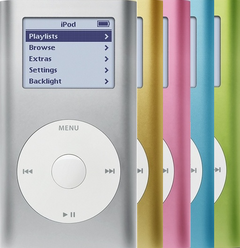
Outer protective glass lens only — for scratches, cracks, haze, or chips with the LCD working underneath. Does not fix blank, lined, or backlight faults.
Product Overview
This glass panel listing covers Replacement Glass Display Lens for the exact iPod Mini 2nd Generation fit and physical location.
It is also the lens for the first-generation iPod mini. Apple used one front window across both mini generations, so this listing is the right part whether the capacity is engraved on the back of your mini or not — you do not have to work out which generation you own before ordering it.
This is a fit-and-finish part, so choose it by physical damage, color, part shape, and missing hardware rather than by an electrical symptom.
What Is Included
Condition: Used factory-original part. Quantity and exclusions: The listed part, set, pair, or configuration above is supplied with exactly one plastic pry tool. No other parts, tools, adhesives, or materials are included unless they are explicitly listed above.
Quick Buying Check
Buy this when
- Outer lens damage: Use this when the protective lens over the display is scratched, cracked, hazed, or chipped and the screen underneath still works.
- The original part is cracked, scratched, dented, bent, missing, loose, or cosmetically worn.
- The model, color, model-specific fitment, and capacity family match this listing.
Diagnose first when
- Confirm the LCD underneath still works with a stable image and normal backlight before ordering this lens-only part.
- The problem is power, storage, sync, dock, audio, or display behavior rather than visible physical damage.
- The symptom started after opening the iPod and may be a disturbed internal cable or connector.
Do not buy for
- Do not use this listing for full-size iPod screens. The front opening is the same on both iPod mini generations, so the lens does not have to be matched to one — but a full-size iPod is a different product line and a different window.
- Blank, lined, dim, or backlight behavior belongs on the LCD screen page, not this lens-only page. The lens is the outer window; the picture is made by the LCD underneath it, and a new lens cannot bring back missing pixels, a dead backlight or a blank screen.
- Power, charging, or runtime: Start with the Replacement Battery check.
- iPod Classic or full-size iPod lens routes.
Specifications & Fitment
Part Details
| Detail | Value |
|---|---|
| Model Number | A1051 |
| EMC | EMC 2044 |
| Condition | Used — factory original Apple part. Normal cosmetic wear expected. |
Compatible Variants
The order numbers below are the second-generation iPod minis. The lens itself is not generation-specific: it fits the first-generation mini too, which carries no capacity engraving and is not listed here. If your mini is not in this table but is an iPod mini, this is still the lens.
| Order Number | Capacity | Color | Case | Compatible | Notes |
|---|---|---|---|---|---|
| M9802LL/A | 4GB | Blue | — | Yes— compatible | Stock match |
| M9806LL/A | 4GB | Green | — | Yes— compatible | Stock match |
| M9804LL/A | 4GB | Pink | — | Yes— compatible | Stock match |
| M9800LL/A | 4GB | Silver | — | Yes— compatible | Stock match |
| M9803LL/A | 6GB | Blue | — | Yes— compatible | Stock match |
| M9807LL/A | 6GB | Green | — | Yes— compatible | Stock match |
| M9805LL/A | 6GB | Pink | — | Yes— compatible | Stock match |
| M9801LL/A | 6GB | Silver | — | Yes— compatible | Stock match |
Cosmetic Failure Signs — When to Replace
This part is a cosmetic part — it does not change how the iPod plays, charges, or syncs. Replace it when the damage is physical:
| Symptom | What it means & what to check |
|---|---|
| Scratches over the display | The lens takes the scratches so the LCD underneath does not; replace it when marks sit in the visible display area. |
| Cracks and chips | Edge chips spread across the lens over time and let dust reach the screen. |
Not every buyer here is fixing damage: matching the original finish after another repair, restoring a gift or keepsake iPod to clean condition, and finishing a refreshed shell while the case is already open are just as common.
Do Not Buy / Problems This Part Does Not Fix
| Situation | Start here instead |
|---|---|
| Only the screen is affected and everything else works | Use the LCD screen page instead. Replace the lens only when the glass itself is scratched, cracked, hazed or chipped and the picture underneath is still good. |
| A symptom points to a different part | Start with battery for power/runtime symptoms; hard-drive cable for folder, clicking, or restore symptoms; dock-port bracket only when the internal metal bracket that locates the port is bent or missing; click wheel for click-wheel or control symptoms; logic board for dock, sync and charge-port faults — the 30-pin port is part of the board on this model — and for board-side damage or multi-system symptoms before buying this part. |
| Liquid, corrosion, or board-side damage changes the diagnosis | Use this part only when the visible fit, finish, or physical damage matches. |
| You see a folder icon, clicking noise, or restore failure | A folder with an exclamation mark means the iPod cannot find its storage — the drive, its ribbon cable, or the software on it. Check the drive or flash media, storage cable, adapter seating, formatting, and restore path before replacing any part: start on the microdrive (4GB · 6GB), hard-drive ribbon cable or flash storage kit pages. |
| Variant or capacity does not match this listing | Confirm exact model, capacity, case, and variant fit before ordering. |
| Charging, swelling, runtime, or power is the primary problem | Confirm power, charging, and pack-condition clues before replacing this part; start on the battery page. On the mini the battery lies behind the display, so a swelling pack shows as a lifted or bowed screen, a dark blotch spreading across the panel, or a case that will not sit flat — not as a stiff center button. A dark blotch spreading under the glass is pressure on the panel, not damage to the lens, and a new lens will not clear it. |
| The problem is the Hold switch or headphone jack, not this part | Diagnose the exact-model headphone-jack/Hold assembly and its connector before choosing another part. |
| Recent service or connector disturbance is the main clue | Inspect and reseat the cable, latch, or connector path disturbed during service before buying another part. |
Install Overview
Before You Start
Turn Hold off and confirm the model and variant before opening the iPod. Reset first — hold Menu + Select until the unit restarts. Guides that say Menu + Play describe the older, pre-click-wheel iPods.
Treat case opening as the highest handling risk. Work around the seams gently and stop if the shell, clips, or internal stack resist.
Do not pull the halves apart or side-load board sockets. Reseat nearby ribbons and connectors before blaming a replacement part.
Confirm thickness, color, screw points, and nearby hardware alignment before pressing the case fully closed.
After This Repair
| Check | What to do |
|---|---|
| Confirm physical fit | Check that the part sits flush, aligns with nearby openings, and does not pinch nearby parts. |
| Still not fitting cleanly? | Recheck nearby clips, screws, cables, connectors, and fitment before replacing another part. |
Worth Knowing
- One lens, both mini generations. The glass display lens is a single part for the first-generation and second-generation iPod mini alike, in every case color and at both original capacities. Order it without identifying your generation first.
- That is not a rule about mini parts in general. Seven parts cross the two mini generations: this lens, the hard-drive ribbon cable, the headphone-jack / Hold assembly (820-1597-A), the battery, the aluminum housing, the top and bottom bezels and the top screws. The click wheel does not — its connector is a different size on each generation, so a first-generation wheel will not work in a second-generation mini or the other way round — and the screen and logic board are generation-specific too.
- What this part is. The lens is the outer protective window over the display. It is a separate part from the LCD screen underneath, and it carries no electronics: replacing it changes nothing about how the iPod plays, charges or syncs.
- Check the picture before you buy the glass. Marks that sit on top of the display and catch the light when the iPod is off are lens damage. A blank, dim, lined or partly dark image is the LCD or its connection. A dark patch that spreads is pressure on the panel — on the mini the battery lies behind the display, so a swelling pack shows there first.
- Use this listing for cosmetic lens damage after confirming the LCD itself still works.
- Sold as a single replacement lens (not a multi-part kit), fitting either iPod mini generation; installation means removing the top bezel and seating the new lens.
Access Guide
Product-specific placement, reassembly, and check
- Prepare and access. Confirm the exact model and listing fit first. Use the existing steps as a disassembly guide, gather the specified tools, disconnect power where applicable, and keep screws and cable positions organized.
- Place Replacement Glass Display Lens. Seat the display in its original frame position and insert the display cable evenly without pressing on the image area.
- Reassemble without force. Reverse only the access steps needed for this repair, keep cables clear of case edges and screw posts, and close clips in stages.
- Validate before final closure. Before final closure, confirm image, backlight, and controls, and check that no cable or frame edge creates pressure on the panel.
Stop condition: Stop if a connector, latch, screw, clip, housing edge, or the replacement part resists normal alignment. Recheck model fit, orientation, cable routing, and trapped hardware instead of forcing it.
Frequently Asked Questions
How do I choose the right cosmetic part?
For this part you do not have to match the generation: one glass lens fits both iPod mini generations, every case color and both original capacities. Confirm instead that the damage really is on the outer glass, that the picture underneath still works, and that the clip layout and nearby hardware match what you removed. Other mini parts are not like this — the click wheel, for one, is generation-matched.
Is this for a full-size hard-drive iPod?
The iPod mini is a separate Apple product line from full-size hard-drive iPods. This is the iPod mini 2nd Generation.
Will this fix internal electronics symptoms?
No. Housing and trim parts are for fit, finish, color, alignment, or visible damage. Diagnose power, storage, audio, screen, and control faults separately.
How do I confirm this is the right exterior part?
Match the exact iPod Mini 2nd Generation model, visible part shape, color or finish goal, and any capacity or model-specific fitment note before ordering Replacement Glass Display Lens.
Why people land on this part
Also searched as: screen is blank, iPod mini 2nd generation glass display lens replacement, iPod mini second generation glass display lens repair service, iPod mini second generation glass display lens replacement guide, iPod mini second generation replacement glass display lens kit.