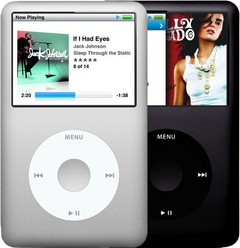
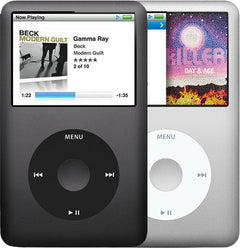
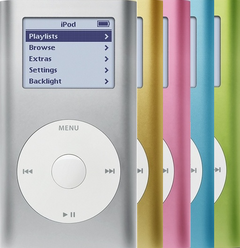

Center button
for the iPod Classic 7th Gen A1238
- 1-year limited warranty
Is this the right part?
For the iPod Classic 7th GenModel A1238
Doing it yourself?
iPod Classic 6th/7th Gen click wheel and center button replacement guide ›iPod Classic 7G — New Center Button
For the iPod Classic 7th Gen
New · Model A1238
$45.90
Sold out
Not for sale right now
We are not selling this part at the moment.
- Condition: new replacement part
- 1-year limited warranty · 30-day returns from delivery
- Free pry tool in the box
- Completed repairs aren't refundable. If a part we fitted fails within a year, we repair it again.
- US shipping is about $6 to $9 by USPS Ground Advantage; free on orders of $200 or moreYou pay the postage to mail your iPod to us, or add our box and prepaid label. Shipping back to you is about $6 to $9 at checkout; free on orders of $200 or more
Questions about this part? Chat with us or email sales@imods.com.
Not sure what's wrong? Get your free repair quotePart details
About this part
Overview
Cosmetic Select/center-button cap only — no electronics. Swap for color or a worn cap. Will not fix a button that clicks but doesn't register.
Fitment snapshot
What Is Included
Fit and specs
Specifications & Fitment
Part Details
| Detail | Value |
|---|---|
| Model Number | A1238 |
| EMC | EMC 2173 |
| Condition | New replacement center button |
Compatible Variants
| Order Number | Capacity | Case | Compatible | Notes |
|---|---|---|---|---|
| MB147LL/A | 80GB | thin | Yes— compatible | Thin-Classic cosmetics/framework interchange; unit is the 2007 thin 80GB Classic — sold under the iPod Classic 6th Generation pages |
| MB565LL/A | 120GB | thin | Yes— compatible | Thin-Classic cosmetics/framework interchange; unit is the Late-2008 thin 120GB Classic — sold under the iPod Classic 6th Generation pages |
| MB150LL/A | 160GB | thick | Yes— compatible | Fits (front cosmetics interchange across the 6th/7th Gen); unit is the 2007 thick 160GB Classic — sold under the iPod Classic 6th Generation pages |
| MB145LL/A | 160GB | thick | Yes— compatible | Fits (front cosmetics interchange across the 6th/7th Gen); unit is the 2007 thick 160GB Classic — sold under the iPod Classic 6th Generation pages |
| MC297LL/A | 160GB | thin | Yes | — |
| MC293LL/A | 160GB | thin | Yes | — |
Install and repair
Step-by-step guide
iPod Classic 6th/7th Gen click wheel and center button replacement
Tools: Plastic opening picks (two or three), Thin metal opening tool, Phillips #00 screwdriver, Plastic spudger and tweezers, Anti-static wrist strap or mat, Small dish or marked paper, Soft, clean cloth and an air blower, Charger and headphones you know work
- Open the caseUnplug any cable. Switch the iPod off (hold Play/Pause until the screen goes dark) and slide Hold to locked. Open it as our opening guide shows: plastic picks keep the seam open along one long side while the tip of a thin metal tool pushes each clip in toward the front panel, rocking on the steel back's rim. Free both long sides, then the one clip in the middle of the top edge, between the Hold switch and the headphone jack. Leave the bottom edge clipped: it is the hinge.
- Unplug the battery firstPart the top ends a little, no further: the battery ribbon and the headphone ribbon still join the two halves. Now and then the drive comes away stuck to the back half, or the battery plug pops out as the case opens, so check for both, and ease a stuck drive back down into the front half.
Install Overview
Rather not open it? Choose We Fix It above: mail your iPod in and we fit it. Turnaround is typically 1–3 business days on our bench. 1-year limited warranty.
Questions
Frequently Asked Questions
Is this an iPod Classic?
Apple sold this model as iPod classic (Late 2009). '7th Generation' is common repair-market shorthand for the thin 160GB A1238 model, not an official Apple product name.
Will this fix internal electronics symptoms?
No. Housing and trim parts are for fit, finish, color, alignment, or visible damage. Diagnose power, storage, audio, screen, and control faults separately.
Does color change physical fitment?
Color alone does not block fitment when the same model, generation, and part shape match. It will only change the visible finish.
Free diagnostic
Broken iPod? We can help.
Mail us your iPod and we will test it and send you a free repair quote. If you don't like our price, we will ship your iPod back at our expense.
How mail-in repair works
Order the free diagnostic
Choose your iPod. Add our shipping box and prepaid label if you need one.
Mail us your iPod
Pack it with your work order. No printer? Put a note in the box with your name, return address, email, iMods order number and what is wrong.
Approve your quote
We test it and email your free repair quote. Most repairs are finished within 1 to 3 business days after you approve the quote.