


iPod Video 5G — Replacement Dock Connector Bezel
iPod Video 5G — Replacement Dock Connector Bezel
Used (Apple Original) · Model A1136
$7.95
Sold out
Not for sale right now
We are not selling this part at the moment.
- Used (Apple Original). Tested: installed in a working iPod and checked before it ships.
- 1-year limited warranty · 30-day returns from delivery
- Free pry tool in the box
- Completed repairs aren't refundable. If a part we fitted fails within a year, we repair it again.
Questions about this part? Chat with us or email sales@imods.com.
Not sure what's wrong? Get your free repair quotePart details
About this part
Overview
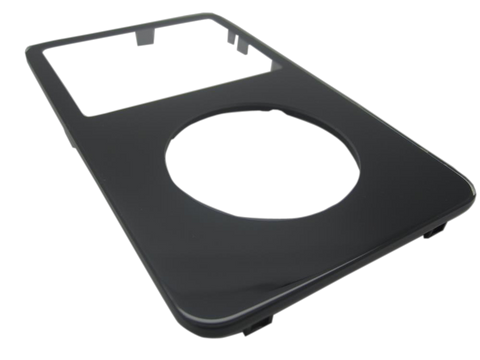
Plastic dock-port bezel/spacer for iPod 5th Generation Video. This is the plastic surround that frames the 30-pin dock opening — not the electrical dock connector, which is a separate soldered part. Buy when the bezel is cracked, broken, missing, discolored, loose, dirty, or for a cosmetic refresh.
Fitment snapshot
What Is Included
Included
Fit and specs
Specifications & Fitment
Part Details
| Detail | Value |
|---|---|
| Model Number | A1136 |
| EMC | EMC 2065 |
| Condition | Used — factory original Apple part. Normal cosmetic wear expected. |
Compatible Variants
| Order Number | Capacity | Color | Case | Compatible | Notes |
|---|---|---|---|---|---|
| MA146LL/A | 30GB | Black | thin (0.43 in) | Yes— compatible | Thin and thick 5G bottom edges curve differently; confirm your rear-case depth before ordering |
| MA446LL/A | 30GB | Black | thin (0.43 in) | Yes— compatible | Thin and thick 5G bottom edges curve differently; confirm your rear-case depth before ordering |
| MA452LL/A | 30GB | Black/Red | thin (0.43 in) | Yes— compatible | Thin and thick 5G bottom edges curve differently; confirm your rear-case depth before ordering |
| MA664LL/A | 30GB | Black/Red | thin (0.43 in) | Yes— compatible | Thin and thick 5G bottom edges curve differently; confirm your rear-case depth before ordering |
| MA002LL/A | 30GB | White | thin (0.43 in) | Yes— compatible | Thin and thick 5G bottom edges curve differently; confirm your rear-case depth before ordering |
| MA444LL/A | 30GB | White | thin (0.43 in) | Yes— compatible | Thin and thick 5G bottom edges curve differently; confirm your rear-case depth before ordering |
| MA147LL/A | 60GB | Black | thick | Yes— compatible | Thin and thick 5G bottom edges curve differently; confirm your rear-case depth before ordering |
| MA003LL/A | 60GB | White | thick | Yes— compatible | Thin and thick 5G bottom edges curve differently; confirm your rear-case depth before ordering |
| MA450LL/A | 80GB | Black | thick | Yes— compatible | Thin and thick 5G bottom edges curve differently; confirm your rear-case depth before ordering |
| MA448LL/A | 80GB | White | thick | Yes— compatible | Thin and thick 5G bottom edges curve differently; confirm your rear-case depth before ordering |
Install and repair
Step-by-step guide
iPod Video 5th Gen back panel replacement
Tools: Plastic opening tools (two or three), Thin plastic picks, Angled tweezers or a small plastic tool, Plastic spudger, Phillips #00 screwdriver, Small dish for screws, Anti-static wrist strap or mat, Soft cloth
- Open the caseUnplug any cable, then switch the iPod off and slide Hold to locked. Free the clips with plastic tools: both long sides, then the top (shallow beside the Hold switch, where the screen sits close), then the bottom. Raise the back only about an inch, since two ribbons still join the halves. Our guide to opening the iPod Video covers this in detail.
- Unplug the batteryFind the battery's orange ribbon where it plugs into the logic board toward the bottom end. Raise its small brown latch straight up by 1 to 2 mm, evenly at both ends, and slide the ribbon out.
Install Overview
Rather not open it? Choose We Fix It above: mail your iPod in and we fit it. Turnaround is typically 3 to 5 business days. 1-year limited warranty.
Open the iPod carefully
The 5G Video shell is easier than later metal Classics, but clips, plastic tabs, and ribbons can still break if forced.
Match bezel shape before teardown
Confirm thin or thick rear housing before installing; a mismatched bezel will not sit cleanly at the bottom edge.
No soldering for the bezel
This plastic trim piece is separate from the soldered 30-pin dock connector.
Keep screws and trim aligned
The dock-area trim depends on clean alignment around the bottom opening before final closure.
Test fit before snapping shut
Confirm the 30-pin cable inserts straight and the bezel sits flush without pinching nearby parts.
Questions
Frequently Asked Questions
Is this the dock connector?
No. This is the plastic surround around the 30-pin dock opening. The electrical 30-pin dock connector is a separate soldered part on the logic board.
Will this fix charging or sync?
No. The bezel has no electrical contacts, so it fixes none of these. Won't charge on the right charger: most likely a worn-out battery, then a damaged charging port, which is part of the logic board. Not seen by the computer: most likely the hard drive, then the sync cable or a damaged dock connector. Try another cable and a port on the computer itself rather than a keyboard's, clean the 30-pin connector and look for lint or bent pins, and rule the battery out; a damaged port is fixed by replacing the logic board, not with a trim part.
What if the dock area is bulging?
Check for a swollen battery first. On this iPod the battery lies behind the display, so a swollen pack shows as a dark pressure mark on the screen, a panel that sits proud or bowed, a front lifting off the metal along the seam, or a case that will not sit flat on a table. Bulging or case separation is a safety issue and should not be treated as a plastic bezel problem.
Does the bezel differ between thin and thick?
Yes. Thick and thin 5th Generation iPod Video rear housings require their own dock-bezel versions because the bottom edge curves differently.
Is this an iPod Classic 5th Generation part?
No. Apple's Classic branding started with the 6th Generation. This listing is for iPod 5th Generation Video / iPod with Video, model A1136 / EMC 2065.
Free diagnostic
Broken iPod? We can help.
Mail us your iPod and we will test it and send you a free repair quote. If you don't like our price, we will ship your iPod back at our expense.
How mail-in repair works
Order the free diagnostic
Choose your iPod. Add our shipping box and prepaid label if you need one.
Mail us your iPod
Pack it with your work order. No printer? Put a note in the box with your name, return address, email, order number and what is wrong.
Approve your quote
We test it and email your free repair quote. Most repairs are finished within 3 to 5 business days after you approve the quote.