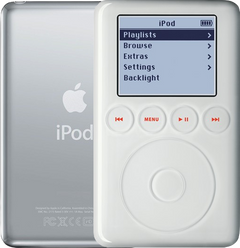
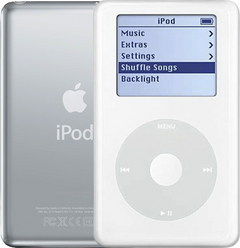
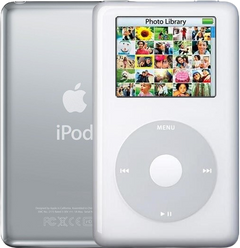
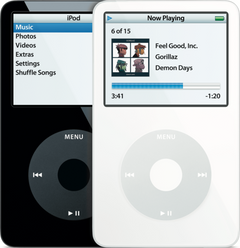


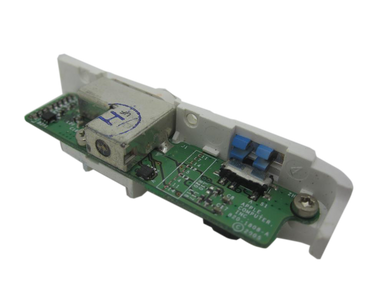
Representative photo. You receive the part named above.
Is this the right part?
For the iPod Photo 20/30GB (thin case)Model A1099
Also for the iPod Photo: Thick (40GB and 60GB) $22.95 · See all
Doing it yourself?
iPod 4th Gen and iPod Photo headphone jack replacement guide ›iPod Photo (4th Generation) — Replacement Headphone Jack (Thin - 20/30GB)
For the iPod Photo 20/30GB (thin case)
Used (Apple Original) · Model A1099
$22.95
Also for the iPod Photo: Thick (40GB and 60GB) $22.95 · See all
Sold out
Not for sale right now
We are not selling this part at the moment.
- Used (Apple Original). Tested: installed in a working iPod and checked before it ships.
- 1-year limited warranty · 30-day returns from delivery
- Free pry tool in the box
- Completed repairs aren't refundable. If a part we fitted fails within a year, we repair it again.
Questions about this part? Chat with us or email sales@imods.com.
Not sure what's wrong? Get your free repair quotePart details
About this part
Overview
Replacement headphone jack assembly for iPod Photo (4th Generation). Use it for damaged audio-output hardware, channel issues, or the Hold switch, which is part of this headphone jack assembly.
Fitment snapshot
What Is Included
Included
Before You Discard The Original
Some replacement assemblies include the white plastic Hold switch slider preassembled. Others may require transferring the slider from your original assembly. Check the replacement part before discarding your original.
Two things are not in the box and are not sold as part of this assembly: the orange headphone-jack flex cable, which is its own listing and is the same part for every capacity, and the three silver Phillips screws that hold the assembly to the rear panel. Plan to transfer both from your original.
What this part might fix
Help pages, step by step, for problems this part might fix:
Most likely fixed by this part
Can also be the cause
- Hold switch not working: broken Hold switch
- Buttons not working: broken Hold switch
Fit and specs
Specifications & Fitment
Also known as iPod with color display (Apple's official name after June 2005).
Part Details
| Detail | Value |
|---|---|
| Model Number | A1099 |
| EMC | EMC 2022 |
| Condition | Used — factory original Apple part. Normal cosmetic wear expected. |
| Part Identifiers |
820-1808-A, 820-1647-A
|
Compatible Variants
| Order Number | Capacity | Color | Case | Compatible | Notes |
|---|---|---|---|---|---|
| MA127LL/A | 20GB | Black/Red (U2) | thin | Yes— compatible | Stock match |
| MA079LL/A | 20GB | White | thin | Yes | — |
| MA215LL/A | 20GB | White (Harry Potter Collector's Edition) | thin | Yes— compatible | Stock match |
| M9829LL/A | 30GB | White | thin | Yes | — |
| PS492AA | 30GB | White (HP) | thin | Yes | — |
| M9585LL/A | 40GB | White | thick | No— wrong case depth | Thin-case part is not compatible with 40GB/60GB thick iPod Photo variants. Use Replacement Headphone Jack (Thick - 40/60GB) instead. |
| M9586LL/A | 60GB | White | thick | No— wrong case depth | Thin-case part is not compatible with 40GB/60GB thick iPod Photo variants. Use Replacement Headphone Jack (Thick - 40/60GB) instead. |
| M9830LL/A | 60GB | White | thick | No— wrong case depth | Thin-case part is not compatible with 40GB/60GB thick iPod Photo variants. Use Replacement Headphone Jack (Thick - 40/60GB) instead. |
| PS493AA | 60GB | White (HP) | thick | No— wrong case depth | Thin-case part is not compatible with 40GB/60GB thick iPod Photo variants. Use Replacement Headphone Jack (Thick - 40/60GB) instead. |
Install and repair
Step-by-step guide
iPod 4th Gen and iPod Photo headphone jack replacement
Tools: Plastic opening tools, one wide and one thin, Plastic spudger, T6 Torx screwdriver, Fine Phillips screwdriver (#00 or PH-000), Anti-static wrist strap or mat, Headphones you know work, Wall charger
- Unplug it, switch it off and lock HoldDisconnect any cable, charger or computer first. Switch the iPod off by holding Play/Pause until the screen goes dark, then slide the Hold switch to locked, so its orange bar shows.
- Release the case clipsOur opening guide has the detail. In short: with the screen up and the dock connector toward you, start on the right-hand long side with the wide plastic tool, its edge tilted toward the steel back, and free the five tabs on that side. Then the two clips beside the dock connector (lightly past the thin steel there), the five tabs on the left-hand side, and the top edge.
Install Overview
Rather not open it? Choose We Fix It above: mail your iPod in and we fit it. Turnaround is typically 1–3 business days on our bench. 1-year limited warranty.
Questions
Frequently Asked Questions
Can one-channel audio be because of something else?
Yes. Try known-good headphones first. Sound still in one ear only points to the headphone jack. Crackling points to the headphone jack, then the logic board.
Can the Hold switch be part of the headphone-jack assembly?
Yes: on every model the Hold switch is part of the headphone jack assembly, so a broken or stuck Hold switch is fixed by a new assembly. On the 4th Gen and iPod Photo an iPod stuck on Hold (locked whatever the switch says) is the headphone jack cable first — often just not pushed fully back in after the case was opened: push it back in — then this assembly. This thin assembly is not interchangeable with the other case thickness.
It plays but nothing comes out
Owners describe the menu and the song timer advancing normally while nothing is heard. Try a second pair of headphones or a speaker first — that one test separates the iPod from the headphones, and it is the step we recommend before any part. If a known-good pair is also silent, look at the jack: clean the opening, check the plug seats fully, and inspect the headphone/Hold assembly and its ribbon where they meet the board — a ribbon left half-seated after a repair is a common cause. Match the assembly to your case depth: the thin 20/30GB and thick 40/60GB builds take different jack assemblies, while the flex cable is the same part for every capacity. If headphone and dock line-out audio are both silent, the fault is most likely the logic board, not the jack or its cable.
Volume is at full but it is quiet
Owners describe it this way: the volume is all the way up and the output stays quiet across several sets of headphones. Try a second pair of headphones or a speaker first — that separates the iPod from the headphones. This iPod has no Volume Limit setting to check: Apple added that to the iPod nano and the fifth-generation iPod in 2006, and this model's software ended at 1.2.1. Owners of European-market units report a fixed software cap with no menu to change it. If a known-good pair is still quiet, clean the jack opening and check the headphone/Hold assembly and its ribbon seating before ordering; for more level on a capped unit, an in-line headphone amplifier is the clean way to get it.
Is this an iPod Classic?
Apple's 'Classic' branding started with the 6th Generation (2007). This is the color-screen iPod photo / iPod with color display generation, not a Classic-branded model.
Free diagnostic
Broken iPod? We can help.
Mail us your iPod and we will test it and send you a free repair quote. If you don't like our price, we will ship your iPod back at our expense.
How mail-in repair works
Order the free diagnostic
Choose your iPod. Add our shipping box and prepaid label if you need one.
Mail us your iPod
Pack it with your work order. No printer? Put a note in the box with your name, return address, email, order number and what is wrong.
Approve your quote
We test it and email your free repair quote. Most repairs are finished within 1 to 3 business days after you approve the quote.