Skip to product information
1 of 1

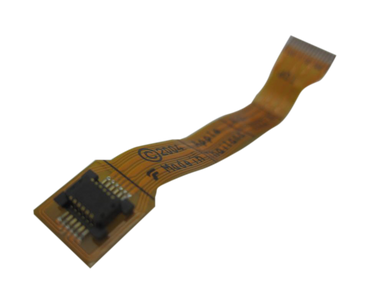
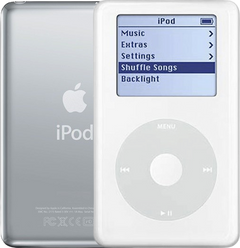
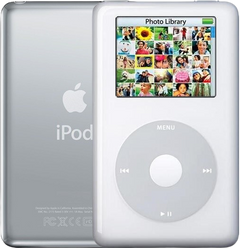
iPod Photo (4th Generation) — Headphone Jack Flex Cable

iPod Photo (4th Generation) — Headphone Jack Flex Cable

Regular price $33.23 USD
Regular price Sale price $33.23 USD
Sale Sold out
Cable 40GB / 60GB / 30GB / 20GB

Replacement internal cable for iPod Photo (4th Generation). Use it when the flex or ribbon is torn, creased, loose, or failing at the connector before blaming the whole attached assembly.

Product Overview

This cable listing covers Headphone Jack Flex Cable and its own connector path on the iPod Photo (4th Generation).

Use Part Details for the confirmed part-number reference. Use the Compatible Variants table below to confirm capacity, color, case, or order-number fitment.

Choose this cable when the matching cable is torn, creased, corroded, or disturbed during service; use the checks below to separate cable damage from the nearby assembly.

What Is Included

Headphone Jack Flex Cable Free plastic pry opening tool 1 year warranty

Quick Buying Check

Buy this when

  • Hard Drive Failure: Use the cable check when reseating, connector inspection, or a known-good drive points to the storage ribbon instead of the drive itself.

Diagnose first when

  • Confirm the capacity and case thickness before ordering battery, hard drive, cable, or rear case parts.
  • Confirm the capacity match before ordering: 20GB, 30GB, 40GB, 60GB.
  • Try a known-good cable, charger, and computer port before opening the iPod.
  • Inspect the dock connector for debris, bent pins, corrosion, or looseness.
  • Separate charging-only failure from computer-recognition or sync failure when choosing a part.

Do not buy for

  • Check cable, charger, battery, storage restore state, and board condition when the dock check is not clearly isolated.
  • Check the board-side connector or adjacent cable first when the damage is not on the replaceable assembly.
  • Check nearby parts first when the symptom is tied to another assembly or appeared after unrelated work.
  • A damaged storage ribbon can make a good drive look failed, while a failing drive can still produce the same sad-iPod symptoms.

Specifications & Fitment

Also known as iPod with color display (Apple's official name after June 2005).

Part Details

Detail Value
Model Number A1099
EMC EMC 2022
Condition Used — factory original Apple part. Normal cosmetic wear expected.
OEM Part 632-0286-A, 632-0346-A, 820-1808-A

Compatible Variants

Order Number Capacity Color Case Compatible Notes
MA127LL/A 20GB Black/Red (U2) thin Yes
MA079LL/A 20GB White thin Yes
MA215LL/A 20GB White (Harry Potter Collector's Edition) thin Yes
M9829LL/A 30GB White thin Yes
PS492AA 30GB White (HP) thin Yes— compatible Stock match
M9585LL/A 40GB White thick Yes
M9586LL/A 60GB White thick Yes
M9830LL/A 60GB White thick Yes
PS493AA 60GB White (HP) thick Yes— compatible Stock match

Diagnostic Failure Cards

Use these model-specific failure cards to decide whether this cable is the right part, a nearby part needs checking first, or escalation makes more sense after simpler checks.

Check before ordering

Audio or Hold problems after repair

What you may notice

  • People report headphone audio, Hold behavior, or both changing after battery, headphone/hold, or internal service.
  • A new symptom appeared after battery, storage, audio, display, or control work.

Diagnose first when

  • Confirm the replacement assembly matches the thin or thick case.
  • Inspect the headphone/hold ribbon and connector before ordering a second part.
  • Compare headphone output, dock or line-out output, and Hold-switch behavior before replacing the headphone/hold assembly.

Similar issues to separate

  • Choose this headphone/hold assembly only when repair work damaged the jack, switch, or ribbon.

Check another part first

  • Check the connector and the part variant first when the symptom began immediately after service.

Repair or replacement paths

  • Reseat the ribbon and correct the part variant first.
  • Replace the assembly when the flex, switch, or jack-board is damaged.

Hold switch is stuck, locked, or not reporting correctly

What you may notice

  • iPod stays locked even when the Hold switch moves.
  • Lock indicator does not match the switch position.
  • Controls appear dead because the Hold path is stuck.

Diagnose first when

  • Move the Hold switch and watch whether the lock indicator changes.
  • Inspect the headphone/hold ribbon if the symptom started after opening the iPod.
  • Confirm the assembly matches the exact case thickness before ordering.

Similar issues to separate

  • Choose this headphone/hold assembly only when the physical Hold switch or its ribbon path is the failing path.
  • Choose this headphone jack / hold-switch assembly when the symptom remains isolated to this assembly, its ribbon, or its connector path after first checks.

Check another part first

  • Check click-wheel input only after the Hold switch path is ruled out.
  • Check the headphone/hold assembly for confirmed Hold switch faults before blaming the click wheel.

Repair or replacement paths

  • Replace the headphone/hold assembly when the switch or its flex path is damaged.
  • Reseat or inspect the connector first when the switch changed behavior after service.
  • Replace the click wheel when the assembly or flex remains damaged after seating checks.

Advanced or board-level cases

Fitment or model-variant boundary

What you may notice

  • A similar-looking part may not match the exact capacity, case thickness, generation, or color.

Check another part first

  • Check the Replacement Click Wheel when controls, wheel, center/select, menu, hold, or unresponsive-button symptoms are the main problem.
  • Check the Replacement Logic Board (Late 2004 / Early 2005) when board-level behavior after replaceable parts and connectors are ruled out is the main problem.

Headphone output compared with dock or line-out audio

What you may notice

  • Headphone audio fails but dock or line-out audio still works.
  • Both headphone and dock output fail, pointing away from the jack alone.
  • Audio behavior differs by output path.

Diagnose first when

  • Compare headphone output with dock or line-out audio on the same track.
  • Test known-good headphones before opening the iPod.
  • Route board-level audio only after jack and dock-output checks disagree with a replaceable-part fault.

Check another part first

  • If both headphone and dock or line-out audio fail, the jack alone is unlikely.
  • Board-level audio diagnosis belongs after output-path and ribbon checks.

Repair or replacement paths

  • Replace the headphone/hold assembly when the failure is isolated to the headphone path.

Cautions

  • Do not treat a broad no-audio symptom as proof that the headphone jack has failed.

No sound or missing headphone audio

What you may notice

  • No sound from the headphone jack.
  • Audio disappears while the iPod otherwise appears to run.
  • Sound changes when the headphone plug or case is moved.

Diagnose first when

  • Test with known-good headphones before opening the iPod.
  • Compare headphone output with dock or line-out audio.
  • Inspect the headphone/hold ribbon and connector if the iPod has been opened.

Similar issues to separate

  • Choose this headphone/hold assembly only when the headphone jack or its ribbon path is the failing audio path.

Check another part first

  • Check the logic board or board-level audio path first when both the headphone jack and dock or line-out path are silent.

Repair or replacement paths

  • Reseat the headphone/hold ribbon when the symptom began after service.
  • Replace the headphone/hold assembly when the jack, ribbon, or hold-board assembly is the suspect path.
  • Use headphone/hold assembly replacement for a failure that follows only the headphone path.
  • Do not treat the headphone jack as the first confirmed fix when every audio output path is silent.

Ribbon, connector, or ground-path checks

What you may notice

  • A symptom starts after opening the iPod or disturbing an internal flex cable.

Headphone Jack / Hold-Switch Assembly appears unresponsive or intermittent

What you may notice

  • People describe behavior where the headphone jack / hold-switch assembly seems dead, intermittent, or only partly responsive.

Diagnose first when

  • Inspect nearby connectors and flex paths if the iPod has been opened.

Similar issues to separate

  • Choose this headphone jack / hold-switch assembly only when the failing behavior follows the part or its own connection path.

Liquid, corrosion, or residue context

What you may notice

  • Symptoms follow liquid exposure, dirty contacts, corrosion, or residue.

Diagnose first when

  • Inspect for liquid, corrosion, residue, torn flex material, or connector damage.

One-channel, static, or uneven headphone audio

What you may notice

  • Sound plays in only one ear or one channel.
  • Static, uneven volume, buzzing, or distortion through headphones.
  • Audio changes when the plug is rotated or moved.

Diagnose first when

  • Try another known-good headphone plug before ordering.
  • Check whether light plug movement changes the channel or static behavior.
  • Inspect headphone-jack contacts and ribbon seating after opening.

Similar issues to separate

  • Choose this headphone/hold assembly only when the one-channel or static symptom follows the jack or ribbon.

Check another part first

  • Check headphones and board-level audio first when the symptom does not react to the jack or ribbon path.

Symptom remains after basic checks

What you may see: The iPod still points back to Headphone Jack Flex Cable after cable seating, battery stability, and nearby connector checks.

Check first: Retest with known-good cables or adjacent parts where practical before ordering.

Check next: A nearby cable, connector, battery, storage device, display path, audio path, or board path can mimic a bad cable.

Symptom changes when touched or reseated

What you may see: The symptom changes after moving the part, reseating a cable, or applying light pressure near the connector path.

Check first: Inspect the connector, latch, flex, solder joints, and nearby board area for damage or corrosion.

Check next: This can still be a connection issue rather than a failed cable alone.

Problem began after another repair

What you may see: The issue started immediately after opening the iPod, replacing another part, or disturbing an internal cable.

Check first: Reopen only as far as needed and inspect the exact area touched during the previous repair.

Check next: Post-repair symptoms often trace to seating, latch, screw, or cable issues before Headphone Jack Flex Cable itself is confirmed bad.

Do Not Buy / Problems This Cable Does Not Fix

Situation Start here instead
Variant or capacity does not match this listing Check the matching drive, cable seating, and board-side connector before ordering.
The problem is the Hold switch or headphone jack, not this part Compare with a known-good storage device before replacing another cable.
A symptom points to a different part Check the matching drive, cable seating, and board-side connector before ordering after matching the exact symptom and part family.
Sound is the only problem Use the nearby diagnostic path that matches the exact symptom and part family.
Cable, computer, sync, or port behavior is the primary problem Inspect and reseat the cable, latch, or connector path disturbed during service before buying another part.
Charging, swelling, runtime, or power is the primary problem Use the port, cable, host, or power path if the storage ribbon is not the isolated fault.

Install Overview

Before You Start

Confirm the model and reset state

Lock the Hold switch so the orange bar is visible before opening the iPod.

Open the case slowly

Treat case opening as the highest handling risk. Work around the seams gently and stop if the shell, clips, or internal stack resist.

Protect nearby connectors

Do not pull the halves apart or side-load board sockets. Reseat nearby ribbons and connectors before blaming a replacement cable.

After This Repair

Check What to do
Test the connected part Confirm the assembly on both ends of the cable behaves normally before closing the iPod.
Still not working? Inspect the latch, cable orientation, and board-side connector before replacing another part.

Worth Knowing

  • Standalone flex cable path for iPod Photo headphone/hold service when the full assembly is not needed.

Frequently Asked Questions

Use these questions to narrow the part path before ordering. They keep each answer focused on a different diagnostic or fitment decision.

What iPod Photo (4th Generation) models does this fit?

This Headphone Jack Flex Cable fits: M9585LL/A (40GB White), M9586LL/A (60GB White), M9829LL/A (30GB White), MA079LL/A (20GB White), M9830LL/A (60GB White), MA127LL/A (20GB Black/Red (U2)), MA215LL/A (20GB White), PS492AA (30GB White (HP)), PS493AA (60GB White (HP)).

Do I need to solder?

No, this installation does not require soldering.

iPod stuck on lock, what component should I replace?

Control symptoms usually need the click wheel, center button, or Hold assembly checked before this cable.

The clicker wont work?

Use the Quick Buying Check, Failure Signs, and Do Not Buy sections together before ordering. The symptom should still point to this cable after nearby parts and fitment are separated.

Does capacity matter for this part?

Use the Specifications & Fitment table as the source of truth. Match model, capacity, case depth, connector style, and order-number family before ordering.

Why people land on this part

Also searched as: new battery, doesn't charge, iPod photo 4th generation headphone jack flex cable replacement, iPod Photo parts, iPod with color display, A1099, Won't Charge, Won't Turn On, Shuts Down Randomly, not charging, charge completely, headphone ribbon cable, headphone board, lock switch cable, hold switch ribbon, headphone/hold flex cable, headphone jack ribbon, hold switch cable.

Symptoms people describe

  • static noise
  • broken ribbon cable
  • one-channel audio
  • stuck on hold
  • static in headphones
  • crackling in headphones
  • frozen on hold
  • hold switch won't toggle

Questions people ask

  • No soldering
  • Genuine Apple Parts
  • One Year Warranty
  • Satisfaction Guaranteed
View full details