Product Overview
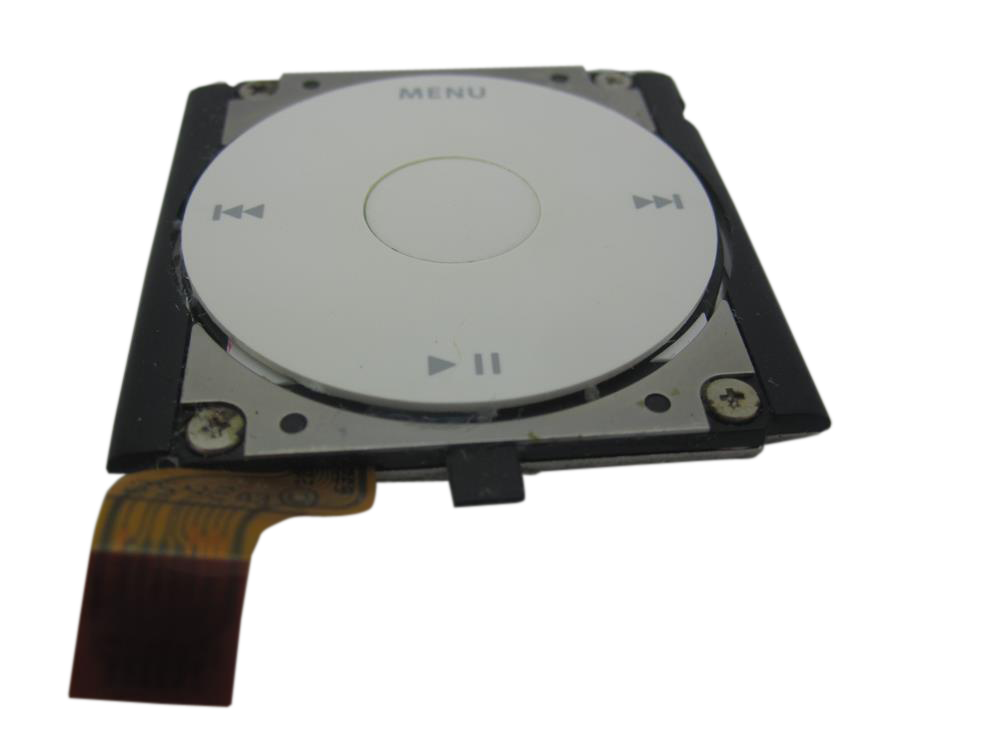
Choose this click wheel listing to restore wheel, button, and center-Select input on the iPod Mini 1st Generation when the control assembly or its flex is damaged or unresponsive.
Use Part Details for the confirmed part-number reference. Use the Compatible Variants table below to confirm capacity, color, or order-number fitment.
Choose this part when Click Wheel Not Working remains after Hold state, Menu + Select reset, battery, storage, ribbon, and connector checks; the checks below help confirm the right part before you order.
What Is Included
Condition: Used factory-original part. Quantity and exclusions: The listed part, set, pair, or configuration above is supplied with exactly one plastic pry tool. No other parts, tools, adhesives, or materials are included unless they are explicitly listed above.
Quick Buying Check
Buy this when
- Click Wheel Not Working: Use the controls check after checking Hold state, force-restart behavior, ribbon seating, and whether the issue affects the whole wheel or just one button.
Diagnose first when
- Unlock Hold, then hard-reset with Menu + Center/Select for 8-10 seconds before ordering.
- If the lock icon stays on or Hold behavior is suspect, check the headphone jack / Hold switch assembly before blaming the click wheel.
- Rule out battery, storage, hard-drive cable, ribbon seating, connector latch, and logic-board connector damage before replacing the wheel.
Specifications & Fitment
Part Details
| Detail | Value |
|---|---|
| Model Number | A1051 |
| EMC | EMC 1984 |
| Condition | Used — factory original Apple part. Normal cosmetic wear expected. |
| OEM Part | 632-0246-A |
| Controller | Synaptics T1005 |
| Type | Capacitive click wheel |
| Text Color | Gray (all body colors) |
Compatible Variants
| Order Number | Capacity | Color | Case | Compatible | Notes |
|---|---|---|---|---|---|
| M9436LL/A | 4GB | Blue | — | Yes | — |
| M9437LL/A | 4GB | Gold | — | Yes | — |
| M9434LL/A | 4GB | Green | — | Yes | — |
| M9435LL/A | 4GB | Pink | — | Yes | — |
| M9160LL/A | 4GB | Silver | — | Yes | — |
is not compatible with
- iPod Mini 2nd Generation click wheel (632-0303-A) — seats physically, no electrical response (Tier-0 verified)
Failure Signs
Use these checks to decide whether this click wheel is the right part, whether a nearby part should be checked first, or whether the symptom needs more diagnosis.
| Symptom | What it means & what to check |
|---|---|
| Center / Select button does not respond or stops clicking |
What you may see: People describe the center, middle, or Select button as no longer clicking, selecting, or responding.
Check first: Confirm Hold is off before judging the controls.
Most likely cause: A button-only symptom can involve the click-wheel assembly, contact path, board-side switch, or how the assembly is seated.
Look elsewhere when: If the lock symbol is active or the Hold slider is not behaving correctly, check the headphone jack / hold-switch assembly before blaming the click wheel.
|
| Hold switch can look like click-wheel failure |
What you may see: The iPod may appear locked, ignore controls, or behave differently when the Hold switch position changes.
Check first: Check whether the lock indicator changes when the Hold switch moves.
Most likely cause: On this model the Hold switch belongs to the headphone jack / hold-switch assembly, not the click wheel.
Look elsewhere when: Check the headphone jack / hold-switch assembly first when the device is locked or the Hold slider is suspect. |
| Click wheel is partly or fully unresponsive |
What you may see: People describe the scroll ring, buttons, or the whole control area as intermittent, partly responsive, or completely dead.
Check first: Confirm Hold is off.
Most likely cause: Whole-wheel symptoms can involve the click-wheel assembly, ribbon seating, ground path, or contamination on contacts.
Look elsewhere when: Check Hold switch, logic-board connector damage, and liquid/corrosion evidence before treating the click wheel as a guaranteed fix. |
| Controls stopped responding after a repair |
What you may see: A common repair pattern is that the iPod powers up after battery, hold-switch, or click-wheel work, but the controls no longer move or select normally.
Check first: Reopen only as far as needed to inspect ribbon seating and latch position.
Most likely cause: Post-repair control failure can point to a disturbed click-wheel ribbon, loose latch, missing ground path, or nearby hold-switch ribbon issue.
Look elsewhere when: If the symptom began during battery or headphone/hold work, inspect those disturbed ribbons before ordering another click wheel. |
| Ribbon, storage connector, or ground-path checks |
What you may see: A symptom starts after opening the iPod or disturbing an internal flex cable. Most likely cause: Connector seating, ribbon damage, or ground-path issues can involve this part, a nearby connector, or a board path. Look elsewhere when: Check the Headphone Jack / Hold Switch Assembly when headphone audio, one-ear sound, crackling, or hold-switch behavior is the main problem.
|
| clicking ticking sounds from the drive | This is a hard-drive failure symptom. Check the hard drive and hard-drive cable before ordering an unrelated part. |
| no power | Try force restart first. If it stays dead after a known-good charge source for 30+ minutes, check battery, then dock connector, then logic board. |
| red x (a mini shows the sad ipod/folder icon instead) | This is a storage-path symptom. Check the hard drive, hard-drive cable, and flash-mod storage path. |
Search Language
Click Wheel Not Working after reset
Use this listing when scrolling, Menu, Select, Play/Pause, Previous, or Next still fails after Hold is unlocked and Menu + Select reset has been tried.
Broken, cracked, loose, or worn wheel
Post-service control failure
If controls failed after a battery or storage repair, recheck ribbon seating, connector latch, and Hold state first.
Repair considerations
Run these checks before replacing the click wheel — they confirm the click wheel is the right fix and not a nearby fault:
- Replace Click Wheel or control assembly
- Recenter or sparingly reattach a shifted rubber button pad
Do Not Buy This Click Wheel Yet If...
| Situation | Start here instead |
|---|---|
| Variant or capacity does not match this listing | Use the iPod Mini 2nd Generation click wheel (632-0303-A); match the exact Mini generation. |
| You see a folder icon, clicking noise, or restore failure | Check the drive or flash media, storage cable, adapter seating, formatting, and restore path before replacing any part. |
| Charging, swelling, runtime, or power is the primary problem | A swollen battery can press on the LCD in this model. Replace the battery first if the case is bulging, then check whether display symptoms remain. |
| The problem is the Hold switch or headphone jack, not this part | Diagnose the exact-model headphone-jack/Hold assembly and its connector before choosing another part. |
Install Overview
Before You Start
For pre-open diagnosis, unlock Hold and use this generation's reset sequence if needed. Before opening, lock the Hold switch so the orange bar is visible, then confirm the model and variant.
Treat case opening as the highest handling risk. Work around the seams gently and stop if the shell, clips, or internal stack resist.
Do not pull the halves apart or side-load board sockets. Reseat nearby ribbons and connectors before blaming a replacement click wheel.
Repair steps
Documented repair-procedure steps for replacing the click wheel on this model (from teardown guides; confirm against your unit before starting):
- Carefully slide the iPod out of its casing by pushing on the logic board near the bottom edge of the click wheel.
- Continue to pull back on the black plastic tab and use your other hand to press down on the click wheel and begin to slide it out of the iPod.
- Continue to pull back on the black plastic tab, use your other hand to press down on the click wheel, and begin to slide it out of the iPod.
- Use a spudger to pull back on the small black plastic tab holding the click wheel in place.
- [NOTE] It's important to press down on the click wheel as you slide it out, otherwise the click wheel could be scratched by the iPod's metal casing.
Disassembly Guide
Disassembly guide summary: iPod Mini Click Wheel Replacement.
Show all 7 installation steps
Carefully slide a small flathead screwdriver or Jimmy into the seam between the metal casing and white plastic bottom. Lever up the white bottom bezel, taking care not to damage the soft plastic.
A small pair of snap-ring pliers is the best tool to take out the metal retaining bracket. You can also lever out the metal retaining bracket beneath the bottom bezel with a flathead screwdriver. Release the bracket by pressing in the corner metal arms first.
Lift the released bracket away and set it aside.
With a spudger or fingertip, carefully disconnect the orange click wheel ribbon from the logic board.
With a spudger, draw back on the small black plastic tab securing the click wheel in place.
Keep pulling back the black plastic tab while pressing down on the click wheel with your other hand, then start sliding the wheel out of the iPod. Press down on the click wheel while sliding it out so the iPod metal casing does not scratch it. To protect the click wheel during removal or installation, cover it with blue painter's masking tape; the tape removes cleanly when the work is finished.
Keep sliding the click wheel outward until it releases from the iPod.
Product-specific placement, reassembly, and check
- Prepare and access. Confirm the exact model and listing fit first. Use the existing steps as a disassembly guide, gather the specified tools, disconnect power where applicable, and keep screws and cable positions organized.
- Place Replacement Click Wheel (632-0246-A). Align the control part with its locating features and seat only the matching ribbon or mechanical interface for this listing.
- Reassemble without force. Reverse only the access steps needed for this repair, keep cables clear of case edges and screw posts, and close clips in stages.
- Validate before final closure. Before final closure, test navigation and every affected button; reopen the fit if a control binds, sits low, or does not register consistently.
Stop condition: Stop if a connector, latch, screw, clip, housing edge, or the replacement part resists normal alignment. Recheck model fit, orientation, cable routing, and trapped hardware instead of forcing it.
After This Repair
| Check | What to do |
|---|---|
| Test every control | Check Menu, Select, Play/Pause, Previous, Next, scrolling, and Hold behavior before closing the case fully. |
| If controls are still odd | Reseat the control ribbon, confirm the Hold switch is off, and inspect any ground strap or latch touched during service. |
Frequently Asked Questions
Use these questions to narrow the part path before ordering. They keep each answer focused on a different diagnostic or fitment decision.
What Replacement Click Wheel (632-0246-A) models does this fit?
This Replacement Click Wheel (632-0246-A) fits: M9160LL/A (4GB Silver), M9434LL/A (4GB Green), M9435LL/A (4GB Pink), M9436LL/A (4GB Blue), M9437LL/A (4GB Gold).
Do I need to solder?
No, this installation does not require soldering. Difficulty: Moderate. Estimated time: 15 minutes.
How do I know if this click wheel needs replacement?
Symptoms that can point to this click wheel include: Click Wheel Not Working, broken wheel, scroll wheel trouble, and button trouble after Hold, reset, battery, storage, and connector checks. Check fitment, connectors, and nearby parts before treating symptoms as proof.
What if only the center or Select button fails?
Confirm Hold is off. Separate center-button-only behavior from a dead scroll ring or multiple failed buttons. Inspect the click-wheel ribbon and ground path if the iPod was opened. Confirm Hold is off before judging the controls. Separate center-button-only behavior from a dead scroll ring or multiple failed buttons. If the iPod has been opened, inspect the click-wheel ribbon, seating, and ground path before ordering another part. Choose this click wheel only when the control assembly or flex path is the failing route. Choose this click wheel only when the assembly, flex, or button path is damaged or no longer making reliable contact. Check the headphone/hold assembly first when the lock indicator or Hold slider is suspect. If the lock symbol is active or the Hold slider is not behaving correctly, check the headphone jack / hold-switch assembly before blaming the click wheel.
Is this for a full-size hard-drive iPod?
The iPod mini is a separate Apple product line from full-size hard-drive iPods. This is the iPod mini 1st Generation.
How do I confirm this is the right part for my iPod?
Use the Quick Buying Check, Failure Signs, and Do Not Buy sections together before ordering. The symptom should still point to this click wheel after nearby parts and fitment are separated.
Why people land on this part
Use the checks above to separate this click wheel from nearby parts before ordering.
Some buyers search for "lock switch"; confirm the checks above point to this same part before ordering.
Also searched as: menu button not responding, no click, restore loop, iPod mini click wheel removal, Hold Switch Stuck, Frozen / Unresponsive, hold button, click wheel connector, ribbon cable, broken click wheel, click wheel cable, clickwheel, iPod mini scroll wheel, Replacement Click Wheel ( <code> 632-0246-A </code>) replacement, iPod Mini, ipod-mini-1st-generation-click-wheel-replacement-parts-and-service, lock switch.
Click Wheel Not Working: What Owners Describe
On the iPod mini 1st Generation, Click Wheel Not Working can describe more than one observable problem. These paraphrased owner reports are anecdotal starting points for diagnosis, not proof that any single part failed.
Anecdotal owner reports (not a guarantee or authoritative proof): - One owner reported that the click wheel stopped responding after a battery replacement, while the battery and display still worked. - Another owner reported that the pause control stopped responding two days after a battery replacement.
Owners searching for this describe it as: iPod mini 1st Generation Click Wheel Not Working, iPod click wheel not working, iPod buttons not responding.
You May Also Want
Battery service is commonly checked while the Mini is open; do not treat battery fitment as the click-wheel failure mechanism.
Related: 128GB Flash Mod Kit (CF-to-SDXC Adapter + 128GB SD Card Included)Flash storage is the common upgrade path while the iPod is already open.