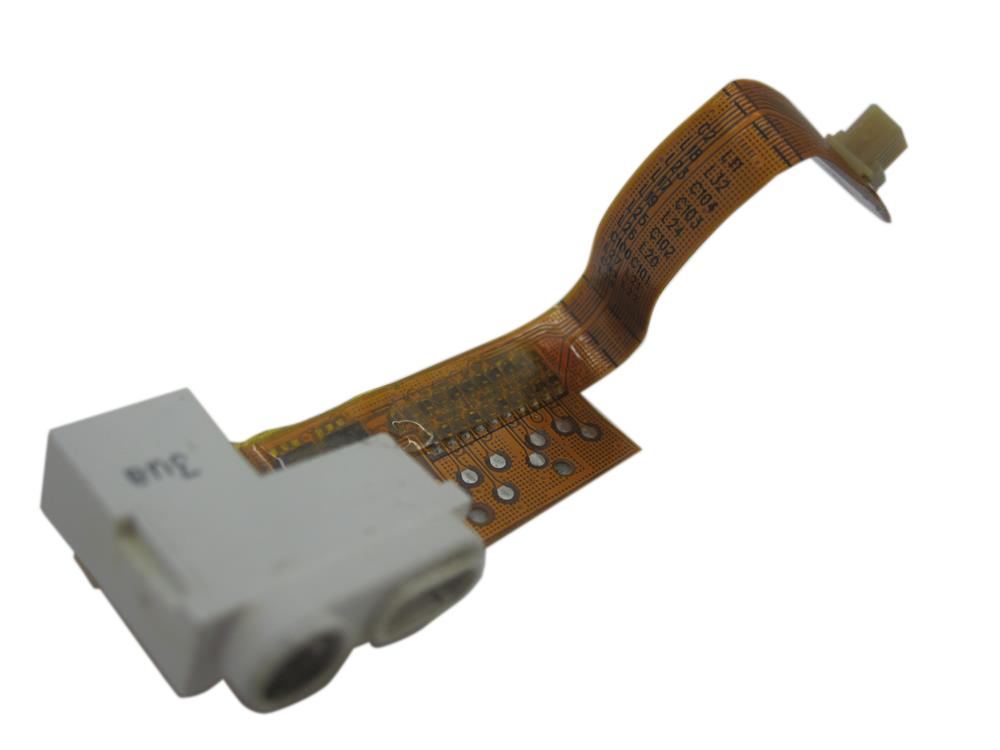
Replacement headphone jack assembly for iPod 3G. Use it for damaged audio-output hardware, channel issues, or related Hold-switch hardware on models where those parts share the same assembly.
Product Overview
This headphone jack listing covers Headphone Jack / Hold Switch Assembly (Thick - 30/40GB) and its own connector path on the iPod 3rd Generation.
Use Part Details for the confirmed part-number reference. Use the Compatible Variants table below to confirm capacity, color, case, or order-number fitment.
Choose this part when your iPod shows Audio Distortion, One Ear Only, Skipping Songs, or Headphone Jack Not Working; the checks below help confirm the right part before you order.
Choose Your Option
This part comes in multiple variants. Confirm your iPod's capacity, case depth, and order number before ordering.
Thin and thick 3G headphone jack / Hold switch assemblies are separate fitment paths.
You're viewing this optionWhat Is Included
Included
Before You Discard The Original
Some replacement assemblies include the white plastic Hold switch slider preassembled. Others may require transferring the slider from your original assembly. Check the replacement part before discarding your original.
Condition: Used factory-original part. Quantity and exclusions: The listed part, set, pair, or configuration above is supplied with exactly one plastic pry tool. No other parts, tools, adhesives, or materials are included unless they are explicitly listed above.
Quick Buying Check
Buy this when
- Headphone Jack Not Working: Use the headphone/Hold check when headphone output or Hold-switch behavior is isolated from dock audio, board audio, and connector seating.
Diagnose first when
- Match thin/thick case depth before ordering the headphone/hold assembly.
- Confirm the capacity match before ordering: 30GB, 40GB.
Specifications & Fitment
Part Details
| Detail | Value |
|---|---|
| Model Number | A1040 |
| EMC | EMC 1961 |
| Condition | Used — factory original Apple part. Normal cosmetic wear expected. |
| Part Identifiers | 632-0218-A |
| Jack Size | 3.5mm |
| Includes Hold Switch | Yes |
Compatible Variants
| Order Number | Capacity | Color | Case | Compatible | Notes |
|---|---|---|---|---|---|
| M8948LL/A | 30GB | White | thick | Yes | — |
| M9245LL/A | 40GB | White | thick | Yes | — |
| M8976LL/A | 10GB | White | thin | No— wrong case depth | Owner-verified: Thick part is not compatible with thin case — risk of LCD damage Use Headphone Jack / Hold Switch Assembly (Thin - 10/15/20GB) instead. |
| M8946LL/A | 15GB | White | thin | No— wrong case depth | Owner-verified: Thick part is not compatible with thin case — risk of LCD damage Use Headphone Jack / Hold Switch Assembly (Thin - 10/15/20GB) instead. |
| M9460LL/A | 15GB | White | thin | No— wrong case depth | Owner-verified: Thick part is not compatible with thin case — risk of LCD damage Use Headphone Jack / Hold Switch Assembly (Thin - 10/15/20GB) instead. |
| M9244LL/A | 20GB | White | thin | No— wrong case depth | Owner-verified: iPod 3rd Generation 10/15/20GB thin headphone/hold assembly Use Headphone Jack / Hold Switch Assembly (Thin - 10/15/20GB) instead. |
Diagnostic Failure Cards
Use these model-specific failure cards to decide whether this headphone jack assembly is the right part, a nearby part needs checking first, or escalation makes more sense after simpler checks.
| Symptom | What it means & what to check |
|---|---|
| Symptom remains after basic checks |
What you may see: The iPod still points back to Headphone Jack / Hold Switch Assembly (Thick - 30/40GB) after cable seating, battery stability, and nearby connector checks. Check first: Retest with known-good cables or adjacent parts where practical before ordering. Check next: A nearby cable, connector, battery, storage device, display path, audio path, or board path can mimic a bad headphone jack assembly. |
| Symptom changes when touched or reseated |
What you may see: The symptom changes after moving the part, reseating a cable, or applying light pressure near the connector path. Check first: Inspect the connector, latch, flex, solder joints, and nearby board area for damage or corrosion. Check next: This can still be a connection issue rather than a failed headphone jack assembly alone. |
| Problem began after another repair |
What you may see: The issue started immediately after opening the iPod, replacing another part, or disturbing an internal cable. Check first: Reopen only as far as needed and inspect the exact area touched during the previous repair. Check next: Post-repair symptoms often trace to seating, latch, screw, or cable issues before Headphone Jack / Hold Switch Assembly (Thick - 30/40GB) itself is confirmed bad. |
| Hold switch is stuck, locked, or not reporting correctly |
What you may notice
Diagnose first when
Similar issues to separate
Where this headphone jack assembly does not fit Check another part first
Repair or replacement paths
|
| Audio or Hold problems after repair |
What you may notice
Diagnose first when
Similar issues to separate
Check another part first
Repair or replacement paths
|
| Dock output and headphone output behave differently |
What you may notice
Diagnose first when
Similar issues to separate
Check another part first
Repair or replacement paths
Cautions
|
| Fitment or model-variant boundary |
What you may notice
Similar issues to separate
Check another part first
|
| Liquid, corrosion, or residue context |
What you may notice
Similar issues to separate
|
| No sound or missing headphone audio |
What you may notice
Diagnose first when
Similar issues to separate
Repair or replacement paths
|
| Ribbon, connector, or ground-path checks |
What you may notice
Similar issues to separate
|
| Headphone Jack / Hold-Switch Assembly appears unresponsive or intermittent |
What you may notice
Diagnose first when
Similar issues to separate
|
| One-channel, static, or uneven headphone audio |
What you may notice
Diagnose first when
Similar issues to separate
Check another part first
|
| Fitment and inspection notes |
|
Repair considerations
Run these checks before replacing the headphone jack assembly — they confirm the headphone jack assembly is the right fix and not a nearby fault:
- Compare headphone output with dock or line-out output
- Replace headphone jack and hold-switch assembly
Do Not Buy / Problems This Headphone Jack Assembly Does Not Fix
| Situation | Start here instead |
|---|---|
| Variant or capacity does not match this listing | Use the Headphone Jack / Hold Switch Assembly (Thin - 10/15/20GB) listing instead. |
| The fault is clearly the storage, battery, or logic board — not the jack or Hold switch | Start with the hard drive, battery, or logic-board check for your model before buying this assembly. |
| Headphone and dock or line-out audio are both silent | Start with the logic board or audio-circuit check; a headphone-only failure is a reason to buy this assembly, not avoid it. |
| A symptom points to a different part | Compare headphone output with dock line-out before treating the jack as the only fault after matching the exact symptom and part family. |
Install Overview
Before You Start
Turn Hold off, use the reset sequence for this generation, and confirm the model and variant before opening the iPod.
Treat case opening as the highest handling risk. Work around the seams gently and stop if the shell, clips, or internal stack resist.
Do not pull the halves apart or side-load board sockets. Reseat nearby ribbons and connectors before blaming a replacement headphone jack assembly.
Repair steps
Documented repair-procedure steps for replacing the headphone jack assembly on this model (from teardown guides; confirm against your unit before starting):
- Carefully disconnect the white battery connector from the logic board. Be sure to pull only on the connector itself and not on the cables.
- Remove the 3 silver Philips screws securing the headphone jack to the rear panel.
- Slide a spudger beneath the orange headphone jack cable and use it to pry the cable up from the rear panel.
Disassembly Guide
Disassembly guide summary: iPod 3rd Generation Headphone Jack Replacement.
Show all 7 installation steps
Before you open the iPod, confirm that the hold switch is in the locked setting. The orange bar should be showing, indicating hold is active.
Move an opening pick as far as possible into the gap between the plastic front and the metal back panel, on the right edge of the iPod. You may have to rock the pick back and forth to move it in farther. With the opening pick, lever up against the plastic front panel and release 5 retaining tabs. Slide the pick along the iPod edge and keep levering gently until the remaining retaining tabs release. In this step, after all five tabs along the right edge are free, the case should open easily.
The iPod case is now open, but do not separate the two halves yet. An orange ribbon cable still connects the headphone jack to the logic board. With the dock connector at the top, open the case like a book and set the rear panel beside the iPod front half.
With a plastic tool or your fingernails, carefully detach the orange headphone jack cable. Make sure to draw straight up on the connector, not the cable itself. The headphone jack connector is unusually tall. When levering, keep the lower plastic connector body attached to the ribbon cable. Lever between the connector and socket, not between the connector halves.
Take out the 3 silver Philips screws securing the headphone jack to the back panel.
Guide a spudger beneath the orange headphone jack cable, then lever the cable up from the rear panel.
Grasp the headphone jack board and raise it out of the iPod. During reassembly, confirm that the plastic hold switch mechanism lines up with the logic board hold switch. The board switch is a small black nub that fits into the slot on the hold switch mechanism.
Product-specific placement, reassembly, and check
- Prepare and access. Confirm the exact model and listing fit first. Use the existing steps as a disassembly guide, gather the specified tools, disconnect power where applicable, and keep screws and cable positions organized.
- Place Headphone Jack / Hold Switch Assembly (Thick - 30/40GB). Align the jack and Hold-switch assembly with the housing openings and seat its cable without twisting or trapping it.
- Reassemble without force. Reverse only the access steps needed for this repair, keep cables clear of case edges and screw posts, and close clips in stages.
- Validate before final closure. Before final closure, test left/right audio, plug detection, and the Hold switch while the assembly remains accessible.
Stop condition: Stop if a connector, latch, screw, clip, housing edge, or the replacement part resists normal alignment. Recheck model fit, orientation, cable routing, and trapped hardware instead of forcing it.
After This Repair
| Check | What to do |
|---|---|
| Test audio and Hold | Use known-good headphones and check both channels, static, plug movement, and Hold-switch behavior. |
| Still not working? | Compare headphone output with dock or line-out behavior when the model supports it, then inspect ribbon seating. |
Worth Knowing
- Headphone jack / hold switch cable — thin 10/15/20GB and thick 30/40GB use separate assemblies; match case depth. The Mini headphone-jack assembly must not be used here.
Hold Switch Stuck: What Owners Describe
On the iPod 3rd Generation, Hold Switch Stuck can describe more than one observable problem. These paraphrased owner reports are anecdotal starting points for diagnosis, not proof that any single part failed.
Anecdotal owner reports (not a guarantee or authoritative proof): - One owner reported that the Hold slider became loose and stopped working after a battery replacement.
Owners searching for this describe it as: iPod 3rd Generation Hold Switch Stuck, iPod Hold switch stuck, iPod stuck in Hold mode.
Frequently Asked Questions
Use these questions to narrow the part path before ordering. They keep each answer focused on a different diagnostic or fitment decision.
How do I choose the right headphone jack assembly?
Match capacity 30GB / 40GB and color White, case depth, and whether the Hold switch shares the same assembly on this model before ordering.
Can one-channel audio be because of something else?
Yes. Check headphones, the jack opening, debris, pressure on the case, ribbon seating, and board-side damage before treating the jack assembly as the only cause.
Can the Hold switch be part of the headphone-jack assembly?
Move the Hold switch and watch whether the lock indicator changes. Inspect the headphone/hold ribbon if the symptom started after opening the iPod. Move the Hold switch and watch whether the lock indicator changes. Check the headphone/hold ribbon if the symptom started after opening the iPod. This thick 40 GB assembly is not interchangeable with the other case thickness. Choose this assembly only when Hold switch behavior is the failing path. Choose this headphone/hold assembly only when the physical Hold switch or its ribbon path is the failing path. Check touch wheel input only after the Hold path is ruled out. Check touch wheel input only after the Hold switch path is ruled out.
Is this an iPod Classic?
Apple's 'Classic' branding started with the 6th Generation (2007). This is the iPod 3rd Generation (2003), model A1040. Apple's official name for this model is iPod (Dock Connector).
Does capacity matter for this part?
Use the Specifications & Fitment table as the source of truth. Match model, capacity, case depth, connector style, and order-number family before ordering.
Some buyers search for "iPod 3rd Gen 30GB 40GB Headphone Jack", "dock connector iPod", "audio-out jack", "lock switch", "lock slider", "iPod with dock connector", or "ipod classic 3rd generation headphone jack"; confirm the checks above point to this same part before ordering.
Why people land on this part
Some buyers search for "White Screen" or "won't charge after replacing the battery"; confirm the checks above point to this same part before ordering.
Also searched as: ipod 3rd generation headphone jack / hold switch assembly replacement, ipod 3g headphone jack, Audio Distortion, One Ear Only, Headphone Jack Not Working, buzzing sound, headphone jack thick replacement, repair the headphone, ipod third generation.
You May Also Want
A fresh battery is often replaced during the same repair while the iPod is open.
Related: 128GB Flash Mod Kit (ATA1 flash adapters + 128GB SD Card Included)Flash storage is the common upgrade path while the iPod is already open.
Related: Replacement Dock Connector BezelHeadphone jack and dock connector are often serviced together.