
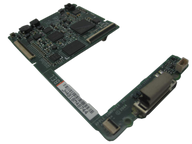
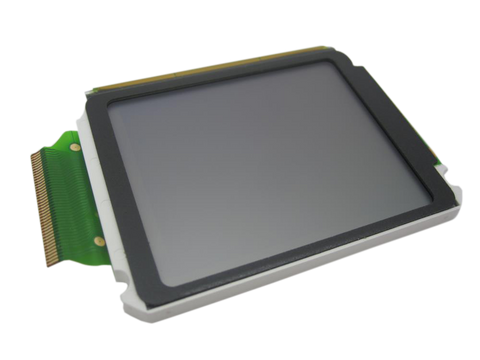
Representative photo. You receive the part named above.
iPod 4G Monochrome — Replacement Logic Board
Used (Apple Original) · Model A1059
$65.90
Sold out
Not for sale right now
We are not selling this part at the moment.
- Used (Apple Original). Tested: installed in a working iPod and checked before it ships.
- 1-year limited warranty · 30-day returns from delivery
- Free pry tool in the box
- Completed repairs aren't refundable. If a part we fitted fails within a year, we repair it again.
Part details
About this part
Overview
Replacement logic board for iPod 4G Monochrome. It ties together power, storage, connection, display, audio, and controls, so use it after the easier connected parts, cables, and connectors have been checked.
Fitment snapshot
Confirm model, generation, part number, and fitment details before ordering.
Product Overview
This logic board listing covers Replacement Logic Board and its own connector path on the iPod 4th Generation (Monochrome).
Use Part Details for the confirmed part-number reference. Use the Compatible Variants table below to confirm capacity, color, case, or order-number fitment.
Choose this part when your iPod shows Sad iPod Icon, Folder Icon, Physical Damage, or Dropped / Not Working; the checks below help confirm the right part before you order.
If known-good cable, power, storage/ribbon, connection, and restore or Disk Mode checks still fail, the logic board remains a suspect, especially when corrosion or board-side connector damage is visible.
What Is Included
Condition: Used factory-original part. What is not in the box: the board arrives bare — no screw set, no battery, no drive, no ribbon cables. Every cable, screw and assembly transfers from your own iPod; the screw set is a separate listing (replacement screw set) if yours are missing. Quantity and exclusions: The listed part, set, pair, or configuration above is supplied with exactly one plastic pry tool. No other parts, tools, adhesives, or materials are included unless they are explicitly listed above.
Quick Buying Check
Buy this when
- Sad iPod Icon: Use the logic-board check only after battery, storage, display, controls, audio/Hold, dock, and connector assemblies are ruled out on this model.
Diagnose first when
- Confirm the board identification below before ordering — the same board serves the 20GB and 40GB builds, thin case and thick.
- LTC4066 enables USB charging — first fullsize iPod with this capability. FireWire charging also supported.
Identify your board before you buy
This listing is one board, and it is the only logic board this model ever used. Check all four before ordering:
-
Year and model. The 2004 iPod (Click Wheel), model number
A1059, EMC 1995. It is on the back of the case, in small print under the Apple logo. - Screen. Grayscale. If yours is a color screen, it is the sibling model and takes its own board.
- Memory and processor. 32 MB of RAM behind a PortalPlayer PP5020 running at 80 MHz. Every board for this model is that specification — there is no larger-memory or smaller-memory version to choose between.
-
The number printed on the board. It reads either
820-1535-Aor820-1723-A. Those are two Apple revision stamps of the same board and either one is the right part; a board carrying a different number is from another iPod.
Is the board tied to capacity? No. One board serves the 20GB and the 40GB builds alike. Capacity lives in the drive, and the thin and thick shells differ in the rear backplate and the drive that fits behind it, not in the board — so a "20GB logic board" and a "40GB logic board" are the same part under two listing titles.
Fit and specs
Specifications & Fitment
Part Details
| Detail | Value |
|---|---|
| Model Number | A1059 |
| EMC | EMC 1995 |
| Condition | Used — factory original Apple part. Normal cosmetic wear expected. |
| SoC | PortalPlayer PP5020 |
| CPU | Dual ARM7TDMI, 80 MHz |
| RAM | 32 MB |
| PMU | NXP PCF50605HN |
| DC-DC Converter | NXP TEA1211HN |
| Buck Regulator | TI LM3485 |
| USB Charger IC | LTC4066 |
| LCD Controller | Renesas HD66753 |
| OEM Part |
820-1535-A, 820-1723-A
|
Compatible Variants
| Order Number | Capacity | Color | Case | Compatible | Notes |
|---|---|---|---|---|---|
| M9787LL/A | 20GB | Black/Red (U2) | thin | Yes | — |
| M9282LL/A | 20GB | White | thin | Yes | — |
| PE435A | 20GB | White (HP) | thin | Yes | — |
| M9268LL/A | 40GB | White | thick | Yes | — |
| PE436A | 40GB | White (HP) | thick | Yes | — |
Install and repair
Repair considerations
Run these checks before replacing the logic board — they confirm the logic board is the right fix and not a nearby fault:
- Escalate board-level soldering or connector damage
- Replace or professionally rework logic board
Install Overview
Before You Start
Turn Hold off, reset with Menu + Select — hold both until the Apple logo appears, about ten seconds — and confirm the model and variant before opening the iPod.
Treat case opening as the highest handling risk. Work around the seams gently and stop if the shell, clips, or internal stack resist.
Do not pull the halves apart or side-load board sockets. Reseat nearby ribbons and connectors before blaming a replacement logic board.
Test known-good replaceable assemblies first so the board is not blamed for a battery, storage, cable, control, screen, or audio path.
Disassembly Guide
Disassembly guide summary: iPod 4th Generation or Photo Logic Board Replacement.
Product-specific placement, reassembly, and check
- Prepare and access. Confirm the exact model and listing fit first. Use the existing steps as a disassembly guide, gather the specified tools, disconnect power where applicable, and keep screws and cable positions organized.
- Place Replacement Logic Board. Install only the exact board variant after every adjacent cable and assembly has been isolated, then reconnect each interface in its original position.
- Reassemble without force. Reverse only the access steps needed for this repair, keep cables clear of case edges and screw posts, and close clips in stages.
- Validate before final closure. Before final closure, validate startup, charging, storage recognition, display, audio, and controls; a generic symptom alone is not proof of a board fault.
Stop condition: Stop if a connector, latch, screw, clip, housing edge, or the replacement part resists normal alignment. Recheck model fit, orientation, cable routing, and trapped hardware instead of forcing it.
After This Repair
| Check | What to do |
|---|---|
| Run the full function check | Verify power, USB sync, storage, display, audio, controls, and charging before treating the repair as finished. |
| Still not working? | Go back through the connected battery, storage, display, dock, audio, and control paths one at a time. |
Troubleshooting
Diagnostic Failure Cards
Use these model-specific failure cards to decide whether this logic board is the right part, a nearby part needs checking first, or escalation makes more sense after simpler checks.
| Symptom | What it means & what to check |
|---|---|
| Symptom remains after basic checks |
What you may see: The iPod still points back to Replacement Logic Board after cable seating, battery stability, and nearby connector checks. Check first: Retest with known-good cables or adjacent parts where practical before ordering. Check next: A nearby cable, connector, battery, storage device, display path, audio path, or board path can mimic a bad logic board. |
| Symptom changes when touched or reseated |
What you may see: The symptom changes after moving the part, reseating a cable, or applying light pressure near the connector path. Check first: Inspect the connector, latch, flex, solder joints, and nearby board area for damage or corrosion. Check next: This can still be a connection issue rather than a failed logic board alone. |
| Problem began after another repair |
What you may see: The issue started immediately after opening the iPod, replacing another part, or disturbing an internal cable. Check first: Reopen only as far as needed and inspect the exact area touched during the previous repair. Check next: Post-repair symptoms often trace to seating, latch, screw, or cable issues before Replacement Logic Board itself is confirmed bad. |
| Hold, lock, or input state can mimic another failure |
What you may notice
Diagnose first when
Similar issues to separate
Check another part first
Repair or replacement paths
|
| Logic Board appears unresponsive or intermittent |
What you may notice
Diagnose first when
Similar issues to separate
Repair or replacement paths
|
| Power, charging, or runtime symptoms |
What you may notice
Diagnose first when
Similar issues to separate
Check another part first
Repair or replacement paths
|
| Symptoms changed after repair or reassembly |
What you may notice
Diagnose first when
Similar issues to separate
Check another part first
Repair or replacement paths
|
| Blank, white, black, lined, or backlight display |
What you may notice
Diagnose first when
Similar issues to separate
Check another part first
Repair or replacement paths
|
| Dock, USB, sync, or charging connection trouble |
What you may notice
Diagnose first when
Similar issues to separate
Check another part first
Repair or replacement paths
|
| Fitment or model-variant mismatch |
What you may notice
Diagnose first when
Similar issues to separate
Check another part first
Repair or replacement paths
|
| Headphone output compared with dock or line-out audio |
What you may notice
Diagnose first when
Similar issues to separate
Check another part first
Repair or replacement paths
Cautions
|
| Logic Board ribbon, connector, or contact path |
What you may notice
Diagnose first when
Similar issues to separate
Check another part first
Repair or replacement paths
|
| No sound or missing headphone audio |
What you may notice
|
| Storage warning symptoms usually start with drive or cable checks |
What you may notice
Diagnose first when
Similar issues to separate
Check another part first
Repair or replacement paths
|
| Liquid, corrosion, or residue context |
What you may notice
Similar issues to separate
Check another part first
|
| Fitment and inspection notes |
Do Not Buy / Problems This Logic Board Does Not Fix
| Situation | Start here instead |
|---|---|
| Variant or capacity does not match this listing | This is a different model — check your order number and generation before ordering. |
| A replaceable attached-part path is isolated | Test the likely battery, storage, screen, audio, cable, or connector path first. |
| Recent service or connector disturbance is the main clue | Reopen carefully, reseat the part that was disturbed, and inspect its latch before buying a board. |
| You see a folder icon, clicking noise, or restore failure | Check the drive or flash media, storage cable, adapter seating, formatting, and restore path before replacing any part. |
| The problem is the Hold switch or headphone jack, not this part | Diagnose the exact-model headphone-jack/Hold assembly and its connector before choosing another part. |
| Only the screen is affected and everything else works | Start with the screen, display ribbon, and backlight path before replacing the logic board. |
| Sound is the only problem | Start with the headphone jack / Hold switch assembly check after matching the exact symptom and part family. |
| Cable, computer, sync, or port behavior is the primary problem | Use the nearby battery, storage, screen, audio, cable, or connector listing that matches the symptom first. |
| Charging, swelling, runtime, or power is the primary problem | Start with the battery, charger, port, and power-connector checks before replacing the logic board. |
Worth Knowing
- PortalPlayer PP5020 — the system-on-chip, a dual ARM7TDMI running at 80 MHz, with 32 MB of RAM alongside it
- NXP/Philips PCF50605HN — Power management IC
- Renesas/Hitachi HD66753 — LCD controller/driver for monochrome display
- NXP/Philips TEA1211HN — DC-DC boost converter for LCD backlight
- Texas Instruments LM3485 — Hysteretic PFET buck regulator
- Linear Technology LTC4066 — USB power manager with Li-Ion charger
- Wolfson WM8975 — Audio CODEC with headphone amp
Folder Icon: What Owners Describe
A folder with an exclamation mark means the iPod cannot find its storage — the drive, its ribbon cable, or the software on it. It is a storage message, and on this model it points at the board only after a known-good drive and a known-good ribbon have both failed. On the iPod 4th Generation (monochrome), Folder Icon can describe more than one observable problem. These paraphrased owner reports are anecdotal starting points for diagnosis, not proof that any single part failed.
Anecdotal owner reports (not a guarantee or authoritative proof): - One owner reported that the folder-error icon remained after a drive adapter and logic-board replacement, and the computer still did not detect the iPod.
Owners searching for this describe it as: iPod 4th Generation (monochrome) Folder Icon, iPod folder error icon, iPod folder warning.
Stuck On Apple Logo: What Owners Describe
On the iPod 4th Generation (monochrome), Stuck On Apple Logo can describe more than one observable problem.
- Another owner reported that the iPod remained at the Apple logo after a battery replacement and would not enter disk mode.
Owners searching for this describe it as: iPod 4th Generation (monochrome) Stuck On Apple Logo, iPod stuck on Apple logo, iPod Apple logo freeze.
What Owners Report
These are anecdotal owner reports, not guarantees or authoritative proof that a particular part will fix a symptom. Use them as a troubleshooting starting point: confirm the symptom, run the quick checks, then match the fix.
Computer or iTunes doesn't see the iPod — cable, port, or board?
Symptoms. "Do not disconnect" flashes and then the device drops back to its menu; the device works fine on its own but the computer never registers it; a newer computer has no FireWire port to fall back on.
Quick diagnosis.
- Rule out the computer first: confirm the USB port works with another device. Then swap the 30-pin cable — cable faults dominate this lane. This iPod syncs and charges over either USB or FireWire through the dock connector, so a cable of the wrong generation can power it and never carry data.
- Test recognition with Disk Mode: reset with Menu + Select, then hold Select + Play/Pause. If the iPod mounts that way, the port and cable are doing their job and the problem is on the software side.
- Know what the connector is: in the repair community's teardown record the 30-pin port mounts by solder directly on the logic board, with no drop-in module swap — a genuinely worn connector means board-level service or a replacement board, so exhaust cable and cleaning steps first.
- FireWire-400 on modern computers needs an adapter chain, and adapter availability is a live constraint — treat any specific adapter as era-bound and verify before relying on that path.
Community signal. Reported by 2 owners.
Sad face, folder icon, or clicking — diagnose before buying parts
Symptoms. File-with-exclamation boot loop after a drive swap; sad face at power-on; noise as if trying to work, but no response; stuck on the Apple logo and won't enter disk mode; visibly damaged board parts near the connector after a mishap.
Quick diagnosis.
- Built-in diagnostics first: reset with Menu + Select, then hold Rewind + Select at the Apple logo. Check whether the drive is accessible or erroring before buying any part.
- Bench-test the suspect drive externally on a USB adapter to split drive vs cable vs board.
- Inspect the 632-0259-A cable for tears and bent pins whenever the drive "fails" — cable faults impersonate drive death, and garbled drive-information output in diagnostics points at the cable rather than the drive.
- In the diagnostics drive-health screen, one owner reads the pending-sector count rather than the reallocated count as the health signal on these drives.
- Before any restore, copy anything you want to keep off the iPod — a restore erases it.
Fixes.
- Drive replacement, flash preferred — when diagnostics implicate the drive, owners steer straight to solid-state at this point; reinstall the software afterward and the sad face is normally gone.
- Whole-board replacement over board-level repair — no public schematics exist for this board, so component-level troubleshooting is guesswork; for genuine board damage a complete replacement board is the economical path, and the model is widely considered worth fixing.
Cautions.
- The sad face usually means the drive, not the board — clear the cheap suspects (cable seating, then drive) before writing off the logic board.
- This model's storage warnings are the sad iPod face, the folder with an exclamation mark and the apple.com/support/ipod prompt. A literal red X in a circle is later-Classic language — seeing one means you are looking at a different iPod.
- The community's tap workaround is a symptom of drive-head stiction, a real failure mechanism on these drives after long storage; it is temporary evidence of a dying drive, never advice. Don't strike the device.
- A restore on this model finishes on FireWire power (the wall-outlet handshake) — a FireWire wall adapter or a powered FireWire port on an older computer — so have one available before drive surgery, or the reinstall will stall.
Community signal. Reported by 5 owners.
Questions
Frequently Asked Questions
Use these questions to narrow the part path before ordering. They keep each answer focused on a different diagnostic or fitment decision.
What iPod 4th Generation (Monochrome) models does this fit?
This Replacement Logic Board fits: M9282LL/A (20GB White), M9268LL/A (40GB White), M9787LL/A (20GB Black/Red (U2)), PE435A (20GB White (HP)), PE436A (40GB White (HP)).
Do I need to solder?
No, this installation does not require soldering.
How do I know if this logic board needs replacement?
These symptoms require exact-model diagnosis first; consider the logic board only after power, storage, cable, display, audio, and control checks isolate a board fault. Check fitment, connectors, and nearby parts before treating symptoms as proof.
What else should I replace at the same time?
Logic board replacement often reveals battery issues — inspect during service. Display connector on the logic board should be inspected during replacement.
Can water damage, liquid, or corrosion make this logic board the right repair path?
Look for visible liquid residue, corrosion, burned parts, lifted pads, or damaged board connectors. Do not use a parts swap as the only test when liquid damage is present; clean and inspect the board path first. Choose this logic board only when the failure is isolated to the board path after external and replaceable-part checks. Check the nearby part path first when the symptom still fits a battery, storage, display, dock, headphone/hold, or click-wheel assembly. Board-level rework and component diagnosis belong in advanced or professional repair context.
Is this an iPod Classic?
Apple's 'Classic' branding started with the 6th Generation (2007). This is the iPod 4th Generation (Click Wheel), the monochrome-screen model from 2004. Apple's official name for this model is iPod (Click Wheel).
You May Also Want
Logic board replacement often reveals battery issues — inspect during service.
Related: 128GB Flash Mod Kit (IDE flash adapter + 128GB SD Card Included)Flash storage is the common upgrade path while the iPod is already open.
Related: Replacement LCD Screen (2" Grayscale)Display connector on the logic board should be inspected during replacement.
Search terms
Some buyers search for "iPod 4th Gen (Black and White Screen)" or "20GB logic board for 40GB iPod"; confirm the checks above point to this same part before ordering.
Why people land on this part
Also searched as: iPod 4th Generation Monochrome Logic Board, Physical Damage, Dropped / Not Working, Water Damage, dead logic board, no power logic board, won't turn on logic board, motherboard, circuit board, board fried, swap logic, accidentally broken, board cable, logic board worth having repaired.
Free diagnostic
Broken iPod? We can help.
Mail us your iPod and we will test it and send you a free repair quote. If you don't like our price, we will ship your iPod back at our expense.