Refurbished iPod Video 5th Gen (A1136), Flash-Storage Modded

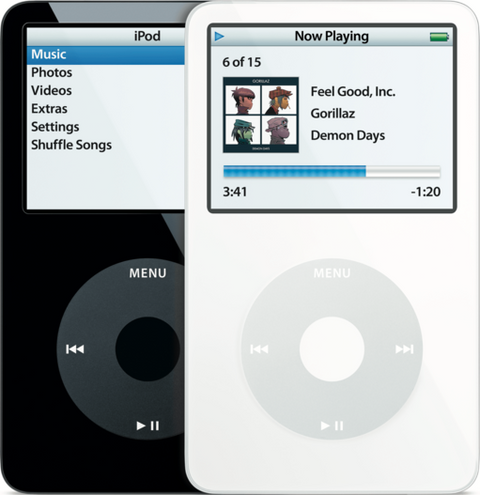
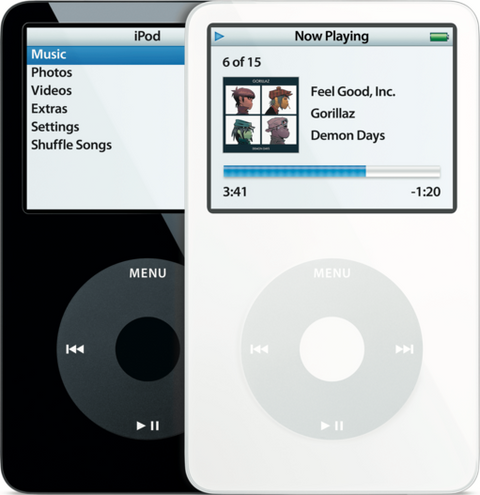
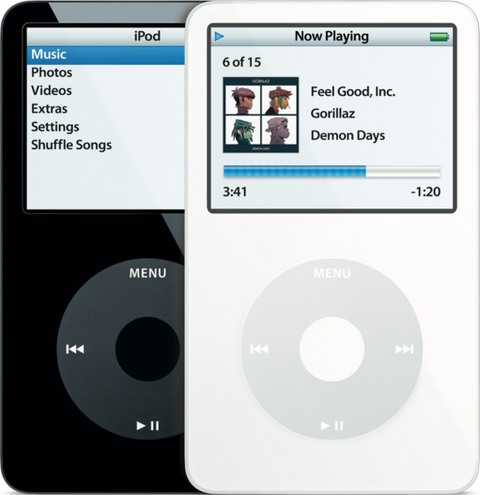
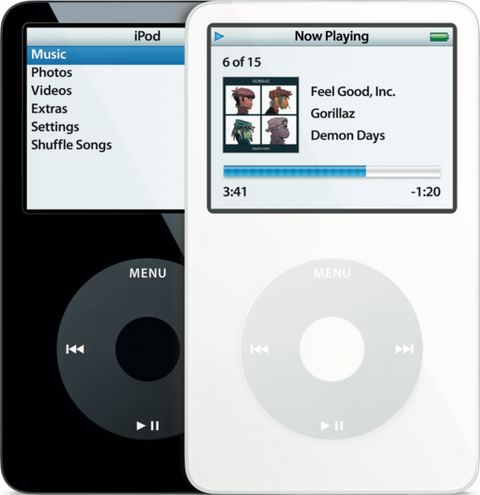
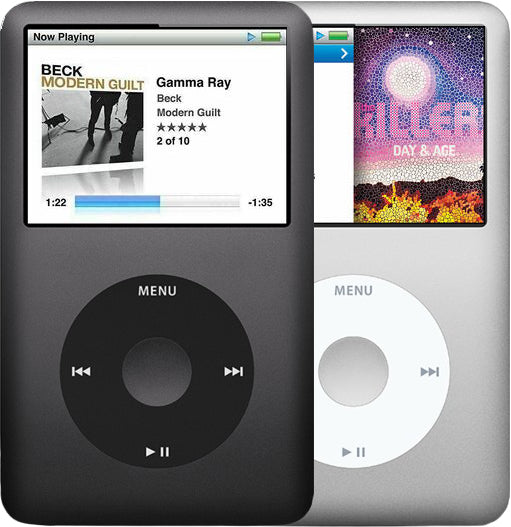
Representative photo of this model. Your unit may vary.

Refurbished iPod Video 5th Generation — Flash-Storage Modded

Model A1136

Refurbished iPod Video 5th Gen (A1136), Flash-Storage Modded

$296.95

Cosmetic condition
Battery
Storage
Case color Choose one

  • Apple original iPod, tested by iMods
  • 1-year limited warranty · 30-day returns from delivery
  • Built after you order: ships in 3 to 5 business days. Free US shipping on orders of $200 or more.

In the box: the iPod and one USB charge/sync cable. No wall charger or headphones.

Your iPod

This iPod

What you get with this iPod

What we did

  • Tested before sale: controls, display, sync and audio
  • New battery fitted
  • 128GB flash card and adapter fitted, formatted and restored
  • Original Apple case with normal signs of use

In the box

In the box: the iPod and one USB charge/sync cable. No wall charger or headphones. The 1-year limited warranty is our own cover on this iPod and runs from the date of delivery.

Versions

How to identify the iPod Video 5th Generation: model and order numbers

Every iPod Video 5th Generation version we sell, by order number. "From" is the lowest price available today.
Order numberListingPrice
MA448LL/A Refurbished iPod Video 5.5G Enhanced 80GB White (MA448LL/A) From $247.95
MA002LL/A Refurbished iPod Video 5G 30GB White (MA002LL/A) From $196.95
— This listing From $296.95
MA450LL/A Refurbished iPod Video 5.5G Enhanced 80GB Black (MA450LL/A) From $247.95
MA444LL/A Refurbished iPod Video 5.5G Enhanced 30GB White (MA444LL/A) From $216.95
MA446LL/A Refurbished iPod Video 5.5G Enhanced 30GB Black (MA446LL/A) From $216.95
MA003LL/A Refurbished iPod Video 5G 60GB White (MA003LL/A) From $216.95
MA147LL/A Refurbished iPod Video 5G 60GB Black (MA147LL/A) From $216.95
MA146LL/A Refurbished iPod Video 5G 30GB Black (MA146LL/A) From $196.95

Setup and reset

How to reset, turn off and restore the iPod Video 5th Generation

Reset: slide Hold on and off, then hold Menu and the center button until the Apple logo appears. It keeps your music and files; some settings may reset.

Something wrong with an iPod like this? Parts and free repair quote

iPod details

About this iPod

Overview

Refurbished iPod 128GB / 256GB / 512GB / 1TB

Refurbished iPod Video 5G — inspected, function-tested, and ready to play. Confirm the exact capacity, color, and order number on this listing before you buy.

Model snapshot

ModeliPod Video 5G
Installed capacity128GB / 256GB / 512GB / 1TB — your choice
ColorWhite or Black
Base iPod releasedBase iPod (A1136) released October 12, 2005 (original 5G) or September 12, 2006 (Enhanced 5.5G), depending on donor unit

Match capacity, color, generation, and order-number family before choosing a complete working iPod.

Product Overview

This refurbished, flash-modded iPod 5th Generation (Video) is a complete working iPod listing; the installed flash capacity and donor color are stated per listing.

You choose the installed capacity on this listing — 128GB, 256GB, 512GB or 1TB. That is real, fitted storage in a finished iPod, not an adapter kit and not a card you supply. The Flash Storage Upgrade section below says what each rung actually buys you on this model.

Use the identification table below to confirm the exact configuration.

Choose Your Option

This refurbished iPod comes in multiple configurations. Confirm capacity, color, case depth, and order number before choosing.

30GB / Black / MA146LL/A Used iPod Video 5G 30GB Black (MA146LL/A) Capacity: 30GB · Color: Black · Case: thin · 32 MB memory View this option → 30GB / Black / MA446LL/A Used iPod Video 5.5G Enhanced 30GB Black (MA446LL/A) Capacity: 30GB · Color: Black · Case: thin · 32 MB memory · Enhanced (Late 2006) View this option → 30GB / White / MA002LL/A Used iPod Video 5G 30GB White (MA002LL/A) Capacity: 30GB · Color: White · Case: thin · 32 MB memory View this option → 30GB / White / MA444LL/A Used iPod Video 5.5G Enhanced 30GB White (MA444LL/A) Capacity: 30GB · Color: White · Case: thin · 32 MB memory · Enhanced (Late 2006) View this option → 60GB / Black / MA147LL/A Used iPod Video 5G 60GB Black (MA147LL/A) Capacity: 60GB · Color: Black · Case: thick · 64 MB memory View this option → 60GB / White / MA003LL/A Used iPod Video 5G 60GB White (MA003LL/A) Capacity: 60GB · Color: White · Case: thick · 64 MB memory View this option → 80GB / Black / MA450LL/A Used iPod Video 5.5G Enhanced 80GB Black (MA450LL/A) Capacity: 80GB · Color: Black · Case: thick · 64 MB memory · Enhanced (Late 2006) View this option → 80GB / White / MA448LL/A Used iPod Video 5.5G Enhanced 80GB White (MA448LL/A) Capacity: 80GB · Color: White · Case: thick · 64 MB memory · Enhanced (Late 2006) View this option →
Varies (flash mod) / White or Black / Flash-Storage Modded Used iPod Video 5th Generation — Flash-Storage Modded Capacity: 128GB / 256GB / 512GB / 1TB (you choose) · Case: thin or thick

A complete iPod Video 5th Generation rebuilt with solid-state storage in place of the mechanical hard drive. You choose the installed capacity when you order: 128GB, 256GB, 512GB or 1TB.

You're viewing this option

About This iPod

Apple unveiled the fifth-generation iPod on October 12, 2005 — the first full-size iPod to play video. Steve Jobs said: 'The new iPod is the best music player ever — it's 30 percent thinner and has 50 percent more storage than its predecessor — yet it sells for the same price and plays stunning video on its 2.5-inch color screen.' That same day, Apple launched iTunes 6 with paid video downloads including Lost, Desperate Housewives, and Pixar shorts.

The 5G launched in 30GB ($299) and 60GB ($399), in white or black — the first standard full-size iPod available in black. On September 12, 2006, Apple refreshed it into the 'Enhanced' model (the community calls it '5.5G'), cutting prices to 30GB ($249) and 80GB ($349), adding a brighter display, search, gapless playback, and improved video decoding. Apple's own name: 'Fifth Generation iPod (Late 2006).'

About This Variant

Detail Value
Base iPod Released Base iPod (A1136) released October 12, 2005 (original 5G) or September 12, 2006 (Enhanced 5.5G), depending on donor unit

What this listing is. A refurbished fifth-generation iPod Video with its mechanical 1.8-inch hard drive removed and a flash adapter and card fitted in its place, then restored and function-tested as a whole iPod. No moving parts, no spin-up current draw, and no drive to click or stall. It arrives formatted and restored; you plug it in and sync.

What you are choosing. The capacity. 128GB, 256GB, 512GB or 1TB is fitted before it ships, and the option you pick is the storage the iPod reports in Settings > About. Read the Flash Storage Upgrade section before choosing, because on this iPod the ceiling that bites first is the track database rather than the card.

What varies with the donor. The base iPod is either a 2005 original or a 2006 Enhanced, in white or black, and the listing states which. Case depth and memory follow the donor family, not the flash capacity: a 30GB-family donor is the thin case with 32 MB of memory, a 60GB or 80GB-family donor is the thick case with 64 MB. Both read A1136 on the back, so the order number on the engraving is what identifies the base unit — see Exact Model Identification.

What Changed

  • Video Playback: First iPod with video playback. A 2005 base unit takes H.264 at 320×240 up to 768 Kbps and MPEG-4 at 480×480 up to 2.5 Mbps; a 2006 Enhanced base unit raises both to 640×480 — H.264 up to 1.5 Mbps, MPEG-4 up to 2.5 Mbps
  • Display: 2.5-inch QVGA (320×240) color LCD with a white LED backlight, replacing the Photo's 2.0-inch 220×176 65K-color display
  • Industrial Design: Thinner profile despite larger display area; maintained signature Click Wheel interface
  • Video Output: Composite video via headphone jack; composite and S-Video via dock connector — no authentication chip required
  • Processor: 5th Generation Video logic platform (dual ARM7TDMI at 80 MHz) + Broadcom BCM2722 VideoCore II coprocessor for hardware video decoding

How This Compares

Why buyers choose this generation: The 5G/5.5G is the audiophile's and modder's iPod: the Wolfson WM8758BG DAC, native Rockbox, the easiest Classic-era teardown, and no storage ceiling. It is also the most variant-rich full-size iPod: ten US order numbers across two years, two of them U2 editions, all engraved A1136. For buyers who care about sound character and tinkerability over raw capacity, this is the one.

What Refurbished Means

A refurbished iPod is a complete used iPod that has been inspected, cleaned, tested, and prepared for resale; it is not a sealed-new Apple retail unit.

Area What this listing means
Inspection Function-tested complete iPod with model, controls, display, sync, and audio checked before sale.
Battery Replacement battery installed unless the listing states otherwise.
Battery Age These iPods are about 21 years old. Original batteries are well beyond their design life.
Storage The mechanical drive is removed and a flash adapter and card are fitted in its place, then formatted, restored and sync-tested as a whole iPod. The installed capacity is the one you choose on this listing.
Cosmetics Cosmetic condition is listing-specific and may vary by shell, backplate, screen lens, and engraving wear.

What's Included

Ships as the iPod plus one USB charge/sync cable. No wall charger or headphones are included.

The flash storage is already fitted, formatted and restored. There is no adapter kit, SD card, screw set or tool in the box, because there is nothing for you to install — if you want to do the conversion yourself, that is the flash storage conversion kit instead.

The 1-year limited warranty above is our own cover on this unit and runs from your purchase. Apple's original 2005–07 manufacturer warranty expired long ago and does not apply to anything on this page.

Fitting is not part of this listing. The conversion is already done and the iPod arrives assembled and function-tested; where we offer fitting on a component, it is a separate choice you make when you order and is never folded into a price.

Model and specs

Exact Model Identification

Detail Value
Apple Model Number A1136
Installed capacity 128GB, 256GB, 512GB or 1TB — chosen on this listing. The capacity engraved on the back is the hard drive that came out.
Color White or Black
EMC EMC 2065

A1136 identifies nothing on its own. Every iPod in this family — 2005 original and 2006 Enhanced, 30GB, 60GB and 80GB, black and white — is engraved A1136 on the back, and a flash build keeps the engraving of the iPod it was built from. The order number is what tells them apart:

  • MA002LL/A (white) and MA146LL/A (black) — October 2005, 30GB, thin case, 32 MB memory.
  • MA003LL/A (white) and MA147LL/A (black) — October 2005, 60GB, thick case, 64 MB memory.
  • MA444LL/A (white) and MA446LL/A (black) — September 2006 Enhanced, 30GB, thin case, 32 MB memory.
  • MA448LL/A (white) and MA450LL/A (black) — September 2006 Enhanced, 80GB, thick case, 64 MB memory.
  • MA452LL/A and MA664LL/A — the two 30GB U2 editions, one from each year.

The engraved capacity on a flash build describes the drive that came out, not the storage that is in it now. What the order number still tells you is the case depth and the memory — and the memory is what sets the track limit.

All Available Variants

Order Number Capacity Color Case Memory Released Refurb
MA002LL/A 30GB White Thin 32 MB October 2005 View refurb
MA146LL/A 30GB Black Thin 32 MB October 2005 View refurb
MA003LL/A 60GB White Thick 64 MB October 2005 View refurb
MA147LL/A 60GB Black Thick 64 MB October 2005 View refurb
MA452LL/A 30GB Black/Red (U2) Thin 32 MB October 2005 All refurbs
MA444LL/A 30GB White Thin 32 MB September 2006 View refurb
MA446LL/A 30GB Black Thin 32 MB September 2006 View refurb
MA448LL/A 80GB White Thick 64 MB September 2006 View refurb
MA450LL/A 80GB Black Thick 64 MB September 2006 View refurb
MA664LL/A 30GB Black/Red (U2) Thin 32 MB September 2006 All refurbs

Specifications

Specification Value
Model Number A1136 (the base iPod)
Order Number Stated per listing — the base iPod is a 2005 original or a 2006 Enhanced
Storage Flash: a ZIF flash adapter and SD/microSD card in place of the original 1.8" hard drive
Installed Capacity 128GB, 256GB, 512GB or 1TB — you choose it when you order
Storage Test Formatted, restored and sync-tested after the flash install
Processor 5th Generation Video logic platform (dual ARM7TDMI at 80 MHz) with a Broadcom BCM2722 video coprocessor
RAM 32 MB on a 30GB-family base unit, 64 MB on a 60GB or 80GB-family base unit — stated per listing
Display 2.5" Color QVGA 320x240 (the brighter Enhanced panel on an Enhanced base unit)
Audio CODEC Wolfson WM8758BG
Case Thin (4.1 x 2.4 x 0.43 inches, 4.8 oz) on a 30GB-family base unit; thick (4.1 x 2.4 x 0.55 inches, 5.5 oz) on a 60GB or 80GB-family one
Battery A new replacement cell matched to the case it is built in — the thin 616-0229 pack or the thick 616-0232 pack
Battery Life (Music) Apple rated the original builds at up to 14 hours (30GB) or 20 hours (60/80GB). Flash storage draws less than a spinning drive; we quote no figure of our own for a rebuilt unit

Compatibility

Modern Sync Notes

  • Broad compatibility: works with all popular Windows versions — Windows XP, Windows 7, Windows 8, Windows 10, and Windows 11 — as well as Macs. Finder handles it on recent macOS.
  • macOS: macOS Sequoia 15.4 and later can break native iPod recognition for some owners; if Finder or Apple Music does not see the iPod, use Windows iTunes or an older Mac for restore and sync.
  • Windows: use iTunes for Windows, or the newer Apple Devices app — Apple’s current guide still directs iPod syncing to iTunes, so use it when a restore has to work. There are no separate drivers to chase.
  • Streaming: These iPods do not provide native Spotify, Apple Music streaming, Wi-Fi, or Bluetooth.

Known OS Compatibility Issues

  • macOS Sequoia 15.4/15.4.1 and 15.5: Sequoia 15.4/15.4.1 broke iPod recognition for many 5G/5.5G users. Sequoia 15.5 partially restored function for some users through an AMPDeviceDiscoveryAgent permission prompt. Workaround: For first-time setup or recovery, use a known-working Windows iTunes or older macOS restore setup. Treat process-kill workarounds as diagnostic only, not guaranteed repair instructions.

Rockbox

Status: Supported

Build: IPOD_VIDEO

Stable IPOD_VIDEO port for original 5G and Enhanced 5.5G variants. Install via Rockbox Utility. FAT32 is required for Rockbox. Adds FLAC/OGG/Opus playback. The PP502x-family sleep/wake glitch is documented for 5G/5.5G as well as earlier PP502x iPods; use the documented Rockbox workaround rather than claiming 5G is unaffected.

iTunes Compatibility

  • Minimum: iTunes 6+ (5G original), iTunes 7+ (5.5G Enhanced)
  • Recommended: Use a current Windows iTunes desktop release or a confirmed working older macOS setup; avoid pinning this listing to a stale latest-version number.
  • Note: On Windows, use the desktop iTunes restore path for 5G/5.5G iPod Video sync or restore checks. On macOS Catalina+, iTunes was replaced by Music/Finder and reliability varies by release; for initial restore or recovery, a known-working Windows iTunes or older macOS setup is recommended.

Flash Storage Upgrade

This iPod is already flash-converted — the mechanical drive is gone and a flash adapter and card are fitted, formatted and restored. What is left for you to decide is the capacity. If you would rather do the conversion yourself on an iPod you already own, that is the 128GB Flash Mod Kit (flash-storage adapter + 128GB SD Card Included) page instead.

Installed Capacity — What Each Option Means Here

Apple rated this body at 7,500 songs per 30GB in 128-Kbps AAC — about 250 songs to the gigabyte. On that arithmetic a 128GB build already reaches the ~20,000-track limit of a 30GB-family (32 MB) base unit, so on that donor the room above 128GB is for lossless, high-bitrate and video files rather than for more songs; a 60GB or 80GB-family (64 MB) base unit indexes about 50,000 and keeps counting further. The track limit is set by the board's memory, which follows the base unit: around 20,000 tracks on a 30GB-family unit (32 MB) and around 50,000 on a 60GB or 80GB-family one (64 MB). Those figures are approximate and move with how much tag data and album art each track carries.

Installed capacity What it means on this iPod
128GB A single card, and the bottom of the adapter maker's own suggested range for a 30GB Video. Roughly four times the largest hard drive Apple ever fitted here, and already past the track limit for a compressed library. The safe choice if your music is AAC or MP3.
256GB Still a single card, and the top of the maker's suggested range for a 30GB Video and the middle of it for a 60/80GB one. Room for a mixed library with some lossless in it.
512GB The top of the maker's suggested range for a 60GB or 80GB build. This is the rung where a fully lossless library stops being the constraint.
1TB Beyond any single-card suggestion; a multi-card adapter carries it. Chosen for lossless archives and for video, not for track count — the database limit is reached long before the space is.

There is no 128GB addressing ceiling on this iPod. That limit belongs to the later iPod classic family, which is a different family with its own pages — check your model before ordering across.

Topic Buyer Guidance
Why buyers upgrade No moving parts, silent operation, lower power draw, improved battery life, and room for higher-capacity libraries.
Capacity guidance The adapter maker’s guidance is a suggestion by build, not a tested ceiling: around 128GB to 256GB on a 30GB Video and 256GB to 512GB on the 60/80GB. Multi-card adapters go further. We name only the capacities we build and test — 128GB, 256GB, 512GB and 1TB — and each one is fitted and restored before it ships. The FAT32 partition ceiling is about 2TiB.
Format requirement Your iPod arrives formatted and restored, so this only matters if you change the card yourself later. SDXC cards (64GB+) must be pre-formatted to FAT32 — default exFAT not supported by original firmware, and Rockbox also requires FAT32. On a Mac the adapter maker also documents erasing to FAT32 or Mac OS Extended (Journaled) and then restoring in iTunes.
Rockbox Supported on this model, and it needs the storage formatted FAT32 either way — see the Rockbox note under Compatibility above rather than two copies of it here.

Setup and care

Battery Safety & Shipping

⚠️ Lithium-Ion / Li-Po Battery Safety. This product contains (or is) a rechargeable lithium-ion/lithium-polymer battery. Charge only with a compatible charger and unplug once fully charged. Avoid charging or storing in direct sunlight or other high-heat environments. Stop using and stop charging immediately if the battery swells, bulges, gets unusually hot, hisses, smokes, or leaks. Do not puncture, crush, bend, short-circuit, or try to "deflate" a swollen cell, and never press a lifted screen or case back down — it can rupture the cell. If electrolyte contacts your eyes, flush with clean water for 15 minutes without rubbing and seek medical care; on skin, wash with water and soap. Battery service should be done by a trained technician. Recycle through an electronics or universal-waste recycler, not household trash.

What a swollen cell looks like on this iPod. On the fifth generation the pack lies behind the display, not behind the Click Wheel, so swelling shows on the screen first: a dark patch or circular pressure mark on the LCD, a panel that has lifted or bowed away from the metal back, a front that no longer sits flush, or a backplate that will not close flat. A center button that has gone stiff or silent is a different fault on this model — that is the Click Wheel assembly, not the battery. If you see any of the swelling signs, stop charging it, stop using it, and do not press the panel back down. The same rule applies to the pack in a rebuild: see the thin and thick battery pages for the pack that matches your case.

Shipping. A refurbished iPod shipped with its battery installed is handled as lithium-ion batteries contained in equipment (UN3481); a loose replacement cell is handled as a lithium-ion battery (UN3480). Carrier, packaging, and destination restrictions can vary, so follow the current checkout and shipping instructions for the offered route.

Questions

Buyer FAQ

What's the difference between the 5G and 5.5G Enhanced?

The 5.5G 'Enhanced' (Late 2006) adds a display Apple rated as 60% brighter, a search function, gapless playback, and improved video decoding (H.264 up to 640x480 vs 320x240). It also introduced the 80GB option. Both share the same Wolfson WM8758BG DAC — the 5.5G does NOT sound different. If the Music menu has 'Search,' it's a 5.5G. A 60GB is always a 5G; an 80GB is always a 5.5G. On a flash build read the order number rather than the engraved capacity, because the engraved capacity is the drive that came out: MA002LL/A, MA146LL/A, MA003LL/A and MA147LL/A are 2005 originals; MA444LL/A, MA446LL/A, MA448LL/A and MA450LL/A are 2006 Enhanced.

Is 30GB enough for my library?

Apple rated the 30GB at up to 7,500 songs (128-Kbps AAC). That's plenty for a curated playlist but small for a whole collection. The 30GB also has only 32MB RAM, which can cause instability with very large track counts. That is the question this listing answers: the flash build starts at 128GB. What the 30GB base unit still sets is the memory — 32MB, so around 20,000 tracks — which is why a 60GB or 80GB base unit is the better foundation for a very large library even though both take the same cards.

What's the deal with the Wolfson DAC?

The 5G/5.5G uses the Wolfson WM8758BG, prized by many for a warm, musical sound — especially through a line-out dock and external amp. The later Classics switched to Cirrus Logic. The debate is genuine: some measurements favor the Cirrus, some ears prefer the Wolfson. Both the 5G and 5.5G share the same DAC, so the 5.5G doesn't sound 'better' than the 5G. Treat the Wolfson as a sound-signature preference, not a measured fact.

Can I play FLAC on this?

Not in Apple's firmware. Stock supports AAC, MP3, Apple Lossless, AIFF, and WAV. Install Rockbox (stable port, IPOD_VIDEO build) to add FLAC, Ogg Vorbis, Opus, and gapless playback. Rockbox needs the iPod formatted as FAT32.

Is the U2 edition just cosmetic?

Yes — internally identical to the standard 30GB of the same generation. The 5G U2 (MA452LL/A) is a standard 5G; the 5.5G U2 (MA664LL/A) is a standard Enhanced. The collector appeal comes from the black front, red Click Wheel, engraved U2 signatures on a gloss-black back, and the short production run. Beware aftermarket 'U2-look' units assembled from parts listings.

Does this work with my Mac?

On older Macs, yes via iTunes or Finder. On macOS Sequoia 15.4+, syncing is unreliable — users report broken recognition tied to the AMPDeviceDiscoveryAgent service. The safest paths are Windows iTunes, an older Mac, or Rockbox for iTunes-free use.

How do I choose the right ZIF cable?

The 5G/5.5G uses different ZIF cables depending on the drive manufacturer. Toshiba drives use cable 632-0337 / 821-0386-03 (the same Toshiba flex also prints 821-0728-01 on later production and Classic-era cables). Hitachi drives use cable 632-0340 / 821-0387-03. The 632 number is the Apple service number and the 821 number is printed on the flex — same part, two labels. These lanes are not interchangeable — the wrong cable causes no storage detection. When installing a flash adapter, check which cable orientation the adapter requires.

How long does the battery last?

Apple's original ratings ran by build: the 2005 30GB up to 14 hours music and 2 hours video; the 2005 60GB up to 20 hours music and 3 hours video; the 2006 Enhanced 30GB up to 14 hours music and 3.5 hours video; the 2006 Enhanced 80GB up to 20 hours music and 6.5 hours video. Those are hard-drive figures; flash storage draws less power than a spinning drive, but we do not publish a runtime of our own for a rebuilt unit. A 20-year-old original battery often delivers far less. Thin batteries are 616-0229 (580 mAh), thick are 616-0232 (~850mAh). Most refurbished units ship with a new battery.

What should I check when it arrives?

Test both headphone channels and dock line-out (the Wolfson WM8758BG can develop cold solder joints — if pressing on the lower-right corner of the case restores audio, the audio IC needs reflow, not a new headphone jack). Check the Click Wheel, Hold switch, screen for dead pixels, and confirm the installed capacity in Settings > About — it should read the capacity you ordered, not the capacity engraved on the back. There is no drive to listen to on a flash build. If it ever starts to a red X, that is the iPod’s own diagnostic saying it cannot use its storage, and the Restore & sync answers below are where to start. Two key sequences are worth knowing before you need them: a reset is Menu and Select — Select is the center button — held until the Apple logo, and Disk Mode is a reset followed immediately by holding Center and Play/Pause until the Disk Mode screen appears.

Is a frozen iPod or Apple-logo loop always a flash adapter problem?

No. A frozen iPod, reboot loop, stuck Apple logo, Folder Icon, or Red X Icon can involve storage setup, battery stability, cable seating, or firmware restore trouble. A folder with an exclamation mark means the iPod cannot find its storage — the card, the adapter, its ribbon cable, or the software on it; a red X is the iPod’s own diagnostic saying it cannot use its storage. Diagnose those routes before replacing anything.

On a flash build there is no drive sound to listen for, so use Disk Mode and the built-in diagnostics instead: the adapter maker’s own first check is that the iPod and the adapter are talking, read from the storage-parameters screen. A tired battery stays on the list too.

Restore & sync

The iPod keeps asking iTunes to restore it, or no computer will see it to restore. What now?

Owners describe it as: the screen demands a restore and restoring changes nothing; every reconnection asks again; the Apple logo appears, the iPod restarts and the loop repeats; after a repair it calls for iTunes but no computer detects it; restores die with 1415/1416-class errors; it is stuck on the Apple logo; or everything works except pressing play on the device itself.

Rule the computer out first: the Apple cable, a port on the computer itself rather than a keyboard or hub, then a second computer. On Windows use iTunes for Windows, or the newer Apple Devices app — Apple's current guide still directs iPod syncing to iTunes — and reinstall it before blaming the iPod. Shows as a generic "USB drive" that never finishes opening? Swap the cable and port, then follow the ladder below; in the thread behind that report the cable was suggested but never confirmed.

The ladder: reset (toggle Hold, then Menu and Center until the Apple logo), then Disk Mode (reset, then immediately hold Center and Play/Pause until the Disk Mode screen), connect, and restore from there. A stuck Apple logo, and a unit that plays through the computer but not on its own, ride the same ladder — reset, then restore and reload, which a technician offered for the plays-nowhere case explicitly as a guess. Any restore erases everything, so copy off what exists only on the iPod first.

If errors keep coming, stop restoring: they have several possible causes — hardware, drivers and iTunes itself — so look at the storage, its ribbon cable and the battery. A drained cell fakes several of these symptoms; a red X with clicking underneath is hardware. Reported by 8 owners, with two more for the logo-and-play cases and one for the hanging USB drive.

My library vanished after an iTunes update and the only copy is on an old iPod. How do I get it back?

Owners describe it as: tens of gigabytes of ripped music disappearing from the library after an update; an old iPod turning up full of songs the current computer has no record of; individual songs starting to skip after a couple of seconds instead of playing.

These are three different jobs, and only one is a restore: recovering the computer's library from its own backup, copying music off the iPod, and erasing the iPod.

In order: before connecting an iPod that holds the only copy, turn automatic sync off. Copy the files off first — in Disk Mode, or with a desktop transfer utility; they are stored renamed in hidden folders, so expect to re-tag and to lose playlists. Only then restore or re-sync. On Windows use iTunes for Windows, or the newer Apple Devices app.

We publish no version-specific recipe for repairing a library file. Songs that skip instead of playing have their own answer below. Reported by 4 owners.

It skips through every song and refuses to take new music. Is the storage failing?

Owners describe it as: browsing works, but selecting a song skips track after track without playing anything, and new music refuses to load.

Reset first — toggle Hold, then hold Menu and Center until the Apple logo. The playback side wedges, and this clears it more often than it deserves to. If it persists, copy off anything that exists only on the iPod, then restore and reload; a technician's advice for this presentation was exactly that, offered as a test rather than a diagnosis.

If mass skipping returns after a clean restore and reload, have the storage and its ribbon looked at rather than reloading a third time — the drive pages carry those checks. Reported by 1 owner.

After storage work, how do I restore, get into Disk Mode, and read the built-in diagnostics?

Disk Mode and the diagnostics are two different things with two different key sequences. Disk Mode: toggle Hold, hold Menu and Center until the iPod resets, then immediately hold Center and Play/Pause until the Disk Mode screen. Connect there and run the restore — also the route back after an accidental reformat by something that is not a computer.

Diagnostics: reset with Menu and Select, then quickly hold Left and Select — the adapter maker documents this route for these iPods. The parameters screen shows what the iPod thinks is fitted and how big it is; corrupt or missing characters point at the drive ribbon. Once they read correctly, check the computer can read and write to the iPod, not merely list it.

Where does the software come from? The restore installs it for you — the supported route, and the one we describe. We do not point buyers at standalone firmware files, and we promise no particular firmware version. A restore erases everything, so copy off what exists only on the iPod first. Reported by 3 owners.

Windows says "Delayed Write Failed", or the device "could not be found". What now?

Owners describe it as: Windows seeing the iPod while iTunes does not, with delayed-write errors; and, after a forced eject in the middle of a glitch, both the file browser and iTunes reporting that the device cannot be found.

Start with the physical path: the Apple cable, a port on the computer itself with no hub, and time to settle after reconnecting. On Windows use iTunes for Windows, or the newer Apple Devices app, and reinstall it before blaming the iPod.

Then test properly rather than by appearance: reach Disk Mode — reset, then hold Center and Play/Pause — and check the computer can actually read and write to the iPod, not merely list it. That is the adapter maker's own check, and it separates a recognition glitch from a storage fault.

Copy off anything irreplaceable, then restore from Disk Mode. Write failures that survive a clean restore belong to the storage and its ribbon cable, which the drive pages cover. Reported by 2 owners.

The screen goes white when it sits idle since I installed third-party firmware. Can I get it back?

One owner reports exactly this on an otherwise healthy iPod, and a restore to stock cleared it. Before undoing anything, copy off what you want to keep, and identify which bootloader is actually installed: removal instructions differ between them, and a general recipe is not a cure.

Holding Menu during start-up boots Apple's own firmware on a dual-boot build, which separates a firmware problem from a hardware one. If you want it back to standard, restore to stock from Disk Mode — a reset and restore does clear a range of software faults on this model.

If the white screen survives a restore to stock, stop treating it as firmware and check the display path: the ribbon, its lock and the connector. We are not claiming a universal cure here, or a general risk of bricking — this is one report, and the exact set-up matters. Reported by 1 owner.

What Owners Report

These are anecdotal owner reports, not guarantees or authoritative proof that a particular part will fix a symptom. Use them as a troubleshooting starting point: confirm the symptom, run the quick checks, then match the fix.

5G, Enhanced, thin, thick — what fits what during upgrades and rebuilds

Owners describe it as: not knowing whether 30GB parts fit a 60/80GB build, whether a thick iPod can become thin after a flash conversion, whether another iPod family's case can be borrowed, and how big the storage can go.

Two axes. Family: the 2005 original and the 2006 Enhanced share these parts. Build: the 30GB is the thin case, the 60/80GB the thick one — backplate depth, battery, headphone-jack and Hold flex and drive bumpers follow the build, not the family. The later iPod Classic is a different family with its own pages.

Capacity. The adapter maker's guidance is a suggestion by build, not a tested ceiling: around 128GB to 256GB on a 30GB Video, 256GB to 512GB on the 60/80GB. On stock Apple firmware, format preparation, card quality and the restore host matter more than the headline number. We name only the capacities we build and test.

Caution. Match the battery to the case you end up with: a thick cell closed into a thin case does not sit properly and presses on the display. Reported by 6 owners.

Flash-converted iPod stuck on "Do not disconnect" or invisible to iTunes

Owners describe it as: after a conversion and a battery swap the iPod appeared in iTunes and then vanished once the case was re-opened; or it works, syncs, and then hangs permanently on "Do not disconnect".

Check first. Eject it properly, then hard reset — Menu and Center until it restarts — and unplug during the reboot; it can take a few tries. If recognition disappeared after reassembly, re-open and look at clearance: one owner found jumper pins on the adapter standing tall enough to touch the metal backplate, and flattening them fixed it. The maker's own advice is to pad and support the adapter, because any movement stresses the ribbon.

What fixes it. Insulate or flatten anything conductive that can touch the case, and re-seat the ribbon at both ends. A worn or damaged 30-pin port stays on the list when the state survives resets and other computers — board-level work, not a trim part. Reported by 2 owners.

Restore errors and card preparation after a flash conversion

Owners describe it as: a fresh conversion booting to a sad face but showing up fine in Disk Mode; a restore failing with error 1429; a conversion that "semi-works" — visible some days, gone others.

Check first. Restore errors have several possible causes — hardware, drivers and iTunes — so check the ribbon seating at both ends and the card itself. Delete every partition on the card and prepare it cleanly rather than reusing it as it came.

Format. For a Windows restore, FAT32: cards of 64GB and up ship exFAT, which the original firmware does not take. The maker also documents a Mac route — erase in the disk utility to FAT32 or Mac OS Extended (Journaled), then restore in iTunes. Third-party firmware has its own requirement. Do not leave a default exFAT card unprepared.

Caution. A build that stays intermittent after a clean re-prep has earned a hardware answer before: in one case the SD-side adapter itself. Reported by 2 owners.

Crashed mid-play and won't boot — rescuing the files, forcing Disk Mode

Owners describe it as: it crashed during playback near an empty battery and never booted again; the drive spins audibly but nothing starts; the files still on it matter more than the iPod does.

Rescue first. Copying comes before formatting or restoring, because a restore erases everything. Force Disk Mode: reset with Menu and Center, then immediately hold Center and Play/Pause until the Disk Mode screen. If the computer can see it there, copy the files off now.

If it will not reach Disk Mode. Read the storage outside the iPod. A cheap USB-to-ZIF adapter is the standard suggestion and is worth doing before spending on a board — but it is no guarantee: one owner on this model could not read a drive through an adapter that still played inside the iPod.

Then re-test on good power. An empty or tired battery produces several of these symptoms by itself, so charge properly and run the ladder again before condemning parts. Reported by 2 owners.

Search terms

Why people land on this part

Common Names & Search Terms

Buyers find this iPod using these names and phrases:

Product Names

ipod video 5th generation refurbished, ipod video 5.5g enhanced, ipod video 80gb black, ipod video 30gb white, ipod video u2 edition, MA002LL/A, MA146LL/A, MA450LL/A, MA452LL/A, MA664LL/A, ipod classic 5th generation, ipod video A1136, iPod video 5th generation flash adapter refurbished

What Buyers Are Looking For

best ipod for audiophile, ipod wolfson dac, best ipod for rockbox, ipod for lossless music, best ipod for car, offline music player

Collector & Enthusiast Terms

ipod video u2 edition value, rarest ipod video, ipod 5.5g collector, ipod video sealed in box, best sounding ipod

Compatibility Questions

ipod video work with mac sequoia, rockbox ipod video, ipod video itunes alternative, ipod video spotify, ipod video flac

Refurbished and custom

Your music. Your kind of iPod.

Pick your iPod, then its color, storage and battery. On the iPod Video 5th Gen and the iPod Classic 6th and 7th Gen you can also choose a new case in your colors and, with flash storage, the 2000mAh extended-life battery. Every iPod we sell is cleaned, tested, fitted with a new battery and covered by a 1-year limited warranty.

Want a silent iPod? Choose flash storage: it has no moving parts to wear out, and it goes up to 1TB on the iPod Video 5th Gen and the iPod Classic 7th Gen.
iPod Classic 7th Gen, representative photo
Representative photo of this model. Your unit may vary.