


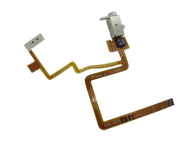
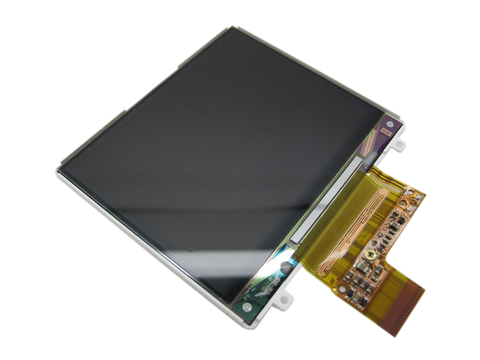
Representative photo. You receive the part named above.
iPod Classic 6G — Replacement Headphone Jack (Thin — 80GB / 120GB)
Used (Apple Original) · Model A1238
$13.95
Also for the iPod Classic 6th Gen: Thick (160GB) $15.95 · See all
Sold out
Not for sale right now
We are not selling this part at the moment.
- Used (Apple Original). Tested: installed in a working iPod and checked before it ships.
- 1-year limited warranty · 30-day returns from delivery
- Free pry tool in the box
- Completed repairs aren't refundable. If a part we fitted fails within a year, we repair it again.
Questions about this part? Chat with us or email sales@imods.com.
Not sure what's wrong? Get your free repair quotePart details
About this part
Overview
Headphone jack and Hold switch assembly for thin 80GB and 120GB iPod Classic 6th Generation models. Buy when headphone audio fails, you hear static or one-channel sound, or the Hold switch is stuck — after confirming the symptom is isolated to this assembly.
Fitment snapshot
632-0371, 632-0402, 632-0626, 632-0627, 821-0690
What Is Included
Included
What this part might fix
Help pages, step by step, for problems this part might fix:
Fit and specs
Specifications & Fitment
Part Details
| Detail | Value |
|---|---|
| Model Number | A1238 |
| EMC | EMC 2173 |
| Condition | Used — factory original Apple part. Normal cosmetic wear expected. |
| Part Numbers |
632-0371, 632-0402, 632-0626, 632-0627, 821-0690
|
Compatible Variants
| Order Number | Capacity | Color | Case | Compatible | Notes |
|---|---|---|---|---|---|
| MB147LL/A | 80GB | Black | thin (0.41 in) | Yes | — |
| MB029LL/A | 80GB | Silver | thin (0.41 in) | Yes | — |
| MB565LL/A | 120GB | Black | thin (0.41 in) | Yes | — |
| MB562LL/A | 120GB | Silver | thin (0.41 in) | Yes | — |
| MC297LL/A | 160GB (Late 2009) | Black | thin | Yes— fits | Fits the Late-2009 thin 160GB (MC293LL/A / MC297LL/A); that model is sold under the iPod Classic 7th Generation (Late 2009) pages. |
| MC293LL/A | 160GB (Late 2009) | Silver | thin | Yes— fits | Fits the Late-2009 thin 160GB (MC293LL/A / MC297LL/A); that model is sold under the iPod Classic 7th Generation (Late 2009) pages. |
| MB150LL/A | 160GB | Black | thick (0.53 in) | No— thick-case jack required | Doesn't fit the thick 160GB case; use the thick headphone jack / Hold switch assembly. |
| MB145LL/A | 160GB | Silver | thick (0.53 in) | No— thick-case jack required | Doesn't fit the thick 160GB case; use the thick headphone jack / Hold switch assembly. |
Install and repair
Install Overview
Rather not open it? Choose We Fix It above: mail your iPod in and we fit it. Turnaround is typically 3 to 5 business days. 1-year limited warranty.
Very difficult opening
The iPod Classic 6th Generation uses metal clips. The thin metal case and rear panel can be damaged if pried too aggressively. Use proper opening tools and work slowly around the perimeter.
Battery flex cable latch is fragile
The battery flex cable uses a small locking tab. Lift it straight up by about 1mm — do not pull sideways or you may break the latch off the board.
Headphone/hold ribbon ZIF latch
Flip the small black locking tab to 90 degrees before pulling the orange ribbon. Forcing the ribbon without releasing the latch can tear the connector.
Hold switch alignment during reassembly
When reinstalling the Hold switch, align the locating pin near the silver screw hole first. Confirm the switch slides freely before securing the screws.
Before You Discard The Original
Some replacement assemblies include the white plastic Hold switch slider preassembled. Others may require transferring the slider from your original assembly. Check the replacement part before discarding your original.
Questions
Frequently Asked Questions
Is the Hold switch part of this assembly?
Yes. On every iPod Classic 6th Generation variant, the Hold switch is physically part of the headphone jack assembly. When you replace the headphone jack, you also replace or transfer the Hold switch.
My iPod only plays through one headphone — is this the right part?
Maybe. First test with known-good headphones and confirm the plug is fully inserted. If one-channel audio persists and the problem follows the jack, not the headphones, this assembly is a strong candidate.
How do I tell thin from thick for this headphone jack assembly?
Check the capacity engraved on the back of your iPod. 80GB and 120GB models use the thin assembly (10.5mm case depth). The original September 2007 160GB uses the thick assembly (13.5mm case depth). The Late 2009 thin 160GB (MC293LL/A, MC297LL/A) shares the thin case depth and takes this same thin assembly; that model is sold under the iPod Classic 7th Generation pages. Engraving worn off? Worn engraving need not stop identification: confirm the case depth (10.5 mm thin, 13.5 mm thick) and the assembly actually installed. Weight and serial describe the original unit — Apple's figures are about 162 g for the thick 160GB and 140 g for the thin 80GB and 120GB — and can mislead after a backplate, drive or battery change, so use them only as supporting clues. Match the physical case depth and installed assembly before ordering; the serial and engraving identify the original build and can mislead after a swap.
Refurbished units often wear swapped backplates, so trust the internals — the drive class and the code printed on the battery — over the engraving or the seller's title.
Does this fit Late 2009 thin 160GB?
Yes. The Late 2009 thin 160GB (MC293LL/A, MC297LL/A) shares the A1238 model number and thin 10.5mm case depth, and this thin headphone jack assembly fits it.
What if the headphone-jack ribbon or its mounting support is loose?
Inspect the attachment before replacing electrical parts. The assembly mounts to the inner frame; damage caused while opening the case can leave it loose. If the mounting or a connector is damaged, do not force the case closed: send the iPod in for our free diagnostic.
Free diagnostic
Broken iPod? We can help.
Mail us your iPod and we will test it and send you a free repair quote. If you don't like our price, we will ship your iPod back at our expense.
How mail-in repair works
Order the free diagnostic
Choose your iPod. Add our shipping box and prepaid label if you need one.
Mail us your iPod
Pack it with your work order. No printer? Put a note in the box with your name, return address, email, order number and what is wrong.
Approve your quote
We test it and email your free repair quote. Most repairs are finished within 3 to 5 business days after you approve the quote.