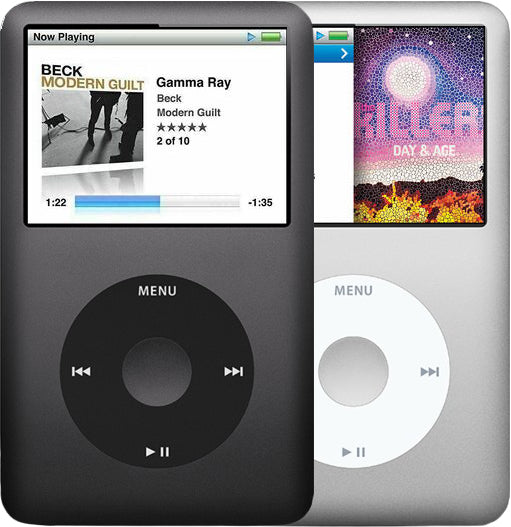
Refurbished iPod Classic 6th Gen — 120GB Silver
Refurbished iPod Classic 6th Gen — 120GB Silver
Model A1238 · Order number MB562LL/A · Thin case
$297.95
- 120GB hard drive
- New battery
- Tested by iMods
- 1-year limited warranty
Sold out
Not for sale right now
We are not selling this iPod at the moment.
- Apple original iPod, tested by iMods
- 1-year limited warranty · 30-day returns from delivery
- Built after you order: ships in 3 to 5 business days. Free US shipping on orders of $200 or more.
Questions about this iPod? Chat with us or email sales@imods.com.
In the box: the iPod and one USB charge/sync cable. No wall charger or headphones.
Your iPod
This iPod
What you get with this iPod
What we did
- Tested before sale: controls, display, sync and audio
- New battery fitted
- Original 120GB hard drive, tested during restore and sync
- Original Apple case with normal signs of use
In the box
In the box: the iPod and one USB charge/sync cable. No wall charger or headphones. The 1-year limited warranty is our own cover on this iPod and runs from the date of delivery.
Versions
How to identify the iPod Classic 6th Generation: model and order numbers
| Order number | Listing | Price |
|---|---|---|
| — | Refurbished iPod Classic 6th Gen — 128GB Flash-Storage Modded | From $331.95 |
| MB147LL/A | Refurbished iPod Classic 6th Gen — 80GB Black | From $231.95 |
| MB029LL/A | Refurbished iPod Classic 6th Gen — 80GB Silver | From $231.95 |
| MB150LL/A | Refurbished iPod Classic 6th Gen — 160GB Black | From $327.95 |
| MB145LL/A | Refurbished iPod Classic 6th Gen — 160GB Silver | From $327.95 |
| MB562LL/A | This listing | From $297.95 |
| MB565LL/A | Refurbished iPod Classic 6th Gen — 120GB Black | From $297.95 |
Setup and reset
How to reset, turn off and restore the iPod Classic 6th Generation
Reset: slide Hold on and off, then hold Menu and the center button until the Apple logo appears. It keeps your music and files; some settings may reset.
Something wrong with an iPod like this? Parts and free repair quote
iPod details
About this iPod
Overview
Refurbished iPod Classic 6G — inspected, function-tested, and ready to play. Confirm the exact capacity, color, and order number on this listing before you buy.
Model snapshot
About This iPod
The 6G was a complete redesign. Apple replaced the polycarbonate plastic front of the 5th-generation iPod with an anodized aluminum faceplate — making it the first full-size iPod never offered in 'signature iPod white.' It introduced Cover Flow album browsing and a split-pane interface, and swapped the PortalPlayer processor for Samsung's S5L8702 and the Wolfson DAC for Cirrus Logic. Battery life improved dramatically — up to 30 hours of music on the 80GB and 40 hours on the 160GB.
At launch, the line comprised a thin 80GB ($249) and a thicker 160GB ($349), each in silver or black. The thick 160GB used a dual-platter Toshiba drive — the only thick-bodied iPod Classic ever made, and now the most sought-after variant among collectors. On September 9, 2008, Apple replaced both with a single thin 120GB model at $249, adding the Genius playlist feature.
The iPod Classic was quietly removed from Apple's online store on September 9, 2014. Tim Cook later explained: 'We couldn't get the parts anymore, not anywhere on Earth. It wasn't a matter of me swinging the ax, saying what can I kill today.' It remains the last click-wheel iPod and the highest-capacity dedicated music player Apple ever made.
About This Variant
The 120GB Silver is the Late 2008 revision — Apple's 'Let's Rock' event on September 9, 2008 replaced both the 80GB and thick 160GB with this single thin model at $249. It added the Genius automatic playlist feature and uses logic board 820-2437-A with populated traces for inline headphone remote support. The best all-around daily-use Classic.
| Detail | Value |
|---|---|
| Released | September 9, 2008 |
| Discontinued | September 9, 2014 |
| Original Price | US$249 |
| This Listing | MB562LL/A |
What Changed
- Industrial Design: Complete redesign — polycarbonate white/black plastic front replaced with anodized aluminum front panel, giving all-metal construction. Available in Silver and Black
How This Compares
Why buyers choose this generation: The 6G is the original 'iPod classic' — the first to carry the name, the first with the all-metal design, and the only generation with the thick-body 160GB collector variant. It sits at the intersection of nostalgia, capacity, and historical significance.
What's Included
- Refurbished iPod
- One USB charge/sync cable
- 1-year limited warranty
Ships as the iPod plus one USB charge/sync cable. No wall charger or headphones are included.
Battery: every unit gets a new standard battery; with a flash build you can pick the 2000mAh extended-life battery instead, under Battery above. It fits flash builds only and weighs more than the standard battery, so the flash build saves less weight.
Model and specs
Exact Model Identification
| Detail | Value |
|---|---|
| Order Number | MB562LL/A |
| Apple Model Number | A1238 |
| Capacity | 120GB |
| Color | Silver |
| EMC | EMC 2173 |
The order number and Apple model number identify the original model; they do not change when a flash build replaces the original drive, so check the installed storage stated on this listing rather than the model number.
Specifications
| Specification | Value |
|---|---|
| Processor | Samsung S5L8702 |
| RAM | 64 MB |
| Storage | 120GB HDD |
| Display | 2.5" Color QVGA 320×240 |
| Audio DAC | Cirrus Logic CS42L55 |
| Battery (Original) | Original: ~580 mAh Li-Ion (Apple-rated 36 hours music) / Refurbished: New (~580 mAh) |
| Music Playback | Up to 36 hours |
| Logic Board | 820-2437-A |
| Dimensions | 4.1 × 2.4 × 0.41" |
| Weight | 4.9 oz |
| Case Thickness | Thin (10.5 mm) |
| Model Number | A1238 |
Compatibility
Sync it with iTunes on a Windows PC, or with the Finder on a Mac (macOS Catalina and later). Step by step: How to put music on an iPod.
Flash storage
Prefer flash storage instead of the hard drive? Pick a flash size under Storage capacity above: we fit it and test the iPod before it ships.
Questions
Buyer FAQ
Should I buy the 80GB, 120GB, or 160GB?
The 80GB is the most affordable entry in the thin case. The 120GB is the best all-rounder — more storage than the 80GB, same thin body, longer rated battery (36 hours), and the Genius feature. The thick 160GB is for collectors and big-library owners — it's the only thick Classic, holds up to 40,000 songs, but was only made for about one year.
Does this work with my Mac?
On a Mac it syncs in the Finder (macOS Catalina or later) or in iTunes (older Macs). If a recent Mac does not see the iPod, the safest path is a Windows PC with iTunes for Windows or an older Mac; Rockbox is an option for iTunes-free use.
Can I use Spotify or Apple Music on it?
No. The iPod Classic has no apps, no Wi-Fi, and no Bluetooth. It plays only files synced from a computer — MP3, AAC, Apple Lossless, AIFF, and WAV. Apple Music subscription tracks cannot be synced to it. This is its appeal for many buyers: a distraction-free, subscription-free music device.
How long does the battery last on a used one?
Apple's original ratings were up to 30 hours (80GB), 36 hours (120GB), and 40 hours (thick 160GB). Every refurbished unit ships with a new replacement battery; actual runtime varies with the new cell, your settings, and how you use the iPod. The thin battery (616-0229) and thick battery (616-0232) are different parts and not interchangeable.
Should I buy stock or Flash-Storage Modded?
Buy stock if you want originality and collector value — an unmodified unit is what purists want. Buy the flash build if you want reliability — it removes the spinning hard drive, the recurring failure point on aging Classics. Note that on 6G models, stock Apple firmware limits flash storage to 128GB; larger totals need unsupported third-party firmware, which our builds do not use.
What's the difference between the thin and thick 160GB?
The original 2007 thick 160GB (MB145/MB150) is 13.5mm deep with a dual-platter drive and 40-hour battery. The later thin 160GB is a different model (the '7th generation' Late 2009, MC293/MC297) at 10.5mm. They look similar but use different drives, batteries and logic boards (the Late 2009 drive runs only on its own board). Verify by the case depth, or in Settings > About (it shows the model).
Will this work in my car?
Usually, yes. The 30-pin dock connector works with many older iPod-ready car stereos, and the 3.5mm headphone jack connects to any aux input. USB/iPod-control support depends on the car stereo's age and compatibility. The Classic has no built-in Bluetooth — you'd need a 30-pin Bluetooth transmitter adapter.
What should I check when it arrives?
Confirm it powers on and holds a charge. Listen for clicking or grinding from the hard drive. Test the Click Wheel in all directions. Verify the capacity matches the listing in Settings > About. Check both headphone channels. Connect via USB and confirm it syncs. For stock-drive units, use Diagnostic Mode (Menu + Center to reset, then hold Previous + Center) to check drive health.
Is this a good collector piece?
The thick 160GB is the standout — a roughly one-year production run, the only thick Classic, and a unique dual-platter drive. Sealed and complete-in-box units carry premiums. The 6G is historically significant as the first 'iPod classic.' No special editions (U2, HP) exist for this generation.
Restore & sync
Anecdotal owner reports (not a guarantee or authoritative proof): the entries below collect what owners of this Classic reported and the checks that resolved them.
My iPod demands a restore on every start — and can I use it with Windows and keep my music?
Owners describe it as: "Use iTunes to Restore" on every boot; wanting to restore without losing the music; wanting to use it with Windows and not iTunes at all; two phantom drives appear; a song freezes mid-play, then a gray Apple logo and back to the menu.
"Use iTunes to Restore" is the iPod's own software declaring itself broken: it means the iPod could not load working software from its own storage, and there is no on-device way around it. A restore always erases the iPod, so copy off anything that exists only on it first (Disk Mode file copy), then judge the hardware by whether the message comes back.
Windows-first use is supported: restoring on a Windows PC with iTunes for Windows formats the iPod for Windows and it syncs there from then on; a Mac-formatted iPod must be restored once on the PC before Windows can use it. Third-party library managers load music day to day for many owners, but they sit on Apple's device format and do not replace the restore when the software breaks.
Phantom double drives and half-recognized states usually clear with a full restore from Disk Mode. Songs that freeze mid-play then drop back to the menu: back up, restore, reload; if the same albums break again, have the drive tested.
Where do I download the software for my Classic? You don't: there is no separate download — the restore tool fetches the correct software for the model and installs it during the restore. If a restore cannot fetch it, update the tool and try again from another port or computer.
I fitted a new drive — where does the software come from? And my dropped iPod boot-loops; will a restore erase everything?
Owners describe it as: new drive installed and wondering where the firmware comes from; dropped it, laggy, then a boot loop; a restore offer that would delete everything; wanting to "copy firmware" from a working iPod to a dead one.
Software is never copied between iPods. After any drive swap: enter Disk Mode (reset, then hold Center + Play/Pause), connect, and let the restore download and install it — a blank new drive shows a folder icon (or similar) until that restore, which is expected.
Boot loop after a drop: suspect the storage and its cable first. Run the boot-time diagnostics (reset, then hold Previous + Center) and read the drive tests; a ribbon cable knocked loose in a drop does the same thing.
The "restore will delete everything" dilemma: yes, it will, every time. The only non-destructive way is copying files off first in Disk Mode — a restore never preserves content.
More questions, answered step by step:

Refurbished and custom
Your music. Your kind of iPod.
Pick your iPod, then its color, storage and battery. On the iPod Video 5th Gen and the iPod Classic 6th and 7th Gen you can also choose a new case in your colors and, with flash storage, the 2000mAh extended-life battery. Every iPod we sell is cleaned, tested, fitted with a new battery and covered by a 1-year limited warranty.
Want a silent iPod? Choose flash storage: it has no moving parts to wear out, and it goes up to 1TB on the 60GB and 80GB iPod Video 5th Gen and the iPod Classic 7th Gen.