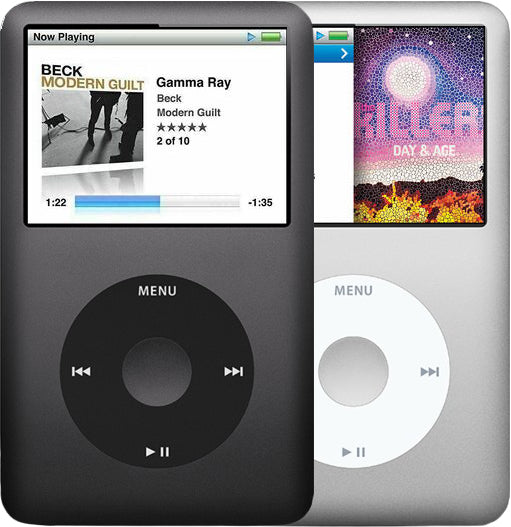
Representative photo of this model. Your unit may vary.
Refurbished iPod Classic 7th Generation — Flash-Storage Modded
Model A1238 · Thin case
$331.95
- 128GB flash
- New battery
- Tested by iMods
- 1-year limited warranty
Sold out
Not for sale right now
We are not selling this iPod at the moment.
- Apple original iPod, tested by iMods
- 1-year limited warranty · 30-day returns from delivery
- Built after you order: ships in 3 to 5 business days. Free US shipping on orders of $200 or more.
Questions about this iPod? Chat with us or email sales@imods.com.
In the box: the iPod and one USB charge/sync cable. No wall charger or headphones.
Your iPod
This iPod
What you get with this iPod
- Model A1238 (EMC 2173)
- 160GB Toshiba MK1634GAL hard drive (one platter, 5 mm), or flash
- Thin 10.5 mm case, 4.9 oz
- 64 MB of memory
- Logic board 820-2437-A
- Software 2.0.4 or 2.0.5: ask us which you will receive
- Released September 9, 2009, US$249 new
What is inside. The thin case; a Samsung S5L8702 processor; the 160GB Toshiba MK1634GAL hard drive; the 2.5-inch color display; and the Cirrus Logic CS42L55 audio chip. The battery is the thin 616-0229 class pack, and a replacement cell goes in before the iPod ships.
It is the thin 160GB, not the earlier thick one. The earlier thick-case 160GB Classic is a different, earlier iPod with its own drive form factor, battery, rear case and parts, and it is sold under our iPod Classic 6th Generation pages. Read the order number, not the capacity: both are 160GB.
What we did
- Tested before sale: controls, display, sync and audio
- New battery fitted
- 128GB flash card and adapter fitted, formatted and restored
- Original Apple case with normal signs of use
In the box
In the box: the iPod and one USB charge/sync cable. No wall charger or headphones. The 1-year limited warranty is our own cover on this iPod and runs from the date of delivery.
Before you buy
Questions before you buy an iPod classic 7th Gen
Does it work with my Mac or PC today?
On a PC, use iTunes for Windows for setup, restore and sync. On a Mac, sync in the Finder (macOS Catalina or later) or in iTunes (older Macs); if a recent Mac does not see the iPod, use a Windows PC or an older Mac. Restore it on the computer you will sync with (a restore erases everything on it, songs included). Late-2012 units need Mac OS X 10.6.8 or later.
What comes in the box, and what do I need to charge it?
The iPod and one USB charge/sync cable; no wall charger and no headphones. Charge it from a USB 2.0 port on the computer itself or a USB power adapter; most keyboard ports are too weak. A first full charge takes about four hours.
How long does the battery last?
Apple rated this model for up to 36 hours of music and 6 hours of video when new. Every refurbished unit ships with a new battery; runtime depends on the cell, your settings and your library. The 2000mAh extended-life battery is offered on flash builds only.
Is 160GB enough for my music library?
For most libraries, comfortably. Apple rated the 160GB for up to 40,000 songs at 128-Kbps AAC. If your library is mostly lossless (ALAC/FLAC), the real count drops substantially — heavy-library and lossless users often go for a flash build with a larger card.
Should I buy stock or flash?
Buy stock if you want originality and collector feel — the spinning drive is 'correct' for the model. Buy a flash build if you want reliability — the aging hard drive is the recurring failure point. The 7G is the best Classic for flash mods because its firmware already supports storage above 128GB. We fit microSD-based flash storage, which draws far less power than an SSD.
Will it work in my car or speaker dock?
Usually. The 3.5 mm headphone jack plays into any aux input, and many iPod-ready car stereos control it through the 30-pin dock connector. Some older docks and stereos do not charge or control the classic, and newer cars often need a 30-pin-to-USB data cable. Video out works only through Apple's own dock cables.
What should I check when it arrives?
Confirm it charges and holds a charge; test the Click Wheel, the Hold switch and both headphone channels; connect by USB and sync; check that Settings > About reads 160GB (or your flash capacity) and software 2.0.4 or 2.0.5. If anything fails, contact us for a claim under our 1-year limited warranty, which runs from the date of delivery.
How do I know I'm getting the real Late 2009 160GB?
Look for order number MC293LL/A (silver) or MC297LL/A (black), model A1238, and 160GB in Settings > About. The older thick 160GB uses order numbers MB145LL/A or MB150LL/A — a different device. Firmware version 2.0.4 or 2.0.5 confirms the Late 2009 model.
Does this work with Windows?
Yes — Windows is the easiest path. Use iTunes for Windows and restore on the computer you intend to sync with (a restore erases everything on it, songs included). Apple's own guide directs iPod syncing to iTunes. There are no separate drivers to install.
Can I use Spotify or Apple Music on it?
No. The Classic has no apps, Wi-Fi, or Bluetooth. It plays only synced local files in supported formats (MP3, AAC, Apple Lossless, AIFF, WAV). Apple Music subscription tracks cannot be synced. Install Rockbox for additional format support including FLAC and Ogg Vorbis.
Does the 7th generation sound different from the 5th generation?
Experts disagree. Every iPod classic uses a Cirrus Logic audio chip; the 5th generation used Wolfson. Some owners prefer the older sound, others hear no difference with good headphones, and neither view is a measurement. If one classic sounds thin or quiet next to an identical one, that points to its board: contact us for a claim under our 1-year limited warranty.
Does it have Bluetooth or USB-C?
No. No iPod classic has Bluetooth, Wi-Fi or a USB-C port. For wireless headphones, owners plug a small Bluetooth transmitter into the 30-pin dock connector.
Specs
iPod classic 7th generation specifications
| Detail | Value |
|---|---|
| Processor | Samsung S5L8702 |
| Storage | 160GB Toshiba MK1634GAL HDD |
| Display | 2.5" Color QVGA 320x240 |
| Screen | 2.5-inch color LCD, 320 x 240 at 163 ppi |
| Audio chip | Cirrus Logic CS42L55 |
| Battery | Original rated by Apple for up to 36 hours of music and 6 of video; Apple published no capacity for the thin cell 616-0229. This iPod has a new battery. |
| Dimensions | 4.1 x 2.4 x 0.41 inches |
| Weight | 4.9 oz |
| Model number | A1238 (shared with the earlier Classics — read the order number) |
| Order number | MC297LL/A (black) · MC293LL/A (silver) |
| Songs (Apple rating) | Up to 40,000 in 128-Kbps AAC |
| Photos | Up to 25,000 |
| Audio formats | AAC, HE-AAC and MP3 up to 320 kbps, Apple Lossless, AIFF, WAV, Audible |
| Remote and microphone | Supports Apple earphones with remote and mic |
| Video out | Through the dock connector with Apple's AV cables |
| Last Apple software | 2.0.4 (2.0.5 on late-2012 units) |
| Introduced | September 9, 2009 |
| Discontinued | September 9, 2014 |
Versions
How to identify the iPod classic 7th generation: model and order numbers
A1238 does not identify this iPod on its own. Every metal-front iPod Classic carries A1238 and EMC 2173 on the back — the 2007 80GB and thick 160GB, the late-2008 120GB and this late-2009 160GB alike. The back does not show the order number: Settings > About and the box do, and that is what tells them apart. Both late-2009 units are 160GB in the thin case: MC293LL/A is silver and MC297LL/A is black. On a 160GB hard-drive unit, Settings > About reads 160GB and a 2.0.4 or 2.0.5 firmware version.
Owners call the Late 2009 160GB the 7th generation; Apple sold it as "iPod classic 160 GB (Late 2009)". It shares model A1238, the case and the Click Wheel with the 6th generation, and it opens and repairs the same way. Screens are one-way: a 7th Gen can use a 6th Gen screen, but a 7th Gen screen in a 6th Gen shows white. What differs: a thinner single-platter 160GB drive, Genius Mixes, and software (2.0.4 or 2.0.5) without the 128GB storage limit. The Late 2008 120GB is a 6th generation model, not a 7th.
| Order number | Listing | Price |
|---|---|---|
| — | This listing | From $331.95 |
| MC293LL/A | Refurbished iPod Classic 7th Generation 160GB Silver (MC293LL/A) | From $355.95 |
| MC297LL/A | Refurbished iPod Classic 7th Generation 160GB Black (MC297LL/A) | From $355.95 |
History
History of the iPod classic 7th generation
When did the iPod classic 7th generation come out?
Apple released the thin 160GB iPod classic on September 9, 2009, at US$249, replacing the 120GB. It stayed on sale unchanged for five years until Apple discontinued it on September 9, 2014, which made it the last iPod classic and the last iPod with a click wheel.
More of its history
The Classic remained on sale unchanged for five years. On September 9, 2014, it was quietly removed from the Apple Store during the iPhone 6 launch. Tim Cook later explained: 'We couldn't get the parts anymore, not anywhere on Earth. The engineering work was massive, and the number of people who wanted it very small.' It is the last iPod classic, the last click-wheel iPod and the highest-capacity music player Apple made.
What changed in September 2009: a 160GB drive thin enough for the 10.5 mm case, Genius Mixes, and software that lifts the 128GB storage limit of the earlier classics.
- Released
- September 9, 2009
- Discontinued
- September 9, 2014
- Original price
- US$249
Previous: the iPod classic 6th generation, 2007 and 2008
Next: none. Apple made no iPod classic after this one.
Setup and reset
How to reset, turn off and restore the iPod classic 7th generation
Reset: slide Hold on and off, then hold Menu and the center button until the Apple logo appears. Nothing is erased.
Where is the manual? Apple's "iPod classic 160 GB (Late 2009)" user guide is on Apple's support site.
Something wrong with an iPod like this? Parts and free repair quote
Flash
iPod classic 7th generation flash storage: capacities and limits
This iPod can be built with flash storage from 128GB to 1TB, built and tested in our shop. Capacities and the flash build: flash-modded iPod Classic 7th Gen.
iPod details
About this iPod
Overview
Refurbished iPod Classic 7G — inspected, function-tested, and ready to play. Confirm the exact capacity, color, and order number on this listing before you buy.
Model snapshot
About This iPod
The Classic remained on sale unchanged for five years. On September 9, 2014, it was quietly removed from the Apple Store during the iPhone 6 launch. Tim Cook later explained: 'We couldn't get the parts anymore, not anywhere on Earth. The engineering work was massive, and the number of people who wanted it very small.' It is the last click-wheel iPod, the last Apple product with a 30-pin dock connector, and the highest-capacity dedicated music player Apple ever made.
About This Variant
This is a late-2009 iPod Classic — the thin 160GB model, order number MC293LL/A in silver or MC297LL/A in black — with the mechanical Toshiba MK1634GAL hard drive removed and a card adapter fitted on the drive ribbon in its place. Expect silence, lower power draw and better shock resistance than the spinning drive it replaced, and no mechanical drive to click, stall or seize.
Why this generation is the flash base. The late-2009 Classic is the preferred mod base because its firmware has no 128GB storage ceiling, so it addresses large flash builds on stock Apple software with nothing else installed. The earlier Classics (6th Gen) and the iPod Video are different models with their own drives and logic boards. This model's ZIF drive cable is the same one the thin 6th Gen uses. The Toshiba-drive iPod Video uses it too. The Hitachi-drive model takes its own cable, and so does the thick 6th Gen 160GB: see their own pages.
What you are choosing. The shell and the installed capacity. Both shells are offered at 128GB, 256GB, 512GB or 1TB. Whichever you pick, the capacity you order is the storage the iPod reports in Settings > About, and the storage is fitted, formatted and restored before it ships.
What does not change with the rung. The base iPod, its board, its display, its Click Wheel and its battery. The battery is the thin 616-0229 class pack and a replacement cell goes in before the iPod ships; the base unit is the late-2009 thin 160GB Classic in either color; the order form has no color choice, so contact us before ordering if you need a particular one.
| Detail | Value |
|---|---|
| Base iPod Released | September 9, 2009 |
What Changed
- Features (Late 2009): 160GB in the thin case, replacing the 120GB at the same $249. Genius playlists carried over from the Late 2008 model.
How This Compares
Compared with the next generation: There is no successor. The 7G is the last iPod Classic — discontinued September 9, 2014. Tim Cook explained that the parts were no longer available. There is no newer Classic to upgrade to, which is what drives its collector and 'last of its kind' appeal.
What's Included
- Refurbished iPod
- One USB charge/sync cable
- 1-year limited warranty
Ships as the iPod plus one USB charge/sync cable. No wall charger or headphones are included. The flash storage and the shell you chose are already fitted — there is no adapter, card or assembly step left for you, and no card to supply.
Battery: every unit gets a new standard battery; with a flash build you can pick the 2000mAh extended-life battery instead, under Battery above. It fits flash builds only and weighs more than the standard battery, so the flash build saves less weight.
Model and specs
Exact Model Identification
| Detail | Value |
|---|---|
| Apple Model Number | A1238 |
| Installed capacity | 128GB, 256GB, 512GB or 1TB — chosen on this listing (the 160GB engraved on the back is the hard drive that came out) |
| Shell | Refurbished original Apple housing, or a new housing — chosen on this listing |
| Color | Silver or Black |
| EMC | EMC 2173 |
A1238 does not identify this iPod on its own, and on a flash build neither does the engraved capacity. Every metal-front iPod Classic carries A1238 and EMC 2173 on the back — the 2007 80GB and thick 160GB, the late-2008 120GB and this late-2009 160GB alike. The back does not carry the order number: Settings > About (and the box) show it; on a 160GB the thin 10.5 mm case also tells the 2009 model from the thick 2007 one. This build starts from MC293LL/A (silver) or MC297LL/A (black), the late-2009 thin 160GB. The 160GB engraved on the back describes the hard drive that came out; the storage that is in it now is the capacity you chose, and that is what Settings > About will read.
Specifications
| Specification | Value |
|---|---|
| Storage Type | flash-storage adapter + SD card (solid state) |
| Max Capacity | Up to 1TB |
| Display | 2.5" Color QVGA 320x240 |
| Audio Chip | Cirrus Logic CS42L55 |
| Battery (Original) | Original: ~580 mAh Li-Ion, the thin 616-0229 class / Refurbished: a new replacement cell |
| Model Number | A1238 (shared with the earlier Classics — read the order number) |
| Base Order Number | MC293LL/A (silver) or MC297LL/A (black) (ask us before ordering if it matters to you) |
| Storage | Flash (flash-storage adapter + SD card) |
| Installed Storage | Flash storage, fitted and restored before shipping — 128GB, 256GB, 512GB or 1TB, as chosen on this listing |
| Adapter Type | flash-storage adapter |
| Restore Test | Restore-tested after flash install |
| Available Capacities | Refurbished original or new shell: 128GB, 256GB, 512GB or 1TB. |
| Shell | Refurbished original Apple housing, or a new housing — chosen on this listing |
| Case | Thin (4.1 x 2.4 x 0.41 inches, 4.9 oz) |
| Software requirement | iTunes 9 or later (Apple’s stated requirement for this model) |
Compatibility
Sync it with iTunes on a Windows PC, or with the Finder on a Mac (macOS Catalina and later). Step by step: How to put music on an iPod.
Questions
Buyer FAQ
Does this work with my Mac?
Yes: in the Finder on macOS Catalina or later (iTunes on older Macs). If a recent Mac does not see the iPod, the safest path is iTunes for Windows on a PC or an older Mac.
Does this work with Windows?
Yes — Windows is the easiest path. Use iTunes for Windows and restore on the computer you intend to sync with (a restore erases everything on it, songs included). Apple's own guide directs iPod syncing to iTunes. There are no separate drivers to install.
Should I buy stock or Flash-Storage Modded?
Buy stock if you want originality and collector feel — the spinning drive is 'correct' for the model. Buy a flash build if you want reliability — the aging hard drive is the recurring failure point. The 7G is the best Classic for flash mods because its firmware already supports storage above 128GB. We fit microSD-based flash storage, which draws far less power than an SSD.
Can I use Spotify or Apple Music on it?
No. The Classic has no apps, Wi-Fi, or Bluetooth. It plays only synced local files in supported formats (MP3, AAC, Apple Lossless, AIFF, WAV). Apple Music subscription tracks cannot be synced. Install Rockbox for additional format support including FLAC and Ogg Vorbis.
How long does the battery last on a used one?
Apple rated this model at up to 36 hours of music and 6 hours of video when new. On a 12-17 year old original battery, expect much less; every refurbished unit ships with a new battery. The thin battery part is 616-0229 (~580 mAh).
How do I know I'm getting the real Late 2009 160GB?
Look for order number MC293LL/A (silver) or MC297LL/A (black), model A1238 in Settings > About; the capacity shown there is the flash size you chose, not 160GB. The older thick 160GB uses order numbers MB145LL/A or MB150LL/A — a different device. Firmware version 2.0.4 or 2.0.5 confirms the Late 2009 model.
Does Rockbox work on this?
Yes. The iPod Classic Rockbox port is considered stable and covers the 7G. It adds FLAC/Ogg/Opus support, gapless playback, themes, and EQ.
What should I check when it arrives?
Confirm the installed flash capacity in Settings > About matches the capacity you ordered — not the 160GB engraved on the back, which is the hard drive that came out — and confirm the shell is the one you chose. Then test the Click Wheel, the Hold switch, both audio channels and a full sync. Look for swollen-battery signs: a lifted or bowed screen, a dark blot spreading across it, a case that will not sit flat. There is no hard drive on this build, so there is no drive scan to run and no clicking to listen for. Three key sequences are worth knowing before you need them. Reset: hold Menu + Center until the Apple logo. Diagnostics: reset, then hold Previous + Center as the logo appears. Disk Mode: reset, then hold Center + Play/Pause. If it ever starts to a red X, that is the iPod’s own diagnostic saying it cannot use its storage: skip the restore and send it to us for a free diagnostic.
Restore & sync
My iPod does not appear, iTunes locks up when it connects, two phantom drives show, or the capacity reads wrong after a restore — and can I use it with Windows?
Owners describe it as: iTunes locks up the moment the iPod connects; "Use iTunes to Restore" but iTunes calls it corrupted; two phantom iPod drives appear; the restore succeeds but the capacity looks wrong afterward; wanting Windows use without iTunes; the recovery software file will not download.
"Use iTunes to Restore" is the iPod's own software declaring itself broken: it means the iPod could not start from its own hard drive, and there is no on-device way around it. Recognition checks, in order: the cable (no corroded or bent contacts), a different USB port on the computer itself, and enough charge for the iPod to turn on — a flat battery is never recognized. Then reset (Menu + Center) with it connected, and Disk Mode if iTunes still cannot see it. Froze on the "connected — eject before disconnecting" screen? Slide Hold off and on, then hold Menu + Center until the Apple logo appears; if it freezes on every connection, check the cable, port and storage before syncing again.
Phantom double drives and half-recognized states usually clear with a full restore from Disk Mode, which puts the iPod back to its original state and installs the current software. Any restore, format or initialize erases everything on the iPod, so copy off anything that exists only on it first. Capacity that reads wrong after a restore: send it to us for a free diagnostic.
Windows works: use iTunes for Windows and restore on the computer you intend to sync with (a restore erases everything on the iPod, songs included). On Windows 10 or 11 get iTunes from the Microsoft Store (or apple.com/itunes); on Windows 7 or 8 install iTunes 12.10.11. Third-party library managers load music day to day for many owners, but they sit on Apple's device format and do not replace the restore when the software breaks.
Where do I download the iPod software? The supported way is a restore: the restore tool fetches and installs this model's software during the restore. We do not point you at separate firmware files or promise a particular version from a download we have not tested; if a restore cannot fetch the software, update the tool and try another port or computer.
I fitted a new drive — where does the software come from? And my dropped iPod boot-loops into a restore that never finishes.
Owners describe it as: wanting to load the firmware without letting iTunes fetch it; a dropped unit that got laggy, then boot-looped into a "restore" that will not finish; a restore offered when the media on the iPod must be kept.
After a drive swap the software comes from the restore: enter Disk Mode (reset, then hold Center + Play/Pause), connect, and let iTunes — on Windows, iTunes for Windows — download and install it. A blank new drive shows a folder icon (or similar) until that restore. We do not supply or point you at separately downloaded firmware images.
The "restore will delete everything" dilemma: yes, every time. Any restore, format or initialize erases everything on the iPod, so copy off anything that exists only on it first. If the iPod still mounts in Disk Mode, that is the way to copy it off.
A restore that never finishes after a drop is a reason to investigate, not to restore again: a drop can unseat the drive ribbon or damage the drive. Run the built-in diagnostics (reset, then Previous + Center as the logo appears); if it still fails, send it to us for a free diagnostic.
More questions, answered step by step:
Refurbished and custom
Your music. Your kind of iPod.
Pick your iPod, then its color, storage and battery. On the iPod Video 5th Gen and the iPod Classic 6th and 7th Gen you can also choose a new case in your colors and, with flash storage, the 2000mAh extended-life battery. Every iPod we sell is cleaned, tested, fitted with a new battery and covered by a 1-year limited warranty.
Want a silent iPod? Choose flash storage: it has no moving parts to wear out, and it goes up to 1TB on the 60GB and 80GB iPod Video 5th Gen and the iPod Classic 7th Gen.