
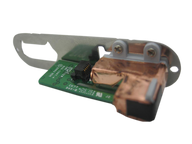
Representative photo. You receive the part named above.
iPod Mini 1G — Headphone Jack / Hold Switch Assembly
Used (Apple Original) · Model A1051
$12.95
Sold out
Not for sale right now
We are not selling this part at the moment.
- Used (Apple Original). Tested: installed in a working iPod and checked before it ships.
- 1-year limited warranty · 30-day returns from delivery
- Free pry tool in the box
- Completed repairs aren't refundable. If a part we fitted fails within a year, we repair it again.
Part details
About this part
Overview
Replacement headphone jack assembly for iPod Mini 1G. Use it for damaged audio-output hardware, channel issues, or related Hold-switch hardware on models where those parts share the same assembly.
Fitment snapshot
Confirm model, generation, part number, and fitment details before ordering.
Product Overview
This headphone jack listing covers Headphone Jack / Hold Switch Assembly and its own connector path on the iPod Mini 1st Generation.
Use Part Details for the confirmed part-number reference. Use the Compatible Variants table below to confirm capacity, color, or order-number fitment.
Choose this part when your iPod shows No Sound or Headphone Jack Not Working; the checks below help confirm the right part before you order.
What Is Included
Condition: Used factory-original part. Quantity and exclusions: The listed part, set, pair, or configuration above is supplied with exactly one plastic pry tool. No other parts, tools, adhesives, or materials are included unless they are explicitly listed above.
Quick Buying Check
Buy this when
- No Sound: Use the headphone/Hold check when headphone output or Hold-switch behavior is isolated from dock audio, board audio, and connector seating.
Diagnose first when
- Confirm the capacity match before ordering: 4GB.
- Try the simple power, cable and connector checks first, and reset the iPod: toggle Hold on and off, then hold Menu + Select (the center button) for about six seconds, until the Apple logo appears.
- If the problem started immediately after opening the iPod, inspect the parts that were disturbed first.
Do not buy for
- Do not use this part for: Full-size hard-drive iPods use a different headphone jack assembly.
- One-ear audio often points to the jack, but both dock and headphone audio failing together can point to the logic board.
- Hold-switch symptoms may be the shared headphone/hold assembly rather than the click wheel.
Fit and specs
Specifications & Fitment
Part Details
| Detail | Value |
|---|---|
| Model Number | A1051 |
| EMC | EMC 1984 |
| Condition | Used — factory original Apple part. Normal cosmetic wear expected. |
| Part Identifiers | 820-1597-A |
| Jack Size | 3.5mm |
| Includes Hold Switch | Yes |
| Design | Press-fit |
Compatible Variants
| Order Number | Capacity | Color | Case | Compatible | Notes |
|---|---|---|---|---|---|
| M9436LL/A | 4GB | Blue | — | Yes | — |
| M9437LL/A | 4GB | Gold | — | Yes | — |
| M9434LL/A | 4GB | Green | — | Yes | — |
| M9435LL/A | 4GB | Pink | — | Yes | — |
| M9160LL/A | 4GB | Silver | — | Yes | — |
820-1597-A, for the iPod Mini 1st Generation 4GB and for the iPod Mini 2nd Generation 4GB and 6GB. This listing is that assembly, so order it here whichever mini you have; there is nothing generation-specific to match. Do not read that across to the parts that are generation-matched — the click wheel, the display and the logic board do not cross the two minis.
Install and repair
Install Overview
Before You Start
Turn Hold off and reset first: toggle Hold on and off, then hold Menu + Select (the center button) for about six seconds, until the Apple logo appears. Guides that say Menu + Play describe the older, pre-click-wheel iPods. Then confirm the model and variant before opening the iPod.
Treat case opening as the highest handling risk. Work around the seams gently and stop if the shell, clips, or internal stack resist.
Do not pull the halves apart or side-load board sockets. Reseat nearby ribbons and connectors before blaming a replacement headphone jack assembly.
Repair steps
Documented repair-procedure steps for replacing the headphone jack assembly on this model (from teardown guides; confirm against your unit before starting):
- Use a spudger to carefully pry up the headphone jack board from the logic board. Be careful to pry up near the connector to prevent unnecessary strain on the board.
- Do not pull on the headphone jack board at the top of the iPod, as the connector to the logic board is fragile.
Disassembly Guide
Disassembly guide summary: iPod Mini Headphone Jack Board Replacement.
Show all 12 installation steps
Confirm that the hold switch is locked before you open the iPod.
Carefully slide a small flathead screwdriver or Jimmy into the seam between the metal casing and white plastic top. Lever up the white top bezel, taking care not to damage the soft plastic. The top bezel is adhesive-backed, so you may need to lever it up from several spots before it releases. Heat up the adhesive for a few seconds with a hair dryer on low heat to make the job easier.
Raise the top bezel off the iPod.
Carefully slide a small flathead screwdriver or Jimmy into the seam between the metal casing and white plastic bottom. Lever up the white bottom bezel, taking care not to damage the soft plastic.
A small pair of snap-ring pliers is the best tool to take out the metal retaining bracket. You can also lever out the metal retaining bracket beneath the bottom bezel with a flathead screwdriver. Release the bracket by pressing in the corner metal arms first.
Lift the released bracket away and set it aside.
With a spudger or fingertip, carefully disconnect the orange click wheel ribbon from the logic board.
Take out the 2 #00 Phillips screws securing the headphone jack to the casing.
Carefully move the iPod out of its casing by pressing on the logic board near the click wheel's bottom edge. Do not tug on the headphone jack board at the iPod top; its logic board connector is fragile.
After the logic board has been pushed out far enough, gently grip it on either side of the display and keep sliding the iPod from its casing.
Raise the battery off the logic board and set it to the side of the iPod.
With a spudger, carefully lever up the headphone jack board from the logic board. Be cautious to lever up near the connector to prevent unnecessary strain on the board. Raise the headphone jack board off of the logic board.
Product-specific placement, reassembly, and check
- Prepare and access. Confirm the exact model and listing fit first. Use the existing steps as a disassembly guide, gather the specified tools, disconnect power where applicable, and keep screws and cable positions organized.
- Place Headphone Jack / Hold Switch Assembly. Align the jack and Hold-switch assembly with the housing openings and seat its cable without twisting or trapping it.
- Reassemble without force. Reverse only the access steps needed for this repair, keep cables clear of case edges and screw posts, and close clips in stages.
- Validate before final closure. Before final closure, test left/right audio, plug detection, and the Hold switch while the assembly remains accessible.
Stop condition: Stop if a connector, latch, screw, clip, housing edge, or the replacement part resists normal alignment. Recheck model fit, orientation, cable routing, and trapped hardware instead of forcing it.
After This Repair
| Check | What to do |
|---|---|
| Test audio and Hold | Use known-good headphones and check both channels, static, plug movement, and Hold-switch behavior. |
| Still not working? | Compare headphone output with dock or line-out behavior when the model supports it, then inspect ribbon seating. |
Troubleshooting
Diagnostic Failure Cards
Use these model-specific failure cards to decide whether this headphone jack assembly is the right part, a nearby part needs checking first, or escalation makes more sense after simpler checks.
| Symptom | What it means & what to check |
|---|---|
| Symptom remains after basic checks |
What you may see: The iPod still points back to Headphone Jack / Hold Switch Assembly after cable seating, battery stability, and nearby connector checks. Check first: Retest with known-good cables or adjacent parts where practical before ordering. Check next: A nearby cable, connector, battery, storage device, display path, audio path, or board path can mimic a bad headphone jack assembly. |
| Symptom changes when touched or reseated |
What you may see: The symptom changes after moving the part, reseating a cable, or applying light pressure near the connector path. Check first: Inspect the connector, latch, flex, solder joints, and nearby board area for damage or corrosion. Check next: This can still be a connection issue rather than a failed headphone jack assembly alone. |
| Problem began after another repair |
What you may see: The issue started immediately after opening the iPod, replacing another part, or disturbing an internal cable. Check first: Reopen only as far as needed and inspect the exact area touched during the previous repair. Check next: Post-repair symptoms often trace to seating, latch, screw, or cable issues before Headphone Jack / Hold Switch Assembly itself is confirmed bad. |
| Hold switch is stuck, locked, or not reporting correctly |
What you may notice
Diagnose first when
Similar issues to separate
Where this headphone jack assembly does not fit
Check another part first
|
| Dock output and headphone output behave differently |
What you may notice
Diagnose first when
Similar issues to separate
Check another part first
Repair or replacement paths
Cautions
|
| Liquid, corrosion, or residue context |
What you may notice
Diagnose first when
Similar issues to separate
Check another part first
|
| No sound or missing headphone audio |
What you may notice
Diagnose first when
Similar issues to separate
Repair or replacement paths
|
| Ribbon, storage connector, or ground-path checks |
What you may notice
Similar issues to separate
|
| Symptoms changed after repair or reassembly |
What you may notice
Similar issues to separate
|
| Match the headphone/hold assembly to your exact iPod Mini 1st Generation before ordering |
What you may notice
Diagnose first when
Similar issues to separate
Check another part first
Repair or replacement paths
|
Do Not Buy / Problems This Headphone Jack Assembly Does Not Fix
| Situation | Start here instead |
|---|---|
| Headphone and dock or line-out audio are both silent | Start with the logic board or audio-circuit check; a headphone-only failure is a reason to buy this assembly, not avoid it. |
| The fault is clearly the storage, battery, or logic board — not the jack or Hold switch | Start with the hard drive, battery, or logic-board check for your model before buying this assembly. |
| A symptom points to a different part | Start with battery for power/runtime symptoms; hard-drive cable for folder, clicking, or restore symptoms; dock-port bracket when the dock area itself is loose or shifted — bent or corroded pins are on the 30-pin port, which is part of the logic board on this model, and the bracket only locates it; click wheel for click-wheel or control symptoms; logic board for board-side damage or multi-system symptoms before buying this part. |
| Variant or capacity does not match this listing | Capacity does not decide this part: every iPod mini takes the same jack / Hold assembly, 4GB or 6GB, 1st Generation or 2nd. Check instead that the iPod is a mini and not a full-size iPod, then compare known-good headphones, Hold behavior, dock or line-out audio, and the headphone/Hold ribbon before ordering. |
Worth Knowing
- One assembly, two jobs: the 3.5 mm headphone jack and the Hold switch are the same board,
820-1597-A. A Hold switch that will not clear the lock icon is this part, not the click wheel, even though the symptom is dead controls. - The same assembly serves both mini generations, so a donor unit of either mini yields the right part.
- The split test decides it in a minute: play one known-good track through the headphones, then through a dock or line-out accessory. Headphones silent and dock fine points at this assembly; both silent points at the logic board instead.
- The jack board's connector to the logic board is the fragile part of this repair. Two #00 Phillips screws hold the jack to the casing; when you slide the stack out, push on the logic board near the click wheel's bottom edge and never tug on the jack board at the top.
- Reaching this part means lifting the adhesive-backed top bezel, so plan on that coming off — warming the adhesive for a few seconds makes it release without tearing the soft plastic.
Questions
Frequently Asked Questions
Use these questions to narrow the part path before ordering. They keep each answer focused on a different diagnostic or fitment decision.
How do I choose the right headphone jack assembly?
Match capacity 4GB and confirm whether the Hold switch shares the same assembly on this model before ordering.
Can one-channel audio be because of something else?
Yes. Check headphones, the jack opening, debris, pressure on the case, ribbon seating, and board-side damage before treating the jack assembly as the only cause.
Can the Hold switch be part of the headphone-jack assembly?
Move the Hold switch and watch whether the lock indicator changes. Inspect the headphone/hold ribbon if the symptom started after opening the iPod. Choose this assembly only when Hold switch behavior is the failing path. Check click-wheel input only after the Hold path is ruled out.
Is this for a full-size hard-drive iPod?
The iPod mini is a separate Apple product line from full-size hard-drive iPods. This is the iPod mini 1st Generation.
Does capacity matter for this part?
No. Every iPod mini takes the same jack / Hold assembly whatever its capacity or generation; confirm only that the iPod is a mini (A1051) and not a full-size iPod.
You May Also Want
A fresh battery is often replaced during the same repair while the iPod is open.
Related: Flash Mod Service (installed by iMods)Flash storage is the common upgrade: we fit it by mail.
Related: Replacement Headphone / Lock Top BezelHeadphone jack is accessed from the top — top bezel removal required.
Search terms
Why people land on this part
Also searched as: iPod mini 1st Generation Headphone Jack / Hold Switch Assembly, no sound comes, Headphone Jack Not Working, no audio, jack on logic.
Free diagnostic
Broken iPod? We can help.
Mail us your iPod and we will test it and send you a free repair quote. If you don't like our price, we will ship your iPod back at our expense.
How mail-in repair works
Order the free diagnostic
Choose your iPod. Add our shipping box and prepaid label if you need one.
Mail us your iPod
Pack it with your work order. No printer? Put a note in the box with your name, return address, email, order number and what is wrong.
Approve your quote
We test it and email your free repair quote. Most repairs are finished within 3 to 5 business days after you approve the quote.