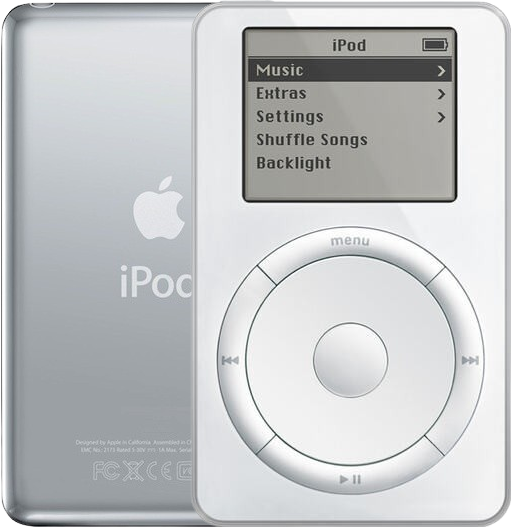
Refurbished iPod 2G — inspected, function-tested, and ready to play. Confirm the exact capacity, color, and order number on this listing before you buy.
Product Overview
This refurbished iPod 2nd Generation 20GB White is a complete working iPod listing for buyers comparing model, capacity, and condition.
Use the identification table below to confirm the exact configuration and order-number record.
Choose Your Option
This refurbished iPod comes in multiple configurations. Confirm capacity, color, case depth, and order number before choosing.
Refurbished iPod 2nd Generation 20GB White M8738LL/A. 2nd Generation logic platform, Wolfson audio DAC, 1,200 mAh Li-Po battery, FireWire only.
You're viewing this optionAbout This iPod
Equally significant, the 2G was the first iPod available for Windows, bundled with Musicmatch Jukebox Plus (since iTunes for Windows did not yet exist). This opened Apple's portable music player to the vast Windows user base for the first time — a strategic move essential to the iPod's eventual mass-market dominance. Separate Mac and Windows SKUs were required (M8737LL/A and M8740LL/A for 10GB, M8738LL/A and M8741LL/A for 20GB).
The 20GB capacity was a new high for the iPod line, holding up to 4,000 songs. Hardware refinements included slightly more rounded edges, a FireWire port cover, and the inclusion of a wired remote and carrying case as standard accessories. The 2G had a relatively short production run — roughly nine months — before being replaced by the completely redesigned 3rd Generation in April 2003.
About This Variant
What this listing is. The 20GB iPod 2nd Generation, order number M8738LL/A — the edition Apple formatted for Mac in 2002 (HFS+, synced with iTunes 3 on Mac OS). Thick 0.84 case at 7.2 oz, with the Toshiba MK2003GAH 1.8-inch drive.
How it differs from M8741LL/A, the other 20GB listing. In one thing only: the disk format it shipped with. M8741LL/A is the Windows edition (FAT32, bundled with Musicmatch Jukebox Plus, because iTunes for Windows did not exist until October 2003). Everything a buyer touches is the same on both — the same 20GB thick case, the same Toshiba MK2003GAH drive, the same 1,200 mAh battery, the same FireWire-only port, the same touch wheel. Either one can be moved to the other platform by restoring it there, so the factory split is a collector's distinction rather than a functional one. Apple's 2002 retail boxes also differed slightly (the Windows editions added a FireWire adapter), but no original packaging or accessory is part of this listing — it ships as the iPod only.
| Detail | Value |
|---|---|
| Released | Announced July 17, 2002; available early August 2002 |
| Discontinued | April 28, 2003 |
| Original Price | US$499 |
| This Listing | M8738LL/A |
What Changed
- Interface: Mechanical scroll wheel replaced by solid-state capacitive Touch Wheel — more durable and smoother, setting the design direction for all future iPod input methods. The touch surface does not rotate: you slide a finger across it, and four separate buttons surround it
- Platform: First Windows support via Musicmatch Jukebox Plus — required separate Mac and Windows SKUs but opened the iPod to the vast Windows user base
- Design: Slightly more rounded body, added FireWire port cover, included wired remote and carrying case as standard accessories
- Connectivity: Still FireWire only — no USB support. Same FireWire port for sync and charging
What Refurbished Means
A refurbished iPod is a complete used iPod that has been inspected, cleaned, tested, and prepared for resale; it is not a sealed-new Apple retail unit.
| Area | What this listing means |
|---|---|
| Inspection | Function-tested complete iPod with model, controls, display, sync, and audio checked before sale. |
| Battery | New 1,200 mAh Li-Po installed unless the listing states otherwise. |
| Battery Age | These iPods are about 24 years old. Original batteries are well beyond their design life. |
| Storage | Storage is tested during restore/sync checks. The original 1.8-inch mechanical hard drive is a 20+ year-old part; treat remaining drive life as unknown. There is no flash alternative on this generation — see Storage on This iPod below. |
| Cosmetics | Cosmetic condition is listing-specific and may vary by shell, backplate, screen lens, and engraving wear. |
Charging & Connection — Check Before You Buy
FireWire only — no USB. This iPod cannot sync or charge over USB. You need a 6-pin FireWire 400 cable and a FireWire power adapter to charge it. Plain USB-to-FireWire adapter cables do not carry FireWire power correctly and can damage the iPod.
| Connection | What works |
|---|---|
| Sync | FireWire 400 (6-pin) only |
| Charging | FireWire power adapter or powered FireWire port only |
| USB | Not supported for sync or charging |
This listing ships the iPod only — no FireWire cable or charger is included, and you will need them to charge the iPod.
Battery Safety & Shipping
⚠️ Lithium-Ion / Li-Po Battery Safety. This product contains (or is) a rechargeable lithium-ion/lithium-polymer battery. Charge only with a compatible charger and unplug once fully charged. Avoid charging or storing in direct sunlight or other high-heat environments. Stop using and stop charging immediately if the battery swells, bulges, gets unusually hot, hisses, smokes, or leaks. Do not puncture, crush, bend, short-circuit, or try to "deflate" a swollen cell, and never press a lifted screen or case back down — it can rupture the cell. If electrolyte contacts your eyes, flush with clean water for 15 minutes without rubbing and seek medical care; on skin, wash with water and soap. Battery service should be done by a trained technician. Recycle through an electronics or universal-waste recycler, not household trash.
Shipping. A refurbished iPod shipped with its battery installed is handled as lithium-ion batteries contained in equipment (UN3481); a loose replacement cell is handled as a lithium-ion battery (UN3480). Carrier, packaging, and destination restrictions can vary, so follow the current checkout and shipping instructions for the offered option.
Exact Model Identification
| Detail | Value |
|---|---|
| Order Number | M8738LL/A |
| Apple Model Number | A1019 |
| Capacity | 20GB |
| Color | White |
| EMC | EMC 1942 |
Every variant in this generation shares the Apple model number A1019 — the order number is what identifies the exact unit. The order number is not engraved on the case: the back carries the model number (A1019), the EMC number and the serial number.
All Available Variants
| Order Number | Capacity | Platform | Case | Released | Original Price | Refurb |
|---|---|---|---|---|---|---|
| M8737LL/A | 10GB | Mac | Thin | July 2002 | US$399 | View refurb |
| M8738LL/A | 20GB | Mac | Thick | July 2002 | US$499 | This page |
| M8740LL/A | 10GB | Windows | Thin | July 2002 | US$399 | View refurb |
| M8741LL/A | 20GB | Windows | Thick | July 2002 | US$499 | View refurb |
Specifications
| Specification | Value |
|---|---|
| Processor | 2nd Generation logic platform (ARM7TDMI, 90 MHz) |
| RAM | 32 MB |
| Storage | 20GB HDD |
| Display | 2" Monochrome 160x128 |
| Audio DAC | Wolfson WM8721 audio DAC |
| Battery (Original) | Original: 1,200 mAh Li-Po / Refurbished: New 1,200 mAh Li-Po |
| Music Playback | Up to 10 hours |
| Connectivity | FireWire only (no USB) |
| Dimensions | 4.02 x 2.43 x 0.84" |
| Weight | 7.2 oz |
| Model Number | A1019 |
What's Included
- Refurbished iPod
- 1-year limited warranty
Ships as the iPod only — no cable, wall charger, or headphones are included.
Compatibility
Modern Sync Notes
- Broad compatibility, with one hard requirement: the software side is the easy part — Windows XP, Windows 7, Windows 8, Windows 10 and Windows 11, as well as Macs, can all run a version of iTunes that talks to this iPod. The hard requirement is the port. This generation syncs, restores and charges over FireWire 400 only and has no USB path at all, so a machine with USB ports alone will never see it, however current its software is. Owners use a Mac with FireWire, or a Windows PC with a FireWire port — built in or added on a card — running iTunes for Windows.
- macOS: macOS Sequoia 15.4 and later can break native iPod recognition for some owners; if Finder or Apple Music does not see the iPod, use Windows iTunes or an older Mac for restore and sync.
- Windows: a Windows PC with a FireWire port running iTunes for Windows is the route owners fall back on. Recognition of this generation on current systems is a moving target, and no iTunes version number is confirmed for this model, so treat version claims found online with suspicion. A 2002 Mac or Windows order number describes how the iPod was formatted at the factory; it does not promise anything about a current operating system.
- Streaming: These iPods do not provide native Spotify, Apple Music streaming, Wi-Fi, or Bluetooth.
Known OS Compatibility Issues
- macOS Sequoia 15.x: Legacy iPod recognition may be unreliable on newer macOS releases; 32-bit iTunes unavailable. Workaround: Use Windows standalone iTunes or an older Mac with a known-good iPod sync path.
- A machine with no FireWire port: there is no software workaround, because this iPod has no USB path for sync, restore or charging. A plain USB-to-FireWire "adapter cable" is not a substitute and can damage the iPod. Workaround: use a Mac or PC that has a FireWire port, or add a FireWire card to a desktop PC.
Rockbox
Status: Supported
Build: IPOD_1G2G
Shared target with 1st Generation. Stable port.
iTunes Compatibility
- Minimum: iTunes 3.0
- Recommended: whichever iTunes for Windows release your FireWire-equipped PC will run, or an older Mac with FireWire — we publish no version number for this model, because none is confirmed for it
- Note: Mac version used iTunes 3.0+. Windows version originally used Musicmatch Jukebox Plus (iTunes for Windows not available until 4.1 in October 2003). FireWire only — USB not supported.
Storage on This iPod
On this model the original mechanical drive is the storage path: the 10GB thin and 20GB thick Toshiba drives are what fits, and no flash-storage adapter is offered for this generation. IDE-to-SD and CompactFlash adapters that work on later iPods are not compatible with this early 50-pin platform, and we do not build or sell a flash conversion for it.
| Question | Answer for this model |
|---|---|
| What is inside this unit | The Toshiba MK2003GAH 1.8-inch mechanical hard drive — the thick 20GB configuration. |
| Can it be flash-modded | Not by us. No flash-storage adapter is compatible with this generation, and no flash build is offered for it. |
| Can the capacity be increased | Not by swapping the shell. Drives pair with the chassis by capacity: a 10GB drive goes in the thin case and a 20GB drive in the thick case; they do not swap. |
| Expected drive life | These drives are 20+ years old. Storage is tested during restore and sync checks before sale, but treat remaining drive life as unknown and keep a copy of anything you load onto it. |
If the drive in this unit ever needs replacing, the matching part is the 20GB hard drive for the thick case; the hard-drive cable is the cheaper part to check first.
Buyer FAQ
What should I check when it arrives?
Confirm the order number, capacity, color, and Apple model number against Exact Model Identification. Then test charging, sync/restore, controls, audio, hold switch, display, and several full tracks before loading your library. This listing is for 20GB, White, M8738LL/A.
Does this work with my Mac or PC?
Only if that computer has a FireWire port. This generation has no USB path at all — not for sync, not for restore, not for charging — so the question is the port before it is the operating system. On a FireWire-equipped machine: Windows iTunes is often the simplest restore path; on newer macOS versions, use Finder or Apple Music first and fall back to an older Mac or Windows iTunes if the iPod is not recognized. A USB-to-FireWire "adapter cable" is not a way round this and can damage the iPod. See the Compatibility section for the rest.
How long does the battery last on a used one?
Runtime depends on battery age, capacity, storage type, and backlight use. This unit ships with a new 1,200 mAh Li-Po cell unless the listing says otherwise, which is the capacity Apple fitted; Apple rated the original at up to 10 hours of music, and a 20-year-old mechanical drive spinning up will not flatter that figure. If you ever fit a larger aftermarket cell, the question to ask is whether it fits under the original backplate, not what it is rated at: not always. Some extended-capacity cells are thicker than the original. Confirm the cell sits without forcing the shell closed before reassembly.
What is different about this exact variant?
The 20GB iPod 2nd Generation formatted for Mac in 2002 (HFS+, synced with iTunes 3 on Mac OS), in the thick 0.84-inch case at 7.2 oz with the Toshiba MK2003GAH drive. The other 20GB listing, M8741LL/A, is the same hardware formatted for Windows; either can be restored to the other platform, so the difference is a collector's one. Identify this unit by capacity 20GB, color White, or order number M8738LL/A.
Which buttons open the built-in diagnostics?
We do not print a combination for this generation. Published entry sequences for the touch-wheel iPod disagree with one another, and no two sources we trust give the same one, so anything printed here would be a guess a buyer acts on. The two sequences that are settled are worth knowing instead: reset is Menu + Play/Pause held until the Apple logo appears, and Disk Mode is that reset followed by Previous + Next held until the Disk Mode screen appears.
Restore & sync
Copy anything you still want off the iPod first — a restore erases it.
My computer does not see the iPod at all
This iPod talks to a computer over FireWire 400 only — there is no USB path for sync, restore or charging, so a machine with USB ports alone will never see it. Before assuming a fault: slide the Hold switch off (flick it on and off once), reset by holding Menu and Play/Pause until the Apple logo appears, then hold Previous and Next as the logo shows to reach Disk Mode and connect. A unit that mounts in Disk Mode has proved its drive and its port, and what is left is a restore from iTunes on a FireWire-equipped Mac or a Windows PC with a FireWire port. Check the FireWire port and cable before blaming the battery — charging and data are separate paths on this model.
iTunes does not see the iPod, or a restore never finishes
What owners see: a folder with an exclamation mark on the screen; the computer lists the iPod as a drive but iTunes will not; a restore starts and never finishes, or the iPod asks to be restored on every connect.
Check the connection before anything else. This generation syncs and restores over FireWire 400 only — "not detected, so try USB" is a misdiagnosis here, not a workaround. Use a known-good FireWire cable and a host that speaks FireWire: a Mac with a FireWire port, or a Windows PC with a FireWire port running iTunes for Windows. Inspect the port for lint, corrosion and bent pins.
Then work through the iPod. Copy anything you still want off it first, because a format or a restore erases it. Reset by holding Menu and Play/Pause until the Apple logo appears — Menu plus the center button belongs to later wheel generations and does nothing here. As the logo shows, hold Previous and Next until the Disk Mode screen appears, then connect: a unit that mounts in Disk Mode has proved its drive and its port. Charge it, then restore. Owners report that a restore that looks stuck can simply be waiting for a FireWire power adapter.
If the restore still fails, check the hard-drive cable first, then the drive, and only then the logic board — the cable is the cheaper part, and the drive pages here and iFixit's guide for this model both put it first.
Two cautions. Wrong platform is a recoverable state, not a hardware fault: a restore on the other platform re-formats the iPod. And treat iTunes-version folklore with suspicion — many claims filed under this model's shorthand describe a much later USB-era player, not this FireWire iPod.
Can I move it between Mac and Windows?
Yes, and no separate updater is needed. Connect it to the platform you want and let iTunes restore it: a restore on a Mac leaves the iPod Mac-formatted, a restore from iTunes for Windows leaves it FAT32, and a FAT32 iPod also mounts on a Mac read-write. Copy anything you want to keep off it first — the restore erases the iPod. Whichever platform you use, the host still has to speak FireWire: this generation has no USB path for sync or restore, so it needs a Mac with FireWire or a PC with a FireWire port. The Mac and Windows editions were separate products in 2002, which is why two formats exist; the factory split matters to collectors rather than to day-to-day use.
Why people land on this part
Common Names & Search Terms
Buyers find this iPod using these names and phrases:
Product Names
ipod 2nd gen 20gb white, ipod touch wheel 20gb mac, ipod 2nd generation refurbished, ipod touch wheel buy, first touch wheel ipod, ipod touch wheel 2002, ipod classic 2nd generation, A1019 ipod, iPod A1019 EMC 1942, M8737LL/A, M8740LL/A, M8738LL/A, M8741LL/A
What Buyers Are Looking For
best vintage ipod for music, best sounding ipod, offline music player retro, ipod for car stereo, early ipod as collector piece
Compatibility Questions
ipod 2nd gen itunes, firewire ipod modern mac, ipod firewire m1 mac, ipod 2nd gen rockbox, ipod firewire to usb-c
Other Models to Consider
Compare the other iPod 2nd Generation listings, or move across to the parts and repair services for this generation:
You May Also Want
Replacement batteries available if the included battery needs future service.
Related: Replacement Hard Drive (10GB)The thin-case drive. A drive is a repair part, not a capacity upgrade: the 10GB drive goes in the 0.72 in thin case only.
Related: Replacement Hard Drive (20GB)The thick-case drive. It fits the 0.84 in thick case only — a 20GB drive does not go into a thin 10GB unit, and the two do not swap.